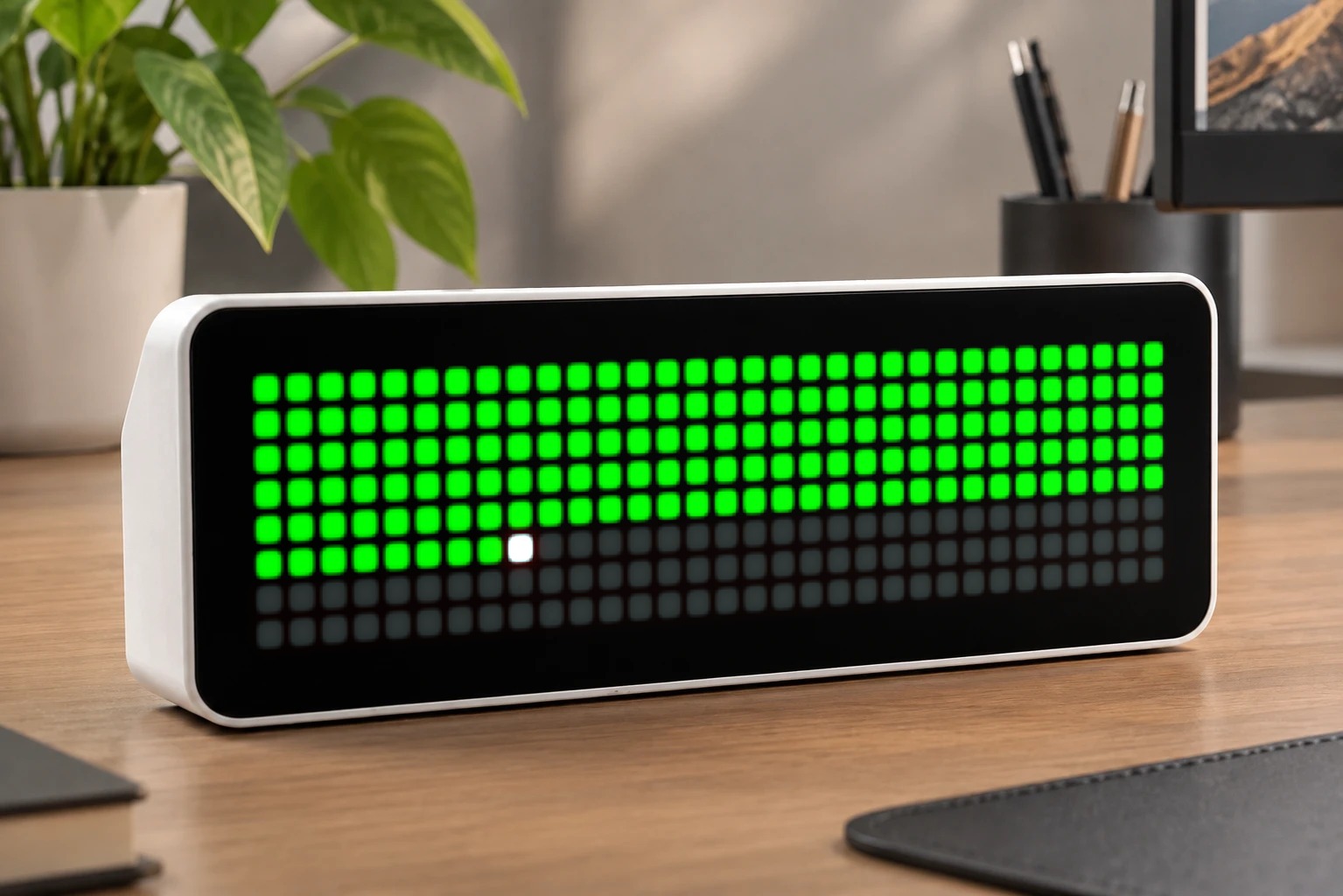
Days Left
A minimalist year-progress visualization for AWTRIX NG's 32×8 LED matrix.
| System | AWTRIX NG Scripts |
|---|---|
| Firmware | AWTRIX NG |
| Topic | Miscellaneous |
| Built by | Hank_the_Tank |
| File | z5e2rcRvq0Np.ax · 2.0 KB |
| Icons | — |
| Published | 29 Aug 2026 |
Days Left
Author: Hank_the_Tank / Claude
Version: 1.0
A minimalist year-progress visualization for AWTRIX NG's 32×8 LED matrix. Every pixel on the panel represents a slice of the year — lit pixels are the days that have already passed, dim pixels are the days still ahead.
How it works
The panel has 256 pixels (32×8), but a year has 365 or 366 days, so there isn't a perfect 1:1 mapping. The script scales the current day-of-year proportionally across all 256 pixels (day_of_year / days_in_year * 256), filling them row by row from top-left to bottom-right. The result reads like a classic "year progress bar" stretched into a grid — at a glance you can see roughly how much of the year is gone and how much is left.
The fill amount is recalculated once per day (not every frame), so the display stays cheap on memory and CPU. Leap years are detected automatically, so the total (365 vs. 366) is always correct.
Features
- Proportional day-of-year progress across the full 32×8 grid
- Automatic leap year handling
- Optional highlight on the pixel representing "today"
- Fully configurable colors — no need to edit the script
Settings
All settings are changed from the AWTRIX web UI (Apps → ⋯ on the app → Settings) — no code editing required.
| Setting | Type | Default | Description |
|---|---|---|---|
colorDone |
color | #00AA00 (green) |
Color of pixels representing days already passed |
colorLeft |
color | #202020 (dark gray) |
Color of pixels representing days remaining |
highlightToday |
bool | true |
Whether to highlight the pixel marking today |
colorToday |
color | #FFFFFF (white) |
Color used for the "today" highlight pixel |
Installation
- Open your AWTRIX NG web interface (device IP address, or
http://awtrixng-xxxxxx.local). - Go to the Scripts tab and create a new script (name it e.g.
DaysLeft). - Paste in the script code and press Save.
- The app joins your rotation automatically.
- Adjust colors and the highlight option anytime via Apps →
⋯→ Settings on the app.
Requirements
- AWTRIX NG firmware with Berry scripting support
- A 32×8 panel (the script auto-adapts via
width()/height(), but was designed and tested at 32×8) - Device time must be synced (NTP) — the app shows an empty/dim grid until the clock is known
z5e2rcRvq0Np.ax
# @name    Days Left
# @desc    Shows elapsed/remaining days of the year as a 32x8 pixel grid
# @author  Hank_the_Tank / Claude
# @version 1.0
# @config  colorDone      color "Color: days elapsed"    default=#00AA00
# @config  colorLeft      color "Color: days remaining"  default=#202020
# @config  highlightToday bool  "Highlight today"         default=true
# @config  colorToday     color "Color: today"            default=#FFFFFF

class DaysLeft
  var colorDone, colorLeft, colorToday, highlightToday
  var filled          # number of "elapsed" pixels, recomputed once per day
  var lastDay         # last day() value we computed for

  def init()
    self.colorDone = store.get("colorDone")
    self.colorLeft = store.get("colorLeft")
    self.colorToday = store.get("colorToday")
    self.highlightToday = store.get("highlightToday")
    self.filled = 0
    self.lastDay = -1
  end

  def is_leap(y)
    return (y % 4 == 0 && y % 100 != 0) || y % 400 == 0
  end

  def day_of_year()
    var mdays = [31,28,31,30,31,30,31,31,30,31,30,31]
    var y = year()
    var m = month()
    var doy = day()
    var i = 0
    while i < m - 1
      doy += mdays[i]
      if i == 1 && self.is_leap(y)
        doy += 1
      end
      i += 1
    end
    return doy
  end

  def refresh()
    if hour() < 0 return end        # time not known yet at boot
    var d = day()
    if d == self.lastDay return end
    self.lastDay = d
    var total = self.is_leap(year()) ? 366 : 365
    var cells = width() * height()
    self.filled = self.day_of_year() * cells / total
  end

  def loop()
    self.refresh()
  end

  def draw()
    clear()
    var w = width()
    var idx = 0
    for y : 0 .. height() - 1
      for x : 0 .. w - 1
        var c = self.colorLeft
        if idx < self.filled
          c = (self.highlightToday && idx == self.filled - 1) ? self.colorToday : self.colorDone
        end
        pixel(x, y, c)
        idx += 1
      end
    end
  end
end

return DaysLeft()
Install it on your AWTRIX NG
Your browser writes the script straight to the device on your network. It joins the app rotation right away.
Some browsers refuse to talk to a device on your network from a public page. Download the flow and paste it into the Scripts tab of your device, or install it from a terminal:
More flows for AWTRIX NG Scripts or Miscellaneous
Something wrong with this flow? Report it.