Clawd - a Tamagotchi for your AWTRIX
Virtual pet crab - feed, play, clean and raise it
| System | AWTRIX NG Scripts |
|---|---|
| Firmware | AWTRIX NG |
| Topic | Miscellaneous |
| Built by | Blueforcer |
| File | wg0GspJj3sl7.ax · 11.1 KB |
| Icons | — |
| Published | 7 Aug 2026 · updated 9 Aug 2026 |
| Downloads | 82 |
Clawd: a Tamagotchi for your AWTRIX
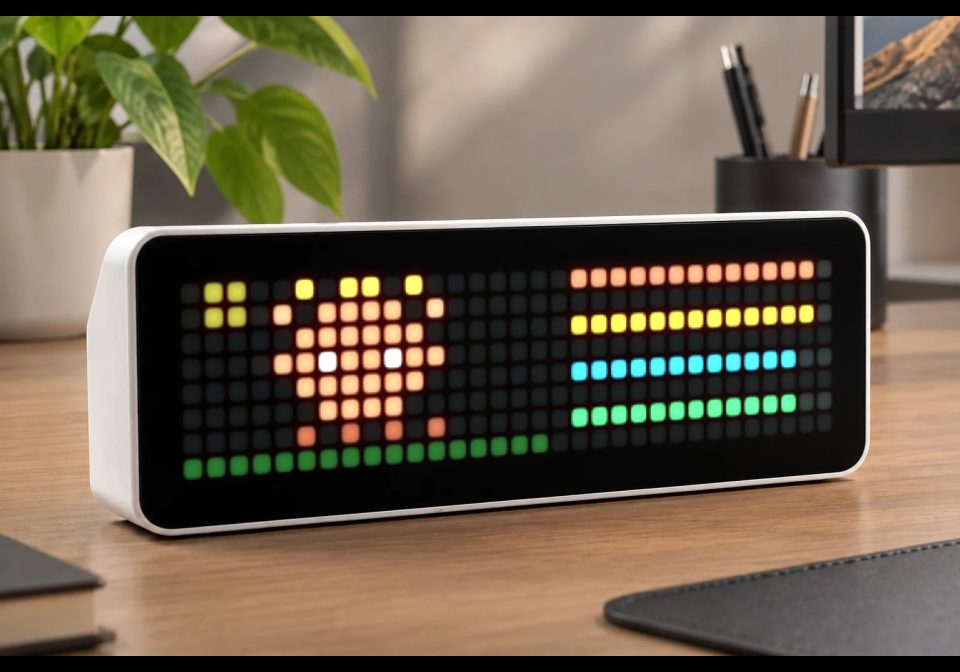
A fully-fledged virtual pet living on your 32x8 matrix. Clawd is a little orange
crab that hatches from an egg, grows through four life stages in real time, and depends
on you to keep it fed, happy, clean and rested. The simulation keeps running while other
apps are on screen, and it even catches up on time the device spent powered off.
Requirements & install
- AWTRIX NG. The script is ~12 KB, so raise the script size limit to 32768 once before installing (WebUI System settings, or:)
curl -X PUT http://<device>/api/v1/system -H 'Content-Type: application/json' -d '{"scriptMaxBytes": 32768}' - ESP32 S3 recommended. It can run on a standard ESP32, but it gets very, very tight with other scripts. Try to install it right after a AWTRIX reboot.
- Time sync (NTP) recommended. Without it there is no day/night scenery, no auto-sleep and no offline catch-up; the pet then only lives while the device is on.
- No icons, no network, no API keys: everything is drawn with primitives and runs entirely on the device. Progress is saved on the device and survives reboots.
What you see on screen
The left two thirds are Clawd's world, the right side shows its condition.
- Four stat bars (right side, top to bottom):
🟠 Hunger · 🟡 Happiness · 🔵 Energy · 🟢 Cleanliness.
A full bar is 100 %. Below 25 % a bar blinks as a warning, and it keeps showing
at least one pixel down to the very last percent. - Ground line (bottom): green by day, dark blue at night.
- Sky: a small sun and a drifting cloud by day, moon and twinkling stars at night.
Day and night follow the real clock (20:00 to 06:00 shows the night scenery). - Poop piles stack up next to the crab (up to 3). They drag cleanliness and
happiness down until you clean up. - Blinking green dot in the top-left corner: Clawd is sick.
- Blue "z" floating next to the crab: sleeping.
- Red heart above the pet: positive feedback (for example warming the egg).
- Red X over the pet: action refused (asleep, dead, too tired, or nothing to cure).
- Green cross flash: healed by medicine.
- Bright flashing of the whole sprite: hatching or evolving right now.
- Egg stage: the egg wobbles, and the orange bar along the ground is the
incubation progress. - Tombstone with a floating ghost: Clawd has died (see Death & restart).
Life stages
| Stage | Reached at (total age) | Look |
|---|---|---|
| Egg | start | wobbling egg, ~30 min to hatch |
| Baby | after hatching | tiny crab, stubby claws |
| Child | 12 h | bigger, proper claws |
| Teen | 36 h | double claws |
| Adult | 72 h | full-grown, three possible forms |
Age counts in real time, sleeping included, and (dampened) even while the device is
off. Which adult you get depends on your care score (see below):
✨ thriving with brighter colors, bigger claws and a golden crown · normal ·
😠 grumpy with darker colors, red eyes and a permanent frown.
Egg tip: pressing the middle button warms the egg. Each press cuts 1 minute off
the incubation (up to half of it), and a little heart confirms it.
How care works
- FEED restores 40 % hunger. Hunger drains from full to empty in about 4 h while
awake (slower asleep). Feeding an already almost-full crab (over 90 %) is
overfeeding and costs happiness; feeding a genuinely hungry crab (under 70 %) earns
care points. 45 to 90 minutes after every meal, a poop appears. - Happiness drains in about 5.5 h, faster while sick or with 2+ poops around, and
not at all during sleep. Playing restores it. - Energy drains in about 7 h awake and recovers during sleep (empty to full in
roughly 2.5 h of sleep). Playing costs 8 % and needs at least 15 %, otherwise Clawd
is too tired. - CLEAN sweeps all poop away and resets cleanliness to 100 %. Cleanliness also
decays slowly on its own, and much faster per visible poop. - Sickness can strike whenever any need is below 20 % or 2+ poops are lying
around. It is a small chance every 10 seconds, so bad conditions catch up with you
within minutes rather than instantly. MED cures it; taking medicine costs a
little happiness. MED without sickness does nothing. - Hidden health (HP): while hunger is at 0, cleanliness is at 0 or Clawd is sick,
health drains. All three together kill in about an hour, starvation alone in about
2.5 h. With everything fine, health slowly recovers. The current HP value is visible
in STATS. - Care score: +10 for every genuinely helpful action (feeding when hungry,
cleaning up poop, curing sickness, a good minigame), and −25 every time a need
bottoms out at 0 or Clawd falls sick. The score decides the adult form.
Sleep
Clawd sleeps automatically from 22:00 to 08:00 (requires a synced clock). You can
override it any time with SLEEP/WAKE; the override lasts until the next
automatic switch point and survives reboots. While sleeping: energy regenerates,
hunger drains at half speed, happiness doesn't drain, no poop, no sickness. Feeding,
playing and cleaning are refused ("let me sleep").
Controls
Left/right switch apps as usual. Everything else is the middle button:
- Press once and the action menu opens. Every further press moves to the next item:
| Item | Effect |
|---|---|
| EXIT | closes the menu (first item on purpose, so accidental opens are harmless) |
| FEED | +40 % hunger |
| PLAY | starts the Star Catch minigame |
| CLEAN | removes all poop, cleanliness back to 100 % |
| MED | cures sickness |
| SLEEP / WAKE | manual sleep toggle (label follows the current state) |
| STATS | scrolls name, age, generation, care score and HP once across the screen |
- The highlighted item shows an orange bar filling along the bottom row (2 s).
Let it fill and the action executes. Press before it fills to move on. - The menu never times out into a surprise: if you walk away, whatever is selected
executes once, and since a fresh menu always starts on EXIT, doing nothing simply
closes it. - Timing tip: leave at least a third of a second between presses. Two presses
within ~0.3 s are the firmware's own display on/off double-click. If that happens,
or a notification overlays the game, Clawd closes the menu safely; it never
executes an action you couldn't see.
Star Catch (the minigame)
A yellow star sweeps back and forth along the top row. Press the middle button when
the star is between the two orange posts on the left, right above the crab. Three
rounds, each one faster; waiting longer than 6 s counts as a miss. Every catch is
+10 % happiness, all three add a +5 % bonus (and hearts). The dots in the top-right
corner count your hits. Playing costs 8 % energy.
Death & restart
If health reaches zero, the scene changes to a tombstone with Clawd's ghost floating
beside it. Starting over is deliberately a two-step confirm: the first press shows
NEW EGG? dimmed (it disappears again after 6 s if you do nothing), a second press
starts a 3-second confirm bar, a third press cancels. Once confirmed, a new egg of the
next generation appears. The generation counter is kept forever and shown in STATS.
While you're away
- The simulation runs at full speed as long as the device is on, whatever app is
showing. - If the device was powered off, Clawd catches up once the clock re-syncs: up to
12 h of missed time at a gentle 30 % rate. It naps while the power is out, so nobody
starves overnight in a drawer. - Notifications (optional, off by default): when a need drops below 15 % or Clawd
falls sick, it interrupts the rotation with " needs you!", at most once per
30 minutes, even across reboots.
Settings (gear icon on the app)
- Pet name: shown in stats and notifications
- Sound: little RTTTL jingles for hatching, meals, evolution, sickness, the
minigame and death. Off by default. - Notifications: the "needs you" alerts described above. Off by default.
wg0GspJj3sl7.ax
# @name    Clawd
# @desc    Virtual pet crab
# @author  Blueforcer
# @version 1.1
# @config  name  text "Pet name" default=Clawd maxlen=12
# @config  sound bool "Sound" default=false
# @config  notif bool "Notifications" default=false
import math
class Clawd
var s,A,B,W,H,X,Y,P,F,R,V,C,D,M,N,L,T,S,K
var u,m,w,r,k,e,a,h,p,t,b,c,n,o,q,v,j,g,l,y,z,d
def init()
self.n=store.get("name")
self.o=store.get("sound")
self.q=store.get("notif")
self.V=[0xD97757,0xE58963,0xA8553C,0xA94F38,0xF0906B,0xC4694D,0xFFFFFF,0xE05540,0xF2E3C8,0xC96F4A,0xFFD34D,0x8B5A2B,0x93A7C4,0x9AA0A6]
var l=store.get("s")
self._f(1)
if isinstance(l,map)
for k:self.s.keys()
var v=l.find(k)
if type(v)=="int" self.s[k]=v end
end
end
self.P=self._d(".m.|mmm")
self.F=self._d(".yy.|mmmm|.ee.")
self.R=self._d("r.r|rrr|.r.")
self.S=[3,0,8,1,13,0,1,2,15,2]
self.K=[0xD97757,0xE8C33F,0x3FB4E8,0x4FC96F]
self.L=["EXIT","FEED","PLAY","CLEAN","MED","SLEEP","STATS"]
self.T=[0,1500,1200,2200,2200,900,700,600,1500,1500]
self.u=0
self.k=0
self.e=0
self.v=120
self.j=10
self.g=-1800000
self.d=0
self._s()
end
def _f(g)
self.s={"s":0,"v":0,"u":1,"h":10000,"a":10000,"e":10000,"c":10000,"x":10000,"l":0,"o":0,"k":0,"g":0,"w":0,"z":0,"n":g,"p":0,"t":0,"y":0,"f":0,"m":0}
end
def _c(v)
return clamp(v,0,10000)
end
def _x()
self.u=0
rotation.resume()
end
def _d(a)
var m={"o":0,"O":1,"q":2,"d":3,"c":4,"x":5,"w":6,"r":7,"e":8,"s":9,"y":10,"m":11,"g":12,"t":13}
var o=[]
var x=0
var y=0
var i=0
var n=size(a)
while i<n
var c=a[i]
if c=="|"
y+=1
x=0
else
var k=m.find(c)
if k!=nil o.push(x*128+y*16+k)end
if y==0 self.X=x+1 end
x+=1
end
i+=1
end
self.Y=y+1
return o
end
def _b(l,ox,oy,oc)
var i=0
var n=size(l)
while i<n
var v=l[i]
pixel(ox+(v>>7),oy+((v>>4)&7),oc!=0?oc:self.V[v&15])
i+=1
end
end
def _s()
var t=self.s
if t["s"]==2
self.A=self._d(".gggg.|gwggwg|gggggg|gggggg|g.g.g.")
self.B=self._d(".ttt.|ttttt|tt.tt|tt.tt|ttttt|ttttt")
return
end
var a,b
var e=t["v"]
if t["s"]==0
a=".eee.|eeeee|esees|eeeee|eseee|.eee."
elif e==1
a="c...c|.ooo.|owowo|.d.d."
b=".....|coooc|owowo|d...d"
elif e==2
a="c....c|.oooo.|owoowo|.oooo.|.d..d."
b="......|cooooc|owoowo|.oooo.|d....d"
elif e==3
a="c.....c|c.ooo.c|.ooooo.|owooowo|.ooooo.|.d.d.d."
b=".......|c.ooo.c|coooooc|owooowo|.ooooo.|d.d.d.d"
elif t["u"]==0
a=".y.yy.y.|c.OOOO.c|.OOOOOO.|OOwOOwOO|.OOOOOO.|..OOOO..|.d.d.d.d"
b="..y..y..|ccOOOOcc|.OOOOOO.|OOwOOwOO|.OOOOOO.|..OOOO..|d.d.d.d."
elif t["u"]==2
a="xx....xx|x.qqqq.x|.qqqqqq.|qqrqqrqq|.qqqqqq.|..dddd..|.d.d.d.d"
b="........|xxqqqqxx|.qqqqqq.|qqrqqrqq|.qqqqqq.|..dddd..|d.d.d.d."
else
a="cc....cc|c.oooo.c|.oooooo.|oowoowoo|.oooooo.|..oooo..|.d.d.d.d"
b="........|ccoooocc|.oooooo.|oowoowoo|.oooooo.|..oooo..|d.d.d.d."
end
self.A=self._d(a)
self.W=self.X
self.H=self.Y
self.B=b==nil?self.A:self._d(b)
end
def _g(i)
return self._d([".r....r.|..r..r..|...rr...|...rr...|..r..r..|.r....r.","........|..yyyy..|.yyyyyy.|.mmmmmm.|.rrrrrr.|.eeeeee.","...y....|..yyy...|yyyyyyy.|.yyyyy..|..y.y...|.y...y..","......ee|.....ee.|....ee..|.yee....|yyy.....|yy......","...rr...|...rr...|.rrrrrr.|.rrrrrr.|...rr...|...rr...","..eee...|.ee.....|.ee.....|.ee.....|.ee.....|..eee...","......w.|......w.|...w..w.|...w..w.|w..w..w.|w..w..w.",".y.y.y..|..yyy...|yyyyyyy.|..yyy...|.y.y.y.."][i])
end
def _n(x)
if self.o&&settings.get("soundEnabled")!=false sound.rtttl(x)end
end
def _w()
if epoch_ms()>0 self.s["y"]=epoch_ms()/1000 end
store.set("s",self.s)
end
def _e(n)
var t=self.s
t["v"]=n
if n==1
t["s"]=1
self.k=4
self._n("h:d=16,o=6,b=180:c,e,g,c7")
else
if n==4
var v=1
if t["z"]>=200
v=0
elif t["z"]<=-100
v=2
end
t["u"]=v
end
self.k=3
self._n("e:d=16,o=5,b=140:c,e,g,8c6,16p,8e6")
end
self.e=now_ms()
self._s()
self._w()
end
def loop()
var now=now_ms()
var ep=epoch_ms()
var t=self.s
self.y=ep>0
if!self.z&&self.y
self.z=true
if t["y"]>0
var el=ep/1000-t["y"]
if el>60
if el>43200 el=43200 end
t["g"]+=el
if t["s"]==1
var d=el*3/10
t["h"]=self._c(t["h"]-d*7/10)
t["a"]=self._c(t["a"]-d/2)
t["e"]=self._c(t["e"]+d/4)
t["c"]=self._c(t["c"]-d/5)
if t["t"]>0
t["t"]-=d
if t["t"]<=0
t["t"]=0
t["p"]=min(t["p"]+1,3)
t["c"]=self._c(t["c"]-1500)
end
end
end
end
end
end
if t["s"]==0
t["g"]+=1
if t["g"]+t["w"]>=1800 self._e(1)end
elif t["s"]==1
t["g"]+=1
if self.y
var au=hour()>=22||hour()<8
if self.l==nil
self.l=au
elif au!=self.l
self.l=au
t["o"]=0
end
if t["o"]==0 t["l"]=au?1:0 end
end
var sl=t["l"]==1
if t["t"]>0&&!sl
t["t"]-=1
if t["t"]<=0
t["t"]=0
t["p"]=min(t["p"]+1,3)
t["c"]=self._c(t["c"]-1500)
end
end
self.j-=1
if self.j<=0
self.j=10
var xt=(t["p"]>=2||t["k"]==1)?5:0
t["h"]=self._c(t["h"]-(sl?3:7))
t["a"]=self._c(t["a"]-(sl?0:5)-xt)
t["e"]=self._c(t["e"]+(sl?12:-4))
t["c"]=self._c(t["c"]-2-4*t["p"])
var cf=t["f"]
var vl=[t["h"],t["a"],t["e"],t["c"]]
var i=0
while i<4
var b=1<<i
if vl[i]==0
if(cf&b)==0
t["z"]-=25
cf^=b
end
elif vl[i]>3000&&(cf&b)!=0
cf^=b
end
i+=1
end
t["f"]=cf
if t["k"]==0&&!sl
if(t["h"]<2000||t["a"]<2000||t["c"]<2000||t["p"]>=2)&&math.rand()%100<2
t["k"]=1
t["z"]-=25
self._n("s:d=8,o=5,b=160:e,p,e")
end
end
var dm=0
if t["h"]==0 dm+=12 end
if t["c"]==0 dm+=6 end
if t["k"]==1 dm+=8 end
t["x"]=self._c(t["x"]+(dm>0?-dm:5))
if t["x"]<=0
t["s"]=2
self.k=9
self.e=now
self.u=0
self._s()
rotation.resume()
self._n("d:d=4,o=4,b=70:8e,8d,c")
self._w()
end
if self.q&&t["s"]==1&&!sl&&now-self.g>1800000
if t["h"]<1500||t["a"]<1500||t["c"]<1500||t["k"]==1
var ok=true
if self.y
var es=ep/1000
if es-t["m"]<=1800
ok=false
else
t["m"]=es
end
end
if ok
self.g=now
var m={"text":self.n+" needs you!","textColor":0xD97757}
if self.o m["soundRtttl"]="s:d=8,o=5,b=160:e,p,e" end
notify(m)
end
end
end
end
if t["s"]==1
var ag=t["g"]
var e=t["v"]
if e==1&&ag>=43200
self._e(2)
elif e==2&&ag>=129600
self._e(3)
elif e==3&&ag>=259200
self._e(4)
end
end
end
self.v-=1
if self.v<=0
self.v=120
if t["s"]!=2 self._w()end
end
end
def _a(id)
var t=self.s
self.u=0
if id==1
if t["l"]==1||t["s"]!=1
self.k=6
else
if t["h"]>9000
t["a"]=self._c(t["a"]-500)
elif t["h"]<7000
t["z"]+=10
end
t["h"]=self._c(t["h"]+4000)
t["t"]=2700+math.rand()%2700
self.k=1
self._n("m:d=16,o=5,b=200:g,p,g,p,g")
end
elif id==2
if t["l"]==1||t["s"]!=1||t["e"]<1500
self.k=6
else
if self.C==nil
self.C=self._d("c....c|.oooo.|owoowo|.oooo.|.d..d.")
self.D=self._d("......|cooooc|owoowo|.oooo.|d....d")
end
self.u=2
self.a=1
self.h=0
self.p=0
self.t=now_ms()
end
elif id==3
if t["l"]==1
self.k=6
else
if t["p"]>0 t["z"]+=10 end
t["p"]=0
t["c"]=10000
self.k=2
self._n("c:d=32,o=6,b=220:e,g")
end
elif id==4
if t["k"]==1
t["k"]=0
t["z"]+=10
t["a"]=self._c(t["a"]-500)
self.k=5
self._n("c:d=32,o=6,b=220:e,g")
else
self.k=6
self._n("x:d=16,o=4,b=200:c")
end
elif id==5
if t["l"]==1
t["o"]=1
t["l"]=0
else
t["o"]=2
t["l"]=1
end
elif id==6
var a=t["g"]
self.b=self.n+"  AGE "+str(a/86400)+"d"+str(a%86400/3600)+"h  GEN "+str(t["n"])+"  CARE "+str(t["z"])+"  HP "+str(t["x"]/100)+"%"
self.c=-1
self.u=3
end
self.e=now_ms()
if self.u==0 rotation.resume()end
if id!=0 self._w()end
end
def on_button(b)
var now=now_ms()
if b!="select"
if self.u!=0 self._x()end
return
end
var st=self.s["s"]
if st==0
self.s["w"]=min(self.s["w"]+60,900)
self.k=7
self.e=now
self._n("c:d=32,o=6,b=220:e,g")
elif st==2
if self.u==5
if self.r==0
self.r=1
self.w=now
rotation.pause()
else
self._x()
end
else
self.u=5
self.r=0
self.w=now
rotation.pause()
end
elif self.u==0
self.u=1
self.m=0
self.M=self._g(0)
self.N=nil
self.w=now
rotation.pause()
elif self.u==1
self.m=(self.m+1)%7
self.M=self._g(self.m)
self.N=self.m==5?self._g(7):nil
self.w=now
rotation.pause()
elif self.u==2
if self.p==0
var p=1500-self.a*250
var cy=(now-self.t)%(2*p)
var x=cy<p?cy*28/p:(2*p-cy)*28/p
x+=2
self.p=(x>=3&&x<=8)?1:2
if self.p==1
self.h+=1
self._n("c:d=32,o=6,b=220:e,g")
else
self._n("x:d=16,o=4,b=200:c")
end
self.t=now
end
rotation.pause()
elif self.u==3
self._x()
end
end
def on_hide()
self._x()
end
def duration()
return 15000
end
def draw()
clear()
var now=now_ms()
var t=self.s
if self.u!=0&&self.u!=3&&self.d>0&&now-self.d>400 self._x()end
self.d=now
if self.u==1
var wk=self.m==5&&t["l"]==1
self._b(wk?self.N:self.M,0,1,0)
text(11,6,wk?"WAKE":self.L[self.m],0xF0E6D8)
rect_fill(0,7,32,1,0x1A1A1A)
var fw=(now-self.w)*32/2000
if fw>32 fw=32 end
if fw>0 rect_fill(0,7,fw,1,0xD97757)end
if now-self.w>=2000 self._a(self.m)end
return
end
if self.u==3
var c=scroll_text(self.b,0xF0E6D8)
if self.c<0
self.c=c
elif c>self.c
self._x()
end
return
end
if self.u==5
rect_fill(0,7,32,1,0x1A1A1A)
var rx=(width()-text_ink_width("NEW EGG?"))/2
if self.r==0
text(rx,6,"NEW EGG?",0x8A8178)
if now-self.w>=6000 self._x()end
return
end
text(rx,6,"NEW EGG?",0xF0E6D8)
var fw=(now-self.w)*32/3000
if fw>32 fw=32 end
if fw>0 rect_fill(0,7,fw,1,0xD97757)end
if now-self.w>=3000
self._f(t["n"]+1)
self.k=7
self.e=now
self.u=0
self._s()
rotation.resume()
self._w()
end
return
end
if self.u==2
line(0,7,16,7,0x1E4D1E)
self._b((now/300)%2==0?self.C:self.D,2,2,0)
pixel(2,0,0xD97757)
pixel(2,1,0xD97757)
pixel(9,0,0xD97757)
pixel(9,1,0xD97757)
var i=0
while i<3
pixel(26+i*2,0,i<self.h?0xFFD34D:0x505050)
i+=1
end
if self.p==0
var p=1500-self.a*250
var cy=(now-self.t)%(2*p)
var x=cy<p?cy*28/p:(2*p-cy)*28/p
pixel(x+2,1,0xFFD34D)
if now-self.t>6000
self.p=2
self.t=now
end
else
if self.p==1
self._b(self.R,5,1,0)
else
line(4,0,8,2,0xE05540)
line(8,0,4,2,0xE05540)
end
if now-self.t>600
self.a+=1
self.p=0
self.t=now
if self.a>3
t["a"]=self._c(t["a"]+1000*self.h+(self.h==3?500:0))
t["e"]=self._c(t["e"]-800)
if self.h>=2 t["z"]+=10 end
self._n(self.h>0?"w:d=16,o=6,b=180:c,e,g,8c7":"x:d=16,o=4,b=200:c")
self.k=8
self.e=now
self.u=0
rotation.resume()
self._w()
end
end
end
return
end
var ed=now-self.e
if self.k>0&&ed>=self.T[self.k]self.k=0 end
if t["s"]==2
line(0,7,16,7,0x1E2430)
self._b(self.B,4,1,0)
self._b(self.A,11,(now/800)%2==0?1:2,0)
return
end
var h=hour()
var ni=t["l"]==1||(self.y&&(h>=20||h<6))
line(0,7,16,7,ni?0x14203A:0x1E4D1E)
if ni
rect_fill(1,0,2,2,0x8C8655)
var i=0
while i<10
if((now/400+i)%5)!=0 pixel(self.S[i],self.S[i+1],0x383838)end
i+=2
end
else
rect_fill(1,0,2,2,0x9A8430)
var cx=(now/900)%46-6
if cx>=-2&&cx<=14
pixel(cx,1,0x2A2A2A)
if cx<=13 pixel(cx+1,1,0x2A2A2A)end
if cx<=12 pixel(cx+2,1,0x2A2A2A)end
end
end
if t["s"]==0
self._b(self.A,(now/700)%2==0?5:6,1,0)
var pr=(t["g"]+t["w"])*17/1800
if pr>17 pr=17 end
if pr>0 rect_fill(0,7,pr,1,0xD97757)end
else
var ox=(17-self.W)/2
var oy=7-self.H
var i=0
while i<t["p"]
self._b(self.P,12+i,5-i,0)
i+=1
end
if t["l"]==1
self._b(self.A,ox,oy,0)
if(now/900)%2==0
text(ox+self.W+1,4,"z",0x5C7FBF)
else
text(ox+self.W+2,5,"z",0x5C7FBF)
end
else
var pe=(self.k==1&&ed<1500)?160:1200
var fl=0
if(self.k==3||self.k==4)&&(ed/140)%2==0 fl=0xFFE9C9 end
self._b((now/pe)%2==0?self.A:self.B,ox,oy,fl)
end
if t["k"]==1&&(now/350)%2==0
pixel(0,0,0x35C24A)
pixel(0,1,0x35C24A)
end
if self.k==1&&ed<900
var fx=(17-self.W)/2-5
if fx<0 fx=0 end
self._b(self.F,fx,3,0)
elif self.k==2
var bx=ed*17/1200
line(bx,2,bx,6,0xF2E3C8)
elif self.k==5&&(ed/150)%2==0
line(7,1,9,1,0x35C24A)
line(8,0,8,2,0x35C24A)
elif self.k==6
line(6,1,10,5,0xE05540)
line(10,1,6,5,0xE05540)
end
end
if self.k==7&&ed<600
self._b(self.R,7,0,0)
elif self.k==8
var i=0
while i<self.h
self._b(self.R,3+i*5,0,0)
i+=1
end
end
var bl=(now/300)%2==0
var i=0
while i<4
var v=i==0?t["h"]:(i==1?t["a"]:(i==2?t["e"]:t["c"]))
rect_fill(18,i*2,14,1,0x202020)
var w=v*14/10000
if w<1&&v>0 w=1 end
if w>0&&(v>=2500||bl)rect_fill(18,i*2,w,1,self.K[i])end
i+=1
end
end
end
return Clawd()
Install it on your AWTRIX NG
Your browser writes the script straight to the device on your network. It joins the app rotation right away.
Some browsers refuse to talk to a device on your network from a public page. Download the flow and paste it into the Scripts tab of your device, or install it from a terminal:
More flows for AWTRIX NG Scripts or Miscellaneous
Something wrong with this flow? Report it.