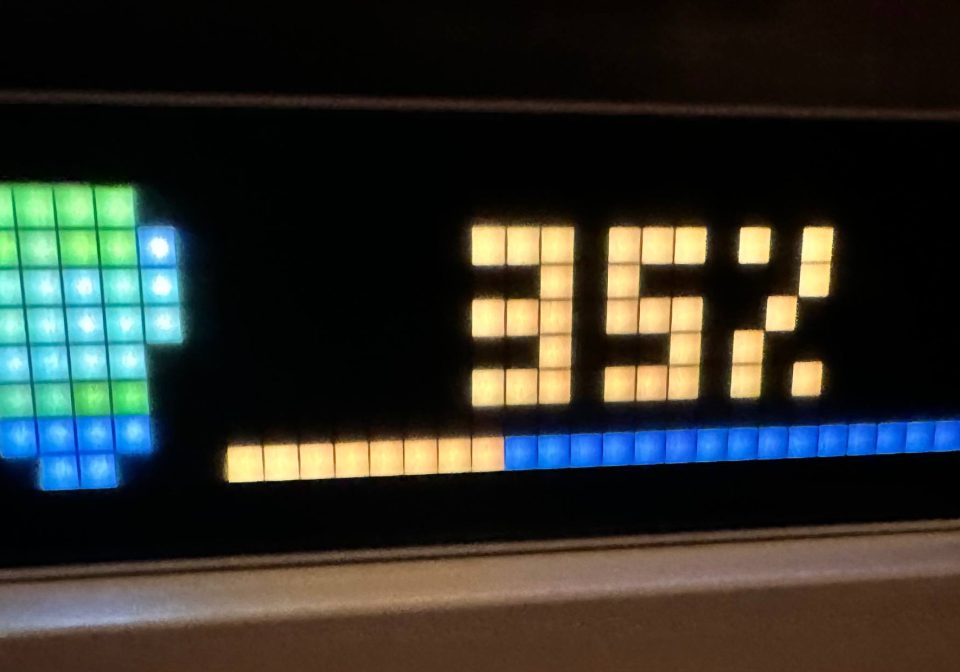
Philips Hue HA Entity Notification
Shows the brightness and hue of a HA light entity
| System | AWTRIX NG Scripts |
|---|---|
| Firmware | AWTRIX NG |
| Topic | Smarthome |
| Built by | Pascal |
| File | smVAUbobU0VX.ax · 3.6 KB |
| Icons | — |
| Published | 3 Aug 2026 |
| Downloads | 48 |
Paste the Flow as a new script and configure it under "apps".
Home Assistant: Your home assistant url/ip with port
Entity: Your HA light entity
Long-lived token: Generate a long lived access token in HA -> Profile -> Security and paste it here
Icon: Go to "Icons" and paste "2448" to get a lightbulb icon or use any other icon you want
smVAUbobU0VX.ax
# @name     HueEntity
# @desc     Polls a Home Assistant entity and announces color + brightness whenever it changes
# @headless true
#
# @config   host    text   "Home Assistant"     default="http://homeassistant.local:8123"
# @config   entity  text   "Entity"             default="light.ENTITY" help="e.g. light.livingroom"
# @config   token   text   "Long-lived token"   maxlen=256 help="HA profile -> Security -> create token"
# @config   every   number "Poll interval"      default=2 min=1 max=60 unit=s
# @config   icon    text   "Icon"               default="2448" help="Icon ID in /ICONS, no extension"
# @config   dwell   number "Display time"       default=3 min=1 max=30 unit=s
# @config   label   text   "Label"              help="optional prefix, e.g. LR"
# @config   showoff bool   "Announce when off"  default=true
# @config   track   color  "Progress track"     default=#666666

import json

class HueEntity
  var last, ticks

  def init()
    self.last  = nil
    self.ticks = 0
  end

  def loop()
    if self.ticks <= 0
      self.ticks = num(store.get("every"), 2)
      self.poll()
    end
    self.ticks -= 1
  end

  # Home Assistant renders the Jinja itself and answers with "1|60|255|180|100",
  # which is far cheaper than parsing the full /api/states entity object.
  def poll()
    var tok = store.get("token")
    if tok == nil || size(tok) < 20 return end

    var tpl = "{% set e='" + store.get("entity") + "' %}"
            + "{% set c = state_attr(e,'rgb_color') or [255,200,120] %}"
            + "{{ 1 if is_state(e,'on') else 0 }}|"
            + "{{ ((state_attr(e,'brightness') or 0) / 255 * 100) | int }}|"
            + "{{ c[0] }}|{{ c[1] }}|{{ c[2] }}"

    http.post(store.get("host") + "/api/template",
              json.dump({"template": tpl}),
              / b, st -> self.on_body(b, st),
              {'headers': {'Authorization': "Bearer " + tok,
                           'Content-Type':  "application/json"}})
  end

  def on_body(body, status)
    if status == 401 log("HueEntity: token rejected") return end
    if body == nil return end

    # matching digits instead of splitting shrugs off any trailing whitespace
    var n = re.matchall("\\d+", body)
    if size(n) < 5 return end

    var is_on = n[0] == "1"
    var pct   = clamp(num(n[1], 0), 0, 100)
    var col   = rgb(num(n[2], 255), num(n[3], 255), num(n[4], 255))

    # only announce real changes, and read the first sample silently
    # so a reboot does not fire a notification by itself
    var key = n[0] + ":" + str(pct) + ":" + str(col)
    if key == self.last return end
    var first = self.last == nil
    self.last = key
    if first return end

    self.announce(is_on, pct, col)
  end

  def announce(is_on, pct, col)
    var label
    if is_on
      label = str(pct) + "%"
    else
      if !store.get("showoff") return end
      pct   = 0
      col   = 0x404040
      label = "OFF"
    end

    var lbl = store.get("label")
    if lbl != nil && size(lbl) > 0
      label = lbl + " " + label
    end

    notify({
      "text":               label,
      "icon":               store.get("icon"),
      "textColor":          col,
      "textCenter":         true,
      "progress":           pct,
      "progressColor":      col,
      "progressTrackColor": store.get("track"),
      "iconMode":           "push",
      "durationMs":         store.get("dwell") * 1000,
      "stack":              false,
      "repeat":             1,
      "scroll":             {"speed": 65}
    })
  end

end

return HueEntity()
Install it on your AWTRIX NG
Your browser writes the script straight to the device on your network. It joins the app rotation right away.
Some browsers refuse to talk to a device on your network from a public page. Download the flow and paste it into the Scripts tab of your device, or install it from a terminal:
More flows for AWTRIX NG Scripts or Smarthome
Something wrong with this flow? Report it.