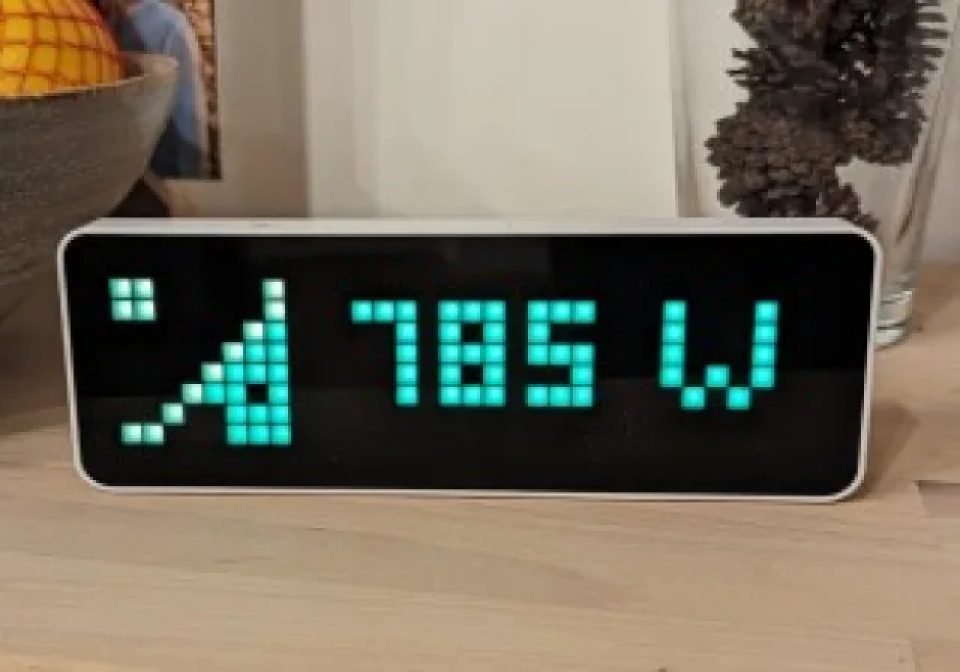
Solar Energy Production (NG)
This Home Assistant Automation blueprint adds the current energy production information to your Awtrix Light - Fixed for AWTRIX NG
| System | Home Assistant Blueprint |
|---|---|
| Firmware | AWTRIX NG |
| Topic | Smarthome |
| Built by | reedy |
| File | m58paZW30tYf.yaml · 5.5 KB |
| Icons | 3 |
| Published | 10 Aug 2026 · updated 11 Aug 2026 |
| Downloads | 114 |
This Home Assistant Automation blueprint adds the current solar energy production information to your Awtrix Light. Updated for AWTRIX NG
The data can be taken from any power sensor that provides this information (e.g. Shelly). You can configure it to not show the information during night or when there is 0 power produced.
Don't forget to install/upload the 3 icons attached to your Awtrix Light to get the full experience.
Updated version of https://flows.blueforcer.de/flow/qRWNOlYn5X4w which itself is an updated version of https://flows.blueforcer.de/flow/YjJZo6m7AyrL
m58paZW30tYf.yaml
---
blueprint:
  name: AWTRIX NG - Solar Energy Monitor
  description: >
    This blueprint will show the current solar energy received.

    It uses a icons 54156 (solar-green), 50557 (solar-white-dyn), 50546 (solar-static) that you need to install.

  domain: automation
  input:
    awtrix:
      name: AWTRIX NG Device
      description: Select the Awtrix NG device
      selector:
        device:
          integration: mqtt
          manufacturer: Blueforcer
          model: AWTRIX NG
          multiple: true
    power_source:
      name: Power Sensor
      description: A sensor providing the current power (W) received from your solar system.
      selector:
        entity:
          domain:
            - sensor
          multiple: false
    threshold_high:
      name: Threshold for high solar production (W)
      description: The threshold above which the energy production of your solar system should be visualized as high. Input in Watts (W).
      selector:
        number:
          min: 0
          max: 100000
          unit_of_measurement: Watt
          mode: slider
      default: 400
    threshold_low:
      name: Threshold for low solar production (W)
      description: The threshold below which the energy production of your solar system should be visualized as low. Input in Watts (W).
      selector:
        number:
          min: 0
          max: 100000
          unit_of_measurement: Watt
          mode: slider
      default: 100
    skip_if_zero_watts:
      name: Hide solar production if at 0 Watts
      description: 'This will not show the solar energy production on your AWTRIX NG if the production is below 0 Watts.'
      selector:
        boolean:
      default: false
    skip_during_night_hours:
      name: Hide solar production during night time
      description: 'This will not show the solar energy production on your AWTRIX NG during night hours (as specified below).'
      selector:
        boolean:
      default: false
    night_starts_after_time:
      name: Night Time Start
      description: Set the start of the night time.
      default: 00:00:00
      selector:
        time: {}
    night_ends_after_time:
      name: Night Time End
      description: Set the end of the night time.
      default: 00:00:00
      selector:
        time: {}
mode: single
variables:
  device_ids: !input awtrix
  devices_topics: >-
    {%- macro get_device_topic(device_id) %}
    {{ states((device_entities(device_id) | select('search','device_topic') | list)[0]) }}
    {%- endmacro %}

    {%- set ns = namespace(devices=[]) %}
    {%- for device_id in device_ids %}
      {%- set device=get_device_topic(device_id)|replace(' ','') %}
      {% set ns.devices = ns.devices + [ device ~ '/cmd/apps/pushed/solar_power'] %}
    {%- endfor %}
    {{ ns.devices }}
  power_sensor: !input power_source
  power_level: >-
    {{ states[power_sensor].state | int(0) | abs }}
  threshold_low: !input threshold_low
  threshold_high: !input threshold_high
  power_level_icon: >-
    {%- if power_level > threshold_high %}{{54156}}{%- endif %}
    {%- if (power_level <= threshold_high) and (power_level > threshold_low) %}{{50557}}{%- endif %}
    {%- if power_level <= threshold_low %}{{50546}}{%- endif %}
  power_level_color: >-
    {%- if power_level > threshold_high %}{{"#04FE04"}}{%- endif %}
    {%- if (power_level <= threshold_high) and (power_level > threshold_low) %}{{"#FCFEFC"}}{%- endif %}
    {%- if power_level <= threshold_low %}{{"#FF4E1A"}}{%- endif %}
  power_level_text: >-
    {%- if power_level > 1000  %}{{ ((power_level | float(default=0)) / 1000) | round(1)}} kW{%- else %}{{power_level | round(0)}} W{%- endif %}
  skip_if_zero_watts: !input skip_if_zero_watts
  skip_during_night_hours: !input skip_during_night_hours
  payload: >-
    {"icon":"{{ power_level_icon }}","text":"{{ power_level_text }}","textColor":"{{ power_level_color }}"}
  night_start: !input night_starts_after_time
  night_end: !input night_ends_after_time

trigger:
  - platform: time_pattern
    minutes: "/1"

condition:
action:
  - choose:
    - alias: "Skipping"
      conditions:
      - condition: template
        value_template: >
          {% set now_time = now().strftime("%H:%M") %}
          {% set night_start = night_start %}
          {% set night_end = night_end %}
          {{ (skip_during_night_hours and ((now_time < night_end) or (now_time > night_start))) or (skip_if_zero_watts and (power_level == 0)) }}
      sequence:
        # It is night time, skipping sending solar power data to AWTRIX NG.
      - repeat:
          for_each: "{{ devices_topics }}"
          sequence:
            - service: mqtt.publish
              data:
                qos: 0
                retain: false
                topic: "{{ repeat.item }}"
                payload: '{}'
    - alias: "Not skipping"
      conditions:
      - condition: template
        value_template: >
          {% set now_time = now().strftime("%H:%M") %}
          {% set night_start = night_start %}
          {% set night_end = night_end %}
          {{ not((skip_during_night_hours and ((now_time < night_end) or (now_time > night_start))) or (skip_if_zero_watts and (power_level == 0))) }}
      sequence:
      - repeat:
          for_each: "{{ devices_topics }}"
          sequence:
            - service: mqtt.publish
              data:
                qos: 0
                retain: false
                topic: "{{ repeat.item }}"
                payload: >
                  {{ payload }}
These icons belong on the device, in /ICONS. Each one is at
most 32×8
pixels — shown here magnified, at their real proportions.

8×8 px

8×8 px

8×8 px
More flows for Home Assistant Blueprint or Smarthome
Something wrong with this flow? Report it.