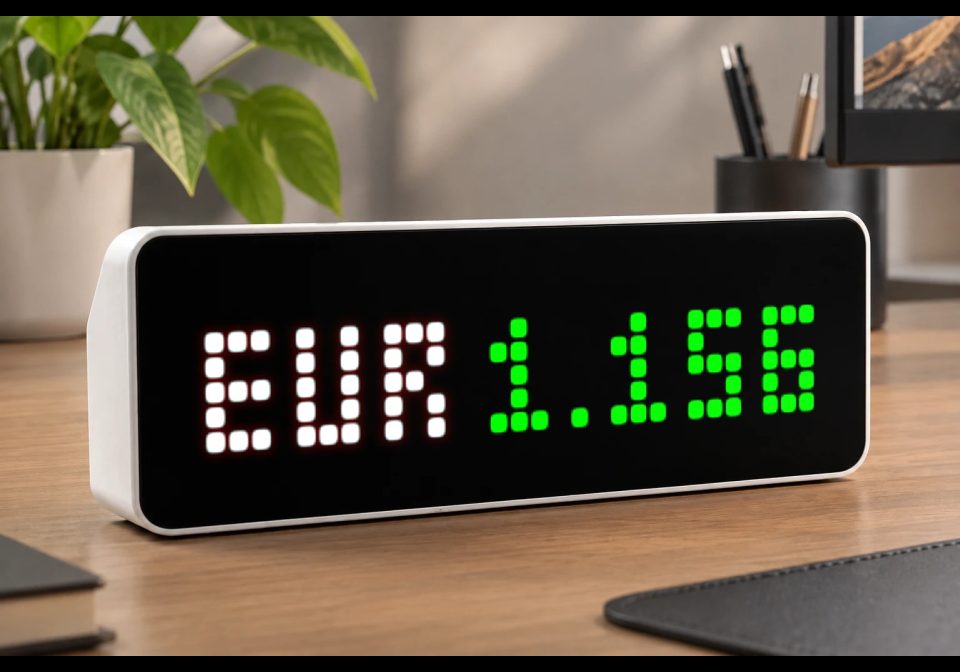
Currency Market
Requests and displays global currency exchange rates directly on your clock.
| System | AWTRIX NG Scripts |
|---|---|
| Firmware | AWTRIX NG |
| Topic | Miscellaneous |
| Built by | Avemer |
| File | kXNxD0v2fzQw.ax · 6.8 KB |
| Icons | — |
| Published | 11 Aug 2026 · updated 12 Aug 2026 |
| Downloads | 33 |
The script uses the free Frankfurter API to periodically request and display currency exchange rates directly on the watch.
Update 1.2
- Fixed an issue with automatic price color comparison when the latest exchange rate remains unchanged across multiple days.
- The script now requests exchange-rate history covering the last 5 calendar days in a single API request.
- The newest rate returned by the API is used as the current price.
- The script searches the historical response for the most recent rate that is actually different from the current rate.
- The current rate is shown in green when it is higher than the most recent different rate.
- The current rate is shown in red when it is lower than the most recent different rate.
- If no different rate can be found within the requested 5-day history, the price remains white.
- This approach prevents the color from incorrectly remaining white when the latest available rate is unchanged for several consecutive days. Especially considering that exchange rates usually change every day.
Note: This update requires additional testing to verify the behavior across date changes, repeated identical rates, weekends, holidays, and different currency pairs.
Update 1.1 Configurable Price Precision
Added a new PRICE_DECIMALS setting that allows you to control how many decimal places are displayed next to the currency ticker.
Examples:
PRICE_DECIMALS = 0 → USD 1
PRICE_DECIMALS = 1 → USD 1.2
PRICE_DECIMALS = 2 → USD 1.23
PRICE_DECIMALS = 3 → USD 1.234
PRICE_DECIMALS = 4 → USD 1.2345
Important: This is display formatting, not mathematical rounding. The underlying exchange rate received from the API is not changed. The setting only controls how many decimal places are shown on the watch.
FEATURES
- Supports currency exchange rates using standard 3-letter ISO currency codes. Examples: EUR, USD, GBP, JPY, CNY and others.
- You can choose which currency is used as the BASE currency and which currency is used as the QUOTE currency.
- Displays the currency ticker together with the exchange-rate value.
- Retrieves exchange-rate history covering the last 5 calendar days in a single request.
- Uses the newest available rate from that history as the current price.
- Searches the same history for the most recent rate that differs from the current rate.
- Repeated identical rates are ignored when determining the comparison value. Especially considering that exchange rates usually change every day.
- Automatic green/red price coloring based on the most recent different rate.
- Custom ticker and price colors.
- Adjustable ticker length.
- Adjustable price precision.
- Adjustable update interval for the historical-rate request.
- Adjustable spacing between ticker and price.
- Lightweight and suitable for the limited resources of the ULANZI TC001.
- Technically, you can have several such scripts that rotate each other on the clock display and show different currency pairs.
!!! IMPORTANT NOTE - Data Source & Delay !!!
- This script uses the free Frankfurter API to retrieve currency exchange-rate data directly on the watch.
- Frankfurter provides exchange rates based on European Central Bank (ECB) reference rates.
- The underlying reference rates are generally updated once per working day. Therefore, the value returned by the API should be considered a daily reference exchange rate, not a live market rate.
- A shorter update interval does not make the underlying exchange rate update more frequently. It only makes the watch request the historical data more often.
- The exact time at which a new ECB reference rate becomes available should not be treated as a real-time market-data timestamp.
- The advantage is that the script runs directly on the watch and does not require Home Assistant, a smart-home server, a PC, or any additional setup. It also works for everyone without an API token or account.
- If real-time currency rates are required, the data source can be replaced with a suitable real-time or market-data API, for example:
- A broker's API;
- A foreign exchange market data API;
- Another real-time currency data provider.
- In other words, this script prioritizes simplicity, free access, and standalone operation over real-time exchange rates.
- It is useful for checking approximate daily reference currency rates directly from the watch without opening a phone, browser, or trading application.
- For actual transactions or real-time exchange rates, always verify the rate with your bank, broker, exchange, or other relevant financial service.
Currency Pair Format
- Currency pairs are specified using two 3-letter ISO currency codes:
BASE/QUOTE - The BASE currency is the currency being priced.
- The QUOTE currency is the currency in which the BASE currency is expressed.
For example:BASE = "EUR"QUOTE = "USD"
means: EUR/USD = how many USD are equal to 1 EUR.
If the exchange rate is 1.17, this means: 1 EUR = 1.17 USD - In general: BASE/QUOTE = value of 1 BASE currency expressed in QUOTE currency.
What is displayed on the watch?
The displayed value is intended to represent the value of 1 BASE currency in the selected QUOTE currency, according to the rate returned by the API.
When TICKER_LETTERS is set to 1–3, the ticker displayed on the watch represents the BASE currency.
For example: BASE = "USD" QUOTE = "RUB" TICKER_LETTERS = 3
displays: USD 80.00
This means: 1 USD = 80 RUB
If TICKER_LETTERS is set to 4 or higher, the complete currency pair is displayed:
USD/RUB 80.00
SETTINGS
In code look for section:
====== START OF USER SETTINGS ======
1. Base Currency
self.BASE_CURRENCY = "USD"
Specifies the currency that you want to price.
Use a 3-letter ISO currency code.
Examples:
EUR — Euro
USD — US Dollar
GBP — British Pound
JPY — Japanese Yen
CNY — Chinese Yuan
CHF — Swiss Franc
RUB — Russian Ruble
For example: self.BASE_CURRENCY = "EUR"
means that the requested exchange rate is based on 1 EUR expressed in the selected QUOTE currency.
2. Quote Currency
self.QUOTE_CURRENCY = "RUB"
Specifies the currency in which the BASE currency is priced.
Examples:
EUR + USD → EUR/USD
USD + EUR → USD/EUR
GBP + USD → GBP/USD
USD + JPY → USD/JPY
EUR + GBP → EUR/GBP
USD + RUB → USD/RUB
For example: self.BASE_CURRENCY = "USD"
self.QUOTE_CURRENCY = "RUB"
creates: USD/RUB
The exchange-rate value represents how many RUB correspond to 1 USD.
3. Adjust Ticker Length
self.TICKER_LETTERS = 3
Controls how many characters of the currency ticker are displayed.
TICKER_LETTERS = 0 → 1.17 — hide ticker
TICKER_LETTERS = 1 → E 1.17 — first letter of BASE currency
TICKER_LETTERS = 2 → EU 1.17 — first two letters of BASE currency
TICKER_LETTERS = 3 → EUR 1.17 — full BASE currency
TICKER_LETTERS = 4 or more → EUR/USD 1.17 — full BASE/QUOTE pair
Important: With values 1–3, the displayed ticker represents the BASE currency, not the QUOTE currency.
For example: BASE = USD QUOTE = RUB TICKER_LETTERS = 3
displays: USD 80.00
not: RUB 80.00
4. Ticker Name Color
self.TICKER_COLOR = 0xFFFFFF
Sets the ticker color using 0xRRGGBB format.
Examples:
0xFFFFFF — White
0xFF0000 — Red
0x00FF00 — Green
0x0000FF — Blue
0xFFFF00 — Yellow
0x00FFFF — Cyan
0xFF00FF — Magenta
5. Price Color Mode
self.PRICE_COLOR_MODE = 2
Controls the price color:
self.PRICE_COLOR_MODE = 0 — always white
self.PRICE_COLOR_MODE = 1 — use the custom PRICE_COLOR
self.PRICE_COLOR_MODE = 2 — automatically use green/red
When automatic mode (2) is enabled:
The script requests the last 5 calendar days of available history.
The newest available rate becomes the current rate.
The script searches backward through the returned history.
The first rate it finds that is different from the current rate becomes the comparison rate.
The current rate is green if it is higher.
The current rate is red if it is lower.
Repeated identical rates are skipped.
6. Custom Price Color
self.PRICE_COLOR = 0xFFFFFF
Used when: PRICE_COLOR_MODE = 1
Uses the same 0xRRGGBB color format as the ticker.
7. Current Price Update Interval
self.CURRENT_PRICE_UPDATE_TICKS = 600
Controls how frequently the script requests the 5-day exchange-rate history.
The value is the number of loop ticks between requests.
The counter is initialized to 0, so the first history request is made immediately when the loop starts.
For example:
600 → request the 5-day history every 600 ticks (Approximately 10 minutes)
3600 → request the 5-day history every 3600 ticks (Approximately 60 minutes)
The actual time represented by one loop tick depends on the watch's script execution cycle. Therefore, these values should be understood as tick counts, not guaranteed minutes or seconds.
- Because Frankfurter's underlying rates are generally updated only once per working day, there is usually little benefit in requesting the same 5-day history very frequently.
8. Text Gap
self.GAP = 2
Controls the distance in pixels between the ticker and the price.
For example: USD 80.00
The value determines the space between USD and 80.00.
TROUBLESHOOTING
If the script does not work, displays an error, fails to load values, or shows incorrect values:
- Make sure you have entered valid 3-letter ISO currency codes for both
BASE_CURRENCYandQUOTE_CURRENCYand saved the changes (Ctrl+S) (see Setting 1 and 2). - Make sure you have specified the currency pair in the correct order and saved the changes (Ctrl+S).
- Try to change
PRICE_DECIMALS = 3The problem may accur when the query result requires fewer characters than specified. ExamplePRICE_DECIMALS = 3But the price is 82.44, SoPRICE_DECIMALSshould be changed to2(Ctrl+S). - Check your internet connection. The script requires internet access to retrieve exchange-rate data.
- Make sure the selected currency pair is supported by the data source.
- The watch may be running out of available memory if you have installed many similar or other scripts at the same time. Consider increasing
CURRENT_PRICE_UPDATE_TICKSso the script requests data less frequently. (Ctrl+S) (see Setting 7) - Always consider rebooting the watch. Open the watch's web interface by entering its IP address in your browser, go to System → Maintenance → Reboot, and then press "Sure?". A reboot can resolve temporary glitches, memory-related issues, and other unexpected script behavior.
Vibecoded with ChatGPT, polished by Avemer.
P.S. I wrote this script for myself, and I bought the Ulanzi TC001 watch for this idea. Therefore, I tried to optimize the code as much as possible. I didn't test it much though. I hope that it will work well, but if I find errors, I will try to fix them and update this flow, create similar scripts with different functionality. The code contains explanations, that take some memory to store, if you run into troubles with that, you can always delete them and you can use it as a base for your development. If mistakes occur, do not judge strictly. And I'm a newbie. I hope this script will be useful to someone.
kXNxD0v2fzQw.ax
# @name Currency Market
# @desc Global currency exchange rate display
# @author Avemer
# @version 1.2
class CurrencyMarket
var BASE_CURRENCY
var QUOTE_CURRENCY
var TICKER_LETTERS
var PRICE_DECIMALS
var TICKER_COLOR
var PRICE_COLOR_MODE
var PRICE_COLOR
var CURRENT_PRICE_UPDATE_TICKS
var GAP
var result
var oldPrice
var comparisonPrice
var currentPriceTicks
var color
var displayTICKER
# ================ START OF USER SETTINGS ================
def init()
# EUR, USD, GBP, JPY, CNY, CHF, RUB
self.BASE_CURRENCY = "EUR"
# EUR + USD = EUR/USD
self.QUOTE_CURRENCY = "USD"
# 0 = hide ticker
# 4+ = full BASE/QUOTE pair
self.TICKER_LETTERS = 3
# NUMBER OF PRICE DECIMAL PLACES
self.PRICE_DECIMALS = 3
# Format: 0xRRGGBB
self.TICKER_COLOR = 0xFFFFFF
# 0 = always white
# 1 = custom PRICE_COLOR
# 2 = automatic green/red comparison
self.PRICE_COLOR_MODE = 2
# CUSTOM PRICE COLOR
# Used when PRICE_COLOR_MODE = 1.
self.PRICE_COLOR = 0xFFFFFF
# CURRENT PRICE UPDATE
self.CURRENT_PRICE_UPDATE_TICKS = 600
# DISTANCE BETWEEN TICKER AND PRICE
self.GAP = 2
# ================ END OF USER SETTINGS ================
# INITIAL VALUES
self.result = "..."
# Newest rate from the API.
self.oldPrice = 0
# Previous rate that is different from the newest rate.
self.comparisonPrice = 0
# Countdown until the next API request.
self.currentPriceTicks = 0
self.color = 0xFFFFFF
self.displayTICKER = ""
# CREATE DISPLAYED TICKER
if self.TICKER_LETTERS <= 0
self.displayTICKER = ""
elif self.TICKER_LETTERS == 1
self.displayTICKER = self.BASE_CURRENCY[0]
elif self.TICKER_LETTERS == 2
self.displayTICKER = self.BASE_CURRENCY[0] + self.BASE_CURRENCY[1]
elif self.TICKER_LETTERS == 3
self.displayTICKER = self.BASE_CURRENCY
else
self.displayTICKER = self.BASE_CURRENCY + "/" + self.QUOTE_CURRENCY
end
end
# offset = 0 -> today
# offset = 1 -> yesterday
# offset = 5 -> five days ago
def get_previous_date(offset)
var y = year()
var m = month()
var d = day()
var i = 0
while i < offset
d -= 1
if d <= 0
m -= 1
if m <= 0
m = 12
y -= 1
end
if m == 1
d = 31
elif m == 2
d = 28
elif m == 3
d = 31
elif m == 4
d = 30
elif m == 5
d = 31
elif m == 6
d = 30
elif m == 7
d = 31
elif m == 8
d = 31
elif m == 9
d = 30
elif m == 10
d = 31
elif m == 11
d = 30
else
d = 31
end
end
i += 1
end
var ms = str(m)
var ds = str(d)
if m < 10
ms = "0" + ms
end
if d < 10
ds = "0" + ds
end
return str(y) + "-" + ms + "-" + ds
end
# APPLY PRICE COLOR
def update_color()
if self.PRICE_COLOR_MODE == 0
self.color = 0xFFFFFF
return
end
if self.PRICE_COLOR_MODE == 1
self.color = self.PRICE_COLOR
return
end
# No different historical price was found.
if self.comparisonPrice <= 0
self.color = 0xFFFFFF
return
end
# Current price is higher than the previous
# different price -> green.
if self.oldPrice > self.comparisonPrice
self.color = 0x00FF00
# Current price is lower than the previous
# different price -> red.
elif self.oldPrice < self.comparisonPrice
self.color = 0xFF0000
else
self.color = 0xFFFFFF
end
end
# FORMAT PRICE
def format_price(value)
var s = str(value)
# 0 DECIMAL PLACES
if self.PRICE_DECIMALS <= 0
var p = re.search(
"[0-9]+",
s
)
if p == nil
return "..."
end
return p[0]
end
# 1 DECIMAL PLACE
if self.PRICE_DECIMALS == 1
var p = re.search(
"[0-9]+[.][0-9]",
s
)
if p == nil
return "..."
end
return p[0]
end
# 2 DECIMAL PLACES
if self.PRICE_DECIMALS == 2
var p = re.search(
"[0-9]+[.][0-9][0-9]",
s
)
if p == nil
return "..."
end
return p[0]
end
# 3 DECIMAL PLACES
if self.PRICE_DECIMALS == 3
var p = re.search(
"[0-9]+[.][0-9][0-9][0-9]",
s
)
if p == nil
return "..."
end
return p[0]
end
# 4 DECIMAL PLACES
if self.PRICE_DECIMALS == 4
var p = re.search(
"[0-9]+[.][0-9][0-9][0-9][0-9]",
s
)
if p == nil
return "..."
end
return p[0]
end
# 5 OR MORE DECIMAL PLACES
return s
end
# PROCESS HISTORY RESPONSE
def on_rates(w, st)
if w == nil
return
end
# FIND ALL RATE VALUES
var search = w
var firstPrice = 0
var lastPrice = 0
var foundCount = 0
var i = 0
while i < 10
var p = re.search(
"rate[^0-9]*([0-9]+[.][0-9]+)",
search
)
if p == nil
break
end
var value = num(p[1])
if value == nil
break
end
if foundCount == 0
firstPrice = value
end
lastPrice = value
foundCount += 1
if foundCount >= 10
break
end
# Search for the next rate.
var second = re.search(
"rate[^0-9]*[0-9]+[.][0-9]+.*rate[^0-9]*([0-9]+[.][0-9]+)",
search
)
if second == nil
break
end
var nextValue = num(second[1])
if nextValue == nil
break
end
lastPrice = nextValue
foundCount += 1
if foundCount >= 10
break
end
search = second[0]
i += 1
end
# NO VALID DATA
if foundCount <= 0
return
end
# CURRENT PRICE
self.oldPrice = lastPrice
self.result = self.format_price(lastPrice)
# FIND LAST DIFFERENT PRICE
self.comparisonPrice = 0
var currentSearch = w
var attempts = 0
while attempts < 10
var q = re.search(
"rate[^0-9]*([0-9]+[.][0-9]+)",
currentSearch
)
if q == nil
break
end
var candidate = num(q[1])
if candidate == nil
break
end
# We found the newest rate that differs
# from the current rate.
if candidate != lastPrice
self.comparisonPrice = candidate
break
end
# Continue searching for an older rate.
var nextSearch = re.search(
"rate[^0-9]*[0-9]+[.][0-9]+.*rate[^0-9]*([0-9]+[.][0-9]+)",
currentSearch
)
if nextSearch == nil
break
end
currentSearch = nextSearch[0]
attempts += 1
end
# APPLY COLOR
self.update_color()
end
# MAIN LOOP
def loop()
self.currentPriceTicks -= 1
if self.currentPriceTicks <= 0
self.currentPriceTicks = self.CURRENT_PRICE_UPDATE_TICKS
# Request five days of historical rates at once.
# The API returns the rates chronologically.
# This allows the script to find the latest
# price that differs from the current one.
var fromDate = self.get_previous_date(5)
var toDate = self.get_previous_date(0)
http.get(
"https://api.frankfurter.dev/v2/rates?base=" + self.BASE_CURRENCY + ""es=" + self.QUOTE_CURRENCY + "&from=" + fromDate + "&to=" + toDate,
/ b, st -> self.on_rates(b, st)
)
end
end
# DRAW
def draw()
clear()
var tickerWidth = text_ink_width(self.displayTICKER)
var priceWidth = text_ink_width(self.result)
var totalWidth = tickerWidth + self.GAP + priceWidth
var x = int((width() - totalWidth) / 2)
if self.TICKER_LETTERS > 0
text(
x,
7,
self.displayTICKER,
self.TICKER_COLOR
)
end
text(
x + tickerWidth + self.GAP,
7,
self.result,
self.color
)
end
def on_button(btn)
end
end
return CurrencyMarket()Install it on your AWTRIX NG
Your browser writes the script straight to the device on your network. It joins the app rotation right away.
Some browsers refuse to talk to a device on your network from a public page. Download the flow and paste it into the Scripts tab of your device, or install it from a terminal:
More flows for AWTRIX NG Scripts or Miscellaneous
Something wrong with this flow? Report it.