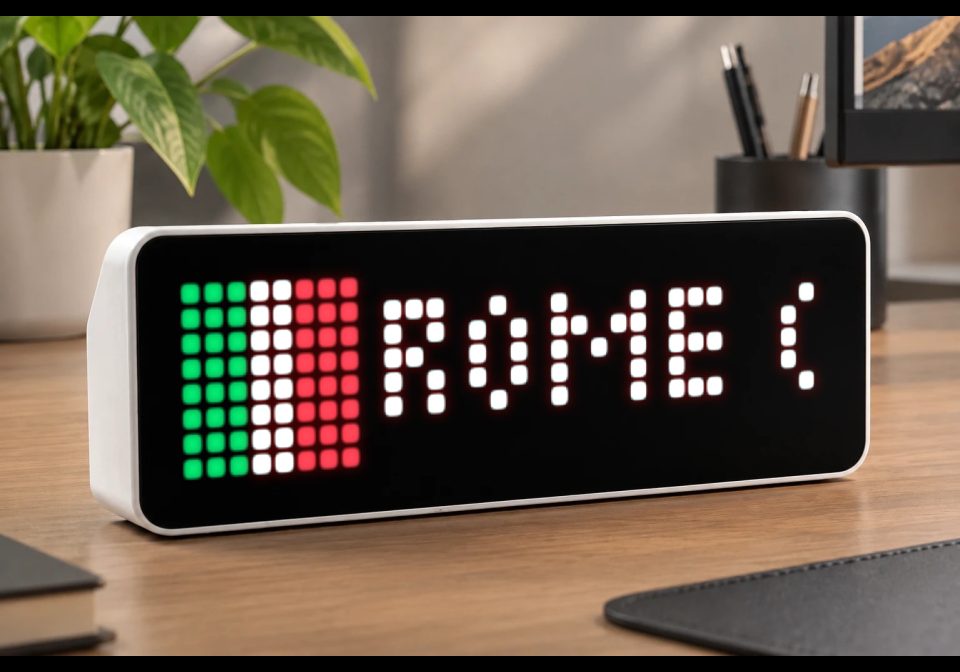
FlightDisplay: Wer fliegt da über mir?
Zeigt Flugzeuge über deinem Zuhause inkl. Route und Herkunftsland auf der AWTRIX an. (🇬🇧 English version below)
| System | Node-RED |
|---|---|
| Firmware | AWTRIX NG |
| Topic | Smarthome |
| Built by | matzzz |
| File | g3nJ7Afoq0jQ.json · 23.4 KB |
| Icons | — |
| Published | 17 Aug 2026 · updated 25 Aug 2026 |
| Downloads | 51 |
🇬🇧 English version below
Erkennt über die kostenlose ADS-B API (adsb.lol) alle Flugzeuge, die innerhalb eines einstellbaren Radius über deinem Standort fliegen.
Zum Callsign wird automatisch die Flugroute (Start- und Zielort) über adsbdb.com abgefragt und zusammen mit einer kleinen Länder-Flagge des Zielorts als Notification an deine AWTRIX gesendet.
Funktionen
- Konfigurierbar über einen einzigen Change-Node (Koordinaten, Radius, Anzeigedauer, Sound, Nachtruhe, Cooldown pro Flugzeug)
- Verhindert Doppel-Meldungen durch Cooldown pro Flugzeug (Standard: 10 Minuten)
- Optionaler Sound, der in einer einstellbaren Nachtruhe automatisch stumm bleibt
- Einfache Pixel-Flaggen für ca. 20 Länder (DE, FR, GB, US, TR, ...)
Einrichtung
- Den Node "⚙️ Konfiguration (hier anpassen!)" öffnen und eigene Koordinaten, MQTT-Topic deiner AWTRIX usw. eintragen
- Beim "An AWTRIX senden"-Node den eigenen MQTT-Broker eintragen
- Deployen — fertig
Beide verwendeten APIs (adsb.lol, adsbdb.com) sind kostenlos und benötigen keinen API-Key.
FlightDisplay: Who's flying over me?
Shows aircraft flying over your home, including route and country of origin, on your AWTRIX.
Uses the free ADS-B API (adsb.lol) to detect all aircraft flying within an adjustable radius of your location.
The flight route (origin and destination) is automatically looked up for the callsign via adsbdb.com and sent to your AWTRIX as a notification, together with a small flag icon for the destination country.
Features
- Configurable via a single Change node (coordinates, radius, display duration, sound, quiet hours, per-aircraft cooldown)
- Prevents duplicate notifications with a per-aircraft cooldown (default: 10 minutes)
- Optional sound that automatically stays muted during an adjustable quiet-hours window
- Simple pixel flags for about 20 countries (DE, FR, GB, US, TR, ...)
Setup
- Open the "⚙️ Configuration (edit here!)" node and enter your own coordinates, your AWTRIX's MQTT topic, etc.
- In the "Send to AWTRIX" node, enter your own MQTT broker.
- Deploy — done.
Both APIs used (adsb.lol, adsbdb.com) are free and require no API key.
g3nJ7Afoq0jQ.json
[
    {
        "id": "7bdabe99d4cae0c7",
        "type": "tab",
        "label": "FlightDisplay",
        "disabled": false,
        "info": "## ✈️ Flugzeug über Location → AWTRIX\n\nZeigt Flugzeuge, die über deinem Zuhause fliegen, inkl. Route (Herkunft → Ziel) und Herkunftsland als kleine Flagge auf deinem AWTRIX-Gerät an.\n\n### Einrichtung\n\n1. Öffne den Node **⚙️ Konfiguration (hier anpassen!)** und trage ein:\n   - `homeLat` / `homeLon` – deine Koordinaten (z.B. von google maps)\n   - `radiusNm` – Suchradius in nautischen Meilen, je kleiner desto genauer \"über dem Haus\"\n   - `awtrixTopic` – MQTT-Topic deines AWTRIX-Geräts, z.B. `AWTRIX-xyz123/cmd/notify`\n   - `durationMs` – wie lange die Anzeige stehen bleibt (ms)\n   - `soundEnabled` – ob bei neuer Anzeige ein Ton kommt\n   - `soundRtttl` – der RTTTL-Klingelton-String\n   - `quietHoursStart` / `quietHoursEnd` – Nachtruhe (Stunde 0-23), in der kein Ton abgespielt wird\n   - `cooldownMinutes` – wie lange ein Flugzeug nach der ersten Anzeige gesperrt bleibt, damit es nicht doppelt gemeldet wird\n2. Öffne den Node **\"Hausposition & Radius\"** und trage bei `User-Agent` eine echte Kontaktmöglichkeit ein (adsb.lol verlangt das, siehe Kommentar im Code).\n3. Öffne den MQTT-Broker Node am **\"An AWTRIX senden\"**-Node und trage die IP/Adresse deines Brokers ein.\n4. Deploy drücken – die Konfiguration wird direkt beim Start geladen.\n\n### Verwendete APIs\n- [adsb.lol](https://api.adsb.lol) – aktuelle Flugzeugpositionen (kostenlos, kein Key nötig, aber echter User-Agent mit Kontaktinfo erforderlich)\n- [adsbdb.com](https://api.adsbdb.com) – Routeninformationen zum Callsign (kostenlos, kein Key nötig)\n\n### Doku zum AWTRIX-Gerät\nhttps://blueforcer.github.io/awtrix-ng/\n\n---\n\n## ✈️ FlightDisplay: Who's flying over me? (English)\n\nShows aircraft flying over your home, including route and country of origin, on your AWTRIX.\n\n### Setup\n\n1. Open the **⚙️ Konfiguration (hier anpassen!)** node and set your coordinates, MQTT topic, display duration, sound, quiet hours and cooldown.\n2. Open the **\"Hausposition & Radius\"** node and set a real contact in the `User-Agent` header (adsb.lol requires this, see code comment).\n3. Open the MQTT broker config on the **\"An AWTRIX senden\"** node and enter your own broker.\n4. Deploy — done.\n\nBoth APIs used (adsb.lol, adsbdb.com) are free and require no API key."
    },
    {
        "id": "cfg1n0dea1b2c3d4",
        "type": "inject",
        "z": "7bdabe99d4cae0c7",
        "name": "Beim Start konfigurieren",
        "props": [
            {
                "p": "payload"
            }
        ],
        "repeat": "",
        "crontab": "",
        "once": true,
        "onceDelay": "0.1",
        "topic": "",
        "payload": "",
        "payloadType": "date",
        "x": 160,
        "y": 40,
        "wires": [
            [
                "cfg2n0dea1b2c3d4"
            ]
        ]
    },
    {
        "id": "cfg2n0dea1b2c3d4",
        "type": "change",
        "z": "7bdabe99d4cae0c7",
        "name": "⚙️ Konfiguration (hier anpassen!)",
        "rules": [
            {
                "t": "set",
                "p": "homeLat",
                "pt": "flow",
                "to": "48.137",
                "tot": "num"
            },
            {
                "t": "set",
                "p": "homeLon",
                "pt": "flow",
                "to": "11.575",
                "tot": "num"
            },
            {
                "t": "set",
                "p": "radiusNm",
                "pt": "flow",
                "to": "5",
                "tot": "num"
            },
            {
                "t": "set",
                "p": "awtrixTopic",
                "pt": "flow",
                "to": "AWTRIX-xyz123/cmd/notify",
                "tot": "str"
            },
            {
                "t": "set",
                "p": "durationMs",
                "pt": "flow",
                "to": "50000",
                "tot": "num"
            },
            {
                "t": "set",
                "p": "soundEnabled",
                "pt": "flow",
                "to": "true",
                "tot": "bool"
            },
            {
                "t": "set",
                "p": "soundRtttl",
                "pt": "flow",
                "to": "beep:d=4,o=6,b=200:16c",
                "tot": "str"
            },
            {
                "t": "set",
                "p": "quietHoursStart",
                "pt": "flow",
                "to": "22",
                "tot": "num"
            },
            {
                "t": "set",
                "p": "quietHoursEnd",
                "pt": "flow",
                "to": "9",
                "tot": "num"
            },
            {
                "t": "set",
                "p": "cooldownMinutes",
                "pt": "flow",
                "to": "10",
                "tot": "num"
            }
        ],
        "action": "",
        "property": "",
        "from": "",
        "to": "",
        "reg": false,
        "info": "### Erklärung der Einstellungen\n\n| Feld | Bedeutung |\n|---|---|\n| `homeLat` | Breitengrad deines Standorts (z.B. deines Hauses), als Dezimalzahl |\n| `homeLon` | Längengrad deines Standorts, als Dezimalzahl |\n| `radiusNm` | Suchradius um deinen Standort in nautischen Meilen. Kleinerer Wert = nur Flugzeuge direkt über dir, größerer Wert = auch Flugzeuge in der Umgebung |\n| `awtrixTopic` | Das MQTT-Topic deines AWTRIX-Geräts für Notifications, z.B. `AWTRIX-xyz123/cmd/notify`. Findest du in der AWTRIX-App/Weboberfläche unter den MQTT-Einstellungen |\n| `durationMs` | Wie lange die Meldung auf dem AWTRIX-Display angezeigt wird, in Millisekunden (50000 = 50 Sekunden) |\n| `soundEnabled` | `true`/`false` – ob bei einer neuen Flugzeug-Meldung ein Ton abgespielt werden soll |\n| `soundRtttl` | Der Klingelton als RTTTL-String, der abgespielt wird, wenn `soundEnabled` = true ist. Format siehe AWTRIX-Doku |\n| `quietHoursStart` | Stunde (0-23), ab der die Nachtruhe beginnt – ab dieser Uhrzeit wird kein Ton abgespielt, auch wenn `soundEnabled` = true ist |\n| `quietHoursEnd` | Stunde (0-23), ab der die Nachtruhe endet und wieder Ton abgespielt wird |\n| `cooldownMinutes` | Wie viele Minuten ein bereits gemeldetes Flugzeug gesperrt bleibt, bevor es erneut gemeldet werden kann (verhindert Doppel-Meldungen, wenn dasselbe Flugzeug mehrfach hintereinander erkannt wird) |\n\nDieser Node läuft einmalig beim Start (Deploy) und schreibt alle Werte in den Flow-Context. Nach einer Änderung hier muss neu deployed werden, damit die neuen Werte übernommen werden.\n\n---\n\n### Settings explained (English)\n\n| Field | Meaning |\n|---|---|\n| `homeLat` / `homeLon` | Latitude / longitude of your location |\n| `radiusNm` | Search radius in nautical miles |\n| `awtrixTopic` | MQTT notify topic of your AWTRIX device |\n| `durationMs` | How long the notification stays on screen (ms) |\n| `soundEnabled` / `soundRtttl` | Whether a sound plays, and which RTTTL tone |\n| `quietHoursStart` / `quietHoursEnd` | Hour range (0-23) during which sound stays muted |\n| `cooldownMinutes` | Minutes before the same aircraft can trigger another notification |\n\nThis node runs once on deploy/start and writes all values into flow context. Re-deploy after changing values here.",
        "x": 440,
        "y": 40,
        "wires": [
            []
        ]
    },
    {
        "id": "3faeb2e009e1adcd",
        "type": "inject",
        "z": "7bdabe99d4cae0c7",
        "name": "alle 30s / every 30s",
        "props": [
            {
                "p": "payload"
            }
        ],
        "repeat": "30",
        "crontab": "",
        "once": true,
        "onceDelay": "3",
        "topic": "",
        "payload": "",
        "payloadType": "date",
        "x": 140,
        "y": 100,
        "wires": [
            [
                "df7dbb3217a0ec54"
            ]
        ]
    },
    {
        "id": "df7dbb3217a0ec54",
        "type": "function",
        "z": "7bdabe99d4cae0c7",
        "name": "Hausposition & Radius",
        "func": "// Werte kommen aus dem Node \"⚙️ Konfiguration\" (Flow-Context).\n// Falls dort nichts gesetzt ist, greifen diese Fallback-Werte.\n// -- Values come from the \"⚙️ Konfiguration\" node (flow context).\n// -- If nothing is set there, these fallback values are used.\nconst homeLat = flow.get('homeLat') ?? 48.137;\nconst homeLon = flow.get('homeLon') ?? 11.575;\nconst radiusNm = flow.get('radiusNm') ?? 5; // Umkreis - je kleiner, desto genauer \"über dem Haus\" / search radius - smaller = more precisely \"overhead\"\n\n// Backoff bei Rate-Limit (429): solange nicht abgelaufen, keine neue Anfrage senden.\n// Wird von \"Neue Flugzeuge filtern\" gesetzt, wenn adsb.lol mit 429 antwortet.\n// -- Backoff on rate limit (429): don't send a new request until this expires.\n// -- Set by \"Neue Flugzeuge filtern\" whenever adsb.lol responds with 429.\nconst rateLimitedUntil = flow.get('adsbRateLimitedUntil') || 0;\nif (Date.now() < rateLimitedUntil) {\n    const waitSec = Math.ceil((rateLimitedUntil - Date.now()) / 1000);\n    node.status({ fill: \"yellow\", shape: \"ring\", text: `rate limited, warte noch ${waitSec}s / waiting ${waitSec}s` });\n    return null; // diesen Zyklus überspringen / skip this cycle\n}\nnode.status({});\n\n// adsb.lol verlangt einen aussagekräftigen User-Agent mit echter Kontaktmöglichkeit,\n// sonst kommt statt JSON nur \"User-Agent too generic; include valid contact info.\" zurück.\n// TODO: Trage hier eine echte Kontaktmöglichkeit ein (E-Mail oder z.B. dein GitHub-Profil).\n// -- adsb.lol requires a meaningful User-Agent with real contact info, otherwise it\n// -- returns \"User-Agent too generic; include valid contact info.\" instead of JSON.\n// -- TODO: Put a real contact here (email address or e.g. your GitHub profile).\nmsg.headers = {\n    'User-Agent': 'NodeRED-FlightDisplay/1.0 (+contact: DEINE-EMAIL@BEISPIEL.DE)'\n};\n\nmsg.url = `https://api.adsb.lol/v2/point/${homeLat}/${homeLon}/${radiusNm}`;\nreturn msg;",
        "outputs": 1,
        "timeout": "",
        "noerr": 0,
        "initialize": "",
        "finalize": "",
        "libs": [],
        "x": 380,
        "y": 100,
        "wires": [
            [
                "7feb4a24ac96d322"
            ]
        ]
    },
    {
        "id": "7feb4a24ac96d322",
        "type": "http request",
        "z": "7bdabe99d4cae0c7",
        "name": "ADS-B Abfrage",
        "method": "GET",
        "ret": "txt",
        "paytoqs": "ignore",
        "url": "",
        "tls": "",
        "persist": false,
        "proxy": "",
        "insecureHTTPParser": false,
        "authType": "",
        "senderr": true,
        "headers": [],
        "x": 600,
        "y": 100,
        "wires": [
            [
                "28e579b74facb18d"
            ]
        ]
    },
    {
        "id": "28e579b74facb18d",
        "type": "function",
        "z": "7bdabe99d4cae0c7",
        "name": "Neue Flugzeuge filtern",
        "func": "// Erst den HTTP-Statuscode prüfen: bei 429 (Rate-Limit) sofort Backoff setzen,\n// statt zu versuchen, die HTML-Fehlerseite als JSON zu parsen.\n// -- Check the HTTP status code first: on 429 (rate limit) set a backoff\n// -- immediately instead of trying to parse the HTML error page as JSON.\nif (msg.statusCode && msg.statusCode !== 200) {\n    if (msg.statusCode === 429) {\n        const backoffMs = 5 * 60 * 1000; // 5 Minuten Pause / 5 minute pause\n        flow.set('adsbRateLimitedUntil', Date.now() + backoffMs);\n        node.warn('adsb.lol: 429 Too Many Requests - pausiere Anfragen für 5 Minuten / pausing requests for 5 minutes');\n        node.status({ fill: \"red\", shape: \"dot\", text: \"429 - backoff aktiv / active\" });\n    } else {\n        node.warn(`adsb.lol antwortete mit Status ${msg.statusCode} / adsb.lol responded with status ${msg.statusCode}`);\n        node.status({ fill: \"red\", shape: \"dot\", text: `HTTP ${msg.statusCode}` });\n    }\n    return null;\n}\n\n// Antwort selbst parsen statt vom http-request-Node automatisch parsen zu lassen.\n// Grund: adsb.lol liefert bei Rate-Limit/fehlendem User-Agent/Wartung manchmal einen\n// Fehlertext statt JSON zurück - mit automatischem Parsen (ret:'obj') bricht der Node\n// dann mit \"JSON parse error\" ab und der ganze Zyklus geht verloren. So läuft der\n// Flow beim nächsten Mal einfach weiter.\n// -- We parse the response ourselves instead of letting the http-request node parse\n// -- it automatically. Reason: adsb.lol sometimes returns a plain error text instead\n// -- of JSON (rate limit, missing User-Agent, maintenance). With automatic parsing\n// -- (ret:'obj') the node would then crash with \"JSON parse error\" and the whole\n// -- cycle would be lost. This way the flow just continues on the next run.\nlet data;\ntry {\n    data = typeof msg.payload === 'string' ? JSON.parse(msg.payload) : msg.payload;\n} catch (e) {\n    node.warn('ADS-B Antwort war kein gültiges JSON (evtl. Rate-Limit/fehlender User-Agent/Wartung bei adsb.lol): ' + String(msg.payload).slice(0, 200));\n    // -- ADS-B response was not valid JSON (possibly rate limit / missing User-Agent / adsb.lol maintenance)\n    return null;\n}\nnode.status({ fill: \"green\", shape: \"dot\", text: `${(data && data.ac && data.ac.length) || 0} Flugzeuge / aircraft` });\n\nconst seen = flow.get('seenAircraft') || {};\nconst now = Date.now();\nconst cooldownMinutes = flow.get('cooldownMinutes') ?? 10;\nconst cooldownMs = cooldownMinutes * 60 * 1000; // Sperre pro Flugzeug / cooldown per aircraft\n\nfor (const hex in seen) {\n    if (now - seen[hex] > cooldownMs) delete seen[hex];\n}\n\nconst aircraft = (data && data.ac) || [];\nconst msgs = [];\n\nfor (const ac of aircraft) {\n    if (!ac.alt_baro || ac.alt_baro === \"ground\") continue; // nur Flugzeuge in der Luft / airborne aircraft only\n    if (!ac.hex || seen[ac.hex]) continue;\n\n    const callsign = (ac.flight || \"\").trim();\n    if (!callsign) continue;\n\n    seen[ac.hex] = now;\n    msgs.push({ aircraftInfo: { callsign, altitude: ac.alt_baro, hex: ac.hex } });\n}\n\nflow.set('seenAircraft', seen);\nreturn [msgs.length ? msgs : null];",
        "outputs": 1,
        "timeout": "",
        "noerr": 0,
        "initialize": "",
        "finalize": "",
        "libs": [],
        "x": 300,
        "y": 180,
        "wires": [
            [
                "39c51ab8b34591ba"
            ]
        ]
    },
    {
        "id": "39c51ab8b34591ba",
        "type": "function",
        "z": "7bdabe99d4cae0c7",
        "name": "Routen-Request vorbereiten",
        "func": "// Auch adsbdb.com bekommt vorsorglich einen echten User-Agent mit, falls die API\n// künftig ebenso strikt prüft wie adsb.lol.\n// -- We also send a real User-Agent to adsbdb.com as a precaution, in case that API\n// -- starts enforcing it as strictly as adsb.lol does.\nmsg.headers = {\n    'User-Agent': 'NodeRED-FlightDisplay/1.0 (+contact: DEINE-EMAIL@BEISPIEL.DE)'\n};\nmsg.url = `https://api.adsbdb.com/v0/callsign/${msg.aircraftInfo.callsign}`;\nreturn msg;",
        "outputs": 1,
        "x": 620,
        "y": 180,
        "wires": [
            [
                "bf460eb38650ad21"
            ]
        ]
    },
    {
        "id": "bf460eb38650ad21",
        "type": "http request",
        "z": "7bdabe99d4cae0c7",
        "name": "Routen-Abfrage (adsbdb)",
        "method": "GET",
        "ret": "txt",
        "paytoqs": "ignore",
        "url": "",
        "tls": "",
        "persist": false,
        "proxy": "",
        "authType": "",
        "senderr": true,
        "x": 870,
        "y": 180,
        "wires": [
            [
                "f0b0281172e34150"
            ]
        ]
    },
    {
        "id": "f0b0281172e34150",
        "type": "function",
        "z": "7bdabe99d4cae0c7",
        "name": "AWTRIX Payload bauen",
        "func": "// --- Flaggen als 8x8-Pixel-Icons (vereinfachte Näherung, keine Pixel-perfekten Flaggen) ---\n// --- Flags as 8x8 pixel icons (simplified approximation, not pixel-perfect flags) ---\nfunction stripesH(colors) {\n    const cmds = []; let y = 0;\n    colors.forEach((c, i) => {\n        const yEnd = Math.round(8 * (i + 1) / colors.length);\n        cmds.push([\"rectFill\", 0, y, 8, yEnd - y, c]);\n        y = yEnd;\n    });\n    return cmds;\n}\nfunction stripesV(colors) {\n    const cmds = []; let x = 0;\n    colors.forEach((c, i) => {\n        const xEnd = Math.round(8 * (i + 1) / colors.length);\n        cmds.push([\"rectFill\", x, 0, xEnd - x, 8, c]);\n        x = xEnd;\n    });\n    return cmds;\n}\nfunction nordicCross(bg, cross) {\n    return [[\"rectFill\", 0, 0, 8, 8, bg], [\"rectFill\", 0, 3, 8, 2, cross], [\"rectFill\", 2, 0, 2, 8, cross]];\n}\nfunction swissCross() {\n    return [[\"rectFill\", 0, 0, 8, 8, \"#FF0000\"], [\"rectFill\", 1, 3, 6, 2, \"#FFFFFF\"], [\"rectFill\", 3, 1, 2, 6, \"#FFFFFF\"]];\n}\nfunction turkeyFlag() {\n    return [[\"rectFill\", 0, 0, 8, 8, \"#E30A17\"], [\"circleFill\", 3, 4, 2, \"#FFFFFF\"], [\"circleFill\", 4, 4, 2, \"#E30A17\"], [\"pixel\", 6, 3, \"#FFFFFF\"]];\n}\nfunction ukFlag() {\n    return [[\"rectFill\", 0, 0, 8, 8, \"#00247D\"], [\"rectFill\", 0, 3, 8, 2, \"#FFFFFF\"], [\"rectFill\", 3, 0, 2, 8, \"#FFFFFF\"], [\"rectFill\", 0, 3, 8, 1, \"#CF142B\"], [\"rectFill\", 3, 0, 1, 8, \"#CF142B\"]];\n}\n\nconst FLAGS = {\n    DE: stripesH([\"#000000\", \"#DD0000\", \"#FFCC00\"]),\n    TR: turkeyFlag(),\n    ES: stripesH([\"#AA151B\", \"#F1BF00\", \"#AA151B\"]),\n    FR: stripesV([\"#0055A4\", \"#FFFFFF\", \"#EF4135\"]),\n    IT: stripesV([\"#009246\", \"#FFFFFF\", \"#CE2B37\"]),\n    GB: ukFlag(),\n    NL: stripesH([\"#AE1C28\", \"#FFFFFF\", \"#21468B\"]),\n    PL: stripesH([\"#FFFFFF\", \"#DC143C\"]),\n    AT: stripesH([\"#ED2939\", \"#FFFFFF\", \"#ED2939\"]),\n    CH: swissCross(),\n    GR: stripesH([\"#0D5EAF\", \"#FFFFFF\", \"#0D5EAF\", \"#FFFFFF\", \"#0D5EAF\"]),\n    PT: stripesV([\"#046A38\", \"#DA291C\"]),\n    BE: stripesV([\"#000000\", \"#FAE042\", \"#ED2939\"]),\n    SE: nordicCross(\"#006AA7\", \"#FECC00\"),\n    NO: nordicCross(\"#EF2B2D\", \"#FFFFFF\"),\n    DK: nordicCross(\"#C60C30\", \"#FFFFFF\"),\n    FI: nordicCross(\"#FFFFFF\", \"#003580\"),\n    IE: stripesV([\"#169B62\", \"#FFFFFF\", \"#FF883E\"]),\n    CZ: stripesH([\"#FFFFFF\", \"#D7141A\"]),\n    HR: stripesH([\"#FF0000\", \"#FFFFFF\", \"#171796\"]),\n    US: stripesH([\"#B22234\", \"#FFFFFF\", \"#3C3B6E\"]),\n    EG: stripesH([\"#CE1126\", \"#FFFFFF\", \"#000000\"]),\n    MA: [[\"rectFill\", 0, 0, 8, 8, \"#C1272D\"], [\"pixel\", 4, 4, \"#006233\"]]\n};\n\n// --- eigentliche Payload-Erstellung ---\n// --- actual payload construction ---\n// Antwort selbst parsen (siehe 'ret':'txt' am Node), damit eine kaputte/nicht-JSON\n// Antwort von adsbdb.com den Flow nicht mit \"JSON parse error\" abbrechen lässt.\n// -- Parse the response ourselves (see 'ret':'txt' on the node) so a broken/non-JSON\n// -- response from adsbdb.com doesn't crash the flow with \"JSON parse error\".\nlet apiResponse;\ntry {\n    apiResponse = typeof msg.payload === 'string' ? JSON.parse(msg.payload) : msg.payload;\n} catch (e) {\n    node.warn('adsbdb Antwort war kein gültiges JSON: ' + String(msg.payload).slice(0, 200));\n    // -- adsbdb response was not valid JSON\n    return null;\n}\n\nconst info = msg.aircraftInfo || {};\nconst callsign = info.callsign || \"?\";\nconst route = apiResponse && apiResponse.response && apiResponse.response.flightroute;\n\nif (!route) {\n    return null;\n}\n\nconst originCity = route.origin ? (route.origin.municipality || route.origin.iata_code) : \"?\";\nconst originIso = route.origin && route.origin.country_iso_name;\nconst destCity = route.destination ? (route.destination.municipality || route.destination.iata_code) : \"?\";\nconst destIso = route.destination && route.destination.country_iso_name;\n\nconst originLabel = originIso ? `${originCity} (${originIso})` : originCity;\nconst destLabel = destIso ? `${destCity} (${destIso})` : destCity;\n\nconst textFragments = [\n    { text: callsign, color: \"#FFCC00\" },\n    { text: \" | \", color: \"#666666\" },\n    { text: `${originLabel} -> ${destLabel}`, color: \"#FFFFFF\" }\n];\n\nlet draw = [], textOffsetX = 0;\nif (destIso && FLAGS[destIso]) {\n    draw = FLAGS[destIso];\n    textOffsetX = 9;\n}\n\n// Werte kommen aus dem Node \"⚙️ Konfiguration\" (Flow-Context), mit Fallbacks.\n// -- Values come from the \"⚙️ Konfiguration\" node (flow context), with fallbacks.\nconst awtrixTopic = flow.get('awtrixTopic') ?? \"AWTRIX-xyz123/cmd/notify\";\nconst durationMs = flow.get('durationMs') ?? 50000;\nconst soundEnabled = flow.get('soundEnabled') ?? true;\nconst soundRtttl = flow.get('soundRtttl') ?? \"beep:d=4,o=6,b=200:16c\";\nconst quietHoursStart = flow.get('quietHoursStart') ?? 22;\nconst quietHoursEnd = flow.get('quietHoursEnd') ?? 9;\n\n// Nachtruhe -> kein Piepton / quiet hours -> no beep\nconst hour = new Date().getHours();\nconst isQuietHours = (hour >= quietHoursStart || hour < quietHoursEnd);\n\nmsg.topic = awtrixTopic;\nmsg.payload = {\n    text: textFragments,\n    draw: draw,\n    textOffsetX: textOffsetX,\n    durationMs: durationMs,\n    stack: true\n};\n\nif (soundEnabled && !isQuietHours) {\n    msg.payload.soundRtttl = soundRtttl;\n}\n\nreturn msg;",
        "outputs": 1,
        "timeout": "",
        "noerr": 0,
        "initialize": "",
        "finalize": "",
        "libs": [],
        "x": 1150,
        "y": 180,
        "wires": [
            [
                "1707fe3ccf05abf9"
            ]
        ]
    },
    {
        "id": "1707fe3ccf05abf9",
        "type": "mqtt out",
        "z": "7bdabe99d4cae0c7",
        "name": "An AWTRIX senden",
        "topic": "",
        "qos": "",
        "retain": "",
        "respTopic": "",
        "contentType": "",
        "userProps": "",
        "correl": "",
        "expiry": "",
        "broker": "mqtt_broker",
        "x": 1430,
        "y": 180,
        "wires": []
    },
    {
        "id": "catch_all_errors01",
        "type": "catch",
        "z": "7bdabe99d4cae0c7",
        "name": "⚠️ Alle Fehler auffangen / Catch all errors",
        "scope": null,
        "uncaught": false,
        "x": 220,
        "y": 420,
        "wires": [
            [
                "dbg_catch_all_err01"
            ]
        ]
    },
    {
        "id": "dbg_catch_all_err01",
        "type": "debug",
        "z": "7bdabe99d4cae0c7",
        "name": "🚨 Fehler-Debug / Error debug",
        "active": false,
        "tosidebar": true,
        "console": false,
        "tostatus": false,
        "complete": "true",
        "statusVal": "",
        "statusType": "auto",
        "x": 480,
        "y": 420,
        "wires": []
    },
    {
        "id": "mqtt_broker",
        "type": "mqtt-broker",
        "name": "",
        "broker": "",
        "port": "1883",
        "clientid": "",
        "autoConnect": true,
        "usetls": false,
        "protocolVersion": "4",
        "keepalive": "60",
        "cleansession": true,
        "autoUnsubscribe": true,
        "birthTopic": "",
        "birthQos": "0",
        "birthPayload": "",
        "birthMsg": {},
        "closeTopic": "",
        "closePayload": "",
        "closeMsg": {},
        "willTopic": "",
        "willQos": "0",
        "willPayload": "",
        "willMsg": {},
        "userProps": "",
        "sessionExpiry": ""
    }
]