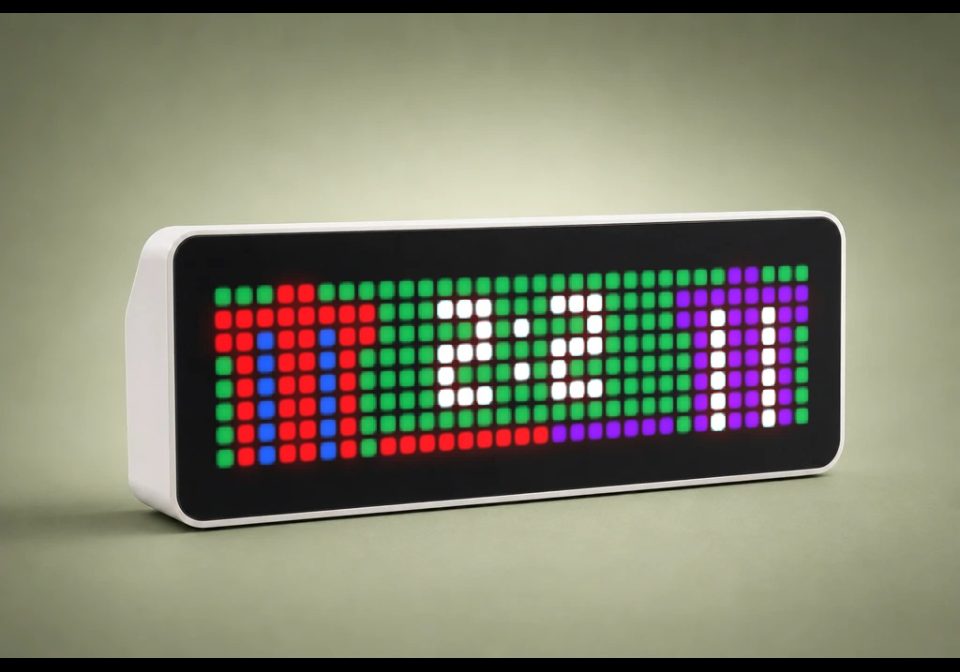
Fussball
Display live football scores from Home Assistant
| System | Home Assistant Blueprint |
|---|---|
| Firmware | AWTRIX NG |
| Topic | Miscellaneous |
| Built by | Hank_the_Tank |
| File | eUrDhXvQAFGo.yaml · 12.3 KB |
| Icons | — |
| Published | 8 Aug 2026 · updated 9 Aug 2026 |
| Downloads | 26 |
⚽ AWTRIX NG Football Scoreboard
Display live football scores from Home Assistant directly on one or more AWTRIX NG devices.
The blueprint uses a sensor from the HACS Team Tracker integration. It automatically creates a pushed app while the selected match is live, updates the score and prediction data, and removes the app when the match ends.
Features
- Displays the current football score on AWTRIX NG
- Supports one or multiple AWTRIX NG devices
- Automatically detects whether the tracked team is playing at home or away
- Places the home team on the left and the away team on the right
- Uses the team colors provided by Team Tracker
- Provides two configurable fallback colors for the tracked team
- Offers four different jersey designs
- Automatically mirrors the selected jersey when the tracked team is playing away
- Optional live game-prediction bar
- Optional green pitch background
- Configurable display duration
- Configurable pushed-app name
- Updates automatically when the score or prediction changes
- Immediately switches AWTRIX NG to the scoreboard after an update
- Automatically removes the pushed app when the match is no longer live
Requirements
- Home Assistant 2024.11 or newer
- MQTT integration
- AWTRIX NG with Home Assistant discovery enabled
- Team Tracker installed through HACS
- A configured Team Tracker sensor
Display Layout
The tracked team and its opponent are represented by small pixel-art jerseys.
The current score is displayed in the center of the panel:
Home team 1:0 Away team
The blueprint automatically checks the team_homeaway attribute to determine which team belongs on the left or right side.
Configuration
AWTRIX NG devices
Select one or more AWTRIX NG devices on which the scoreboard should appear.
AWTRIX app name
Enter a unique name for the pushed app.
AWTRIX NG app names may only contain:
A-Z, a-z, 0-9, _ and -
Example:
VFLOsnabrueck
Do not use spaces, umlauts, accented characters or other special characters.
Display duration
Defines how many seconds the scoreboard remains visible during each app rotation.
Team Tracker sensor
Select the Team Tracker sensor representing your team.
Team fallback color 1
The primary replacement color used when Team Tracker reports both team colors as black or does not provide usable color information.
Team fallback color 2
The secondary replacement color used when Team Tracker reports both team colors as black or does not provide usable color information.
Jersey style
Select the jersey design used for the tracked team.
Available styles:
- Standard — vertically striped jersey
- Shoulders — contrasting shoulders and collar
- Center Band — contrasting horizontal band across the center
- Diagonal — diagonal two-color design
The opponent always uses the Standard jersey.
If the tracked team is playing away, the selected design is automatically moved to the right side and mirrored.
Show prediction bar
Controls whether the live game-prediction bar is displayed below the score.
- Enabled: Displays the current win probabilities
- Disabled: Hides the prediction bar
When disabled, changes to the prediction data do not cause unnecessary MQTT updates.
Green pitch background
Controls the background color of the scoreboard.
- Enabled: Green background using
#006C28 - Disabled: Black background using
#000000
The background setting does not affect the jersey colors, score or prediction bar.
Team Color Fallback
Team Tracker may occasionally return the following values when no usable colors are available:
team_colors:
  - "#000000"
  - "#000000"
When this happens, the blueprint automatically uses the two fallback colors selected during setup.
If valid team colors are available, those colors are used instead.
Game Prediction Bar
If enabled, the blueprint extracts the win probabilities from the Team Tracker last_play attribute.
Example:
OSN 33.6%, HDH 66.4%
The bar is displayed between the two jerseys underneath the score.
- The left section represents the home team
- The right section represents the away team
- Each section uses the corresponding primary team color
- The probabilities are automatically reversed when the tracked team is playing away
If last_play does not contain two valid percentage values, the prediction bar remains hidden.
Automatic Updates
The scoreboard is created or updated when:
- The match status changes to
IN - The tracked team scores
- The opponent scores
- The prediction data in
last_playchanges
Prediction changes only trigger an update when the prediction bar is enabled.
After an update, AWTRIX NG immediately switches to the scoreboard.
Removing the Scoreboard
The pushed app is automatically removed when the Team Tracker sensor changes to:
PRE
POST
NOT_FOUND
This prevents completed or unavailable matches from remaining in the AWTRIX NG rotation.
eUrDhXvQAFGo.yaml
blueprint:
  name: ⚽ AWTRIX NG – Fußball Scoreboard ⚽
  author: Hank_the_Tank / AWTRIX NG migration
  description: >-
    # Fußball Scoreboard for AWTRIX NG ver. 1.2

    Displays a live football score from the HACS Team Tracker integration on
    one or more AWTRIX NG devices. The colors on the left and right represent
    the home and away teams. The pushed app is shown when the match starts or
    the score changes, and is removed when the match is no longer live.

    ## Requirements

    - Home Assistant 2024.11 or newer
    - MQTT integration
    - AWTRIX NG with Home Assistant discovery enabled
    - HACS Team Tracker integration

  domain: automation

  input:
    awtrix_devices:
      name: AWTRIX NG devices
      description: Select one or more AWTRIX NG devices.
      selector:
        device:
          multiple: true
          filter:
            - integration: mqtt
              manufacturer: Blueforcer
              model: AWTRIX NG

    app_name:
      name: AWTRIX app name
      description: >-
        Unique pushed-app name. Use only letters, numbers, underscores and
        hyphens, with a maximum length of 32 characters.
      default: football_score
      selector:
        text:

    message_duration:
      name: Display duration
      description: How long the scoreboard should remain visible per rotation.
      default: 15
      selector:
        number:
          min: 0
          max: 300
          step: 1
          mode: box
          unit_of_measurement: s

    team_sensor:
      name: Team Tracker sensor
      description: Select the Team Tracker sensor for your team.
      selector:
        entity:

    fallback_team_color_1:
      name: Team fallback color 1
      description: Used as the primary team color when Team Tracker returns black for both colors.
      default: [102, 0, 153]
      selector:
        color_rgb:

    fallback_team_color_2:
      name: Team fallback color 2
      description: Used as the secondary team color when Team Tracker returns black for both colors.
      default: [255, 255, 255]
      selector:
        color_rgb:

    jersey_style:
      name: Jersey style
      description: Select the jersey design used for your tracked team.
      default: Classic
      selector:
        select:
          options:
            - label: Standard
              value: Classic
            - label: Shoulders
              value: Shoulders
            - label: Center Band
              value: Center Band
            - label: Diagonal
              value: Diagonal

    show_prediction_bar:
      name: Show prediction bar
      description: Display the live win probability below the score.
      default: true
      selector:
        boolean:

    green_background:
      name: Green pitch background
      description: Use green (#006C28) when enabled or black (#000000) when disabled.
      default: true
      selector:
        boolean:

mode: restart

triggers:
  - trigger: state
    entity_id: !input team_sensor
    to: IN
    id: game_live

  - trigger: state
    entity_id: !input team_sensor
    to: PRE
    id: game_not_live

  - trigger: state
    entity_id: !input team_sensor
    to: POST
    id: game_not_live

  - trigger: state
    entity_id: !input team_sensor
    to: NOT_FOUND
    id: game_not_live

  - trigger: state
    entity_id: !input team_sensor
    attribute: team_score
    id: score_changed

  - trigger: state
    entity_id: !input team_sensor
    attribute: opponent_score
    id: score_changed

  - trigger: state
    entity_id: !input team_sensor
    attribute: last_play
    id: prediction_changed

variables:
  device_ids: !input awtrix_devices
  app_name: !input app_name
  team_sensor: !input team_sensor
  message_duration: !input message_duration
  fallback_team_color_1_rgb: !input fallback_team_color_1
  fallback_team_color_2_rgb: !input fallback_team_color_2
  jersey_style: !input jersey_style
  show_prediction_bar: !input show_prediction_bar
  green_background: !input green_background

  background_color: >-
    {{ '#006C28' if green_background else '#000000' }}

  fallback_team_color_1: >-
    {{ '#%02X%02X%02X' | format(
      fallback_team_color_1_rgb[0],
      fallback_team_color_1_rgb[1],
      fallback_team_color_1_rgb[2]
    ) }}
  fallback_team_color_2: >-
    {{ '#%02X%02X%02X' | format(
      fallback_team_color_2_rgb[0],
      fallback_team_color_2_rgb[1],
      fallback_team_color_2_rgb[2]
    ) }}

  mqtt_prefixes: >-
    {% set ns = namespace(prefixes=[]) %}
    {% for device_id in device_ids %}
      {% set entities = device_entities(device_id)
        | select('search', 'mqtt_prefix') | list %}
      {% if entities | length > 0 %}
        {% set prefix = states(entities[0]) | trim %}
        {% if prefix not in ['', 'unknown', 'unavailable'] %}
          {% set ns.prefixes = ns.prefixes + [prefix] %}
        {% endif %}
      {% endif %}
    {% endfor %}
    {{ ns.prefixes | unique | list }}

  home_game: "{{ state_attr(team_sensor, 'team_homeaway') == 'home' }}"
  team_colors: >-
    {% set colors = state_attr(team_sensor, 'team_colors') or [] %}
    {% set color_1 = colors[0] | lower if colors | length > 0 else '' %}
    {% set color_2 = colors[1] | lower if colors | length > 1 else '' %}
    {% if color_1 in ['#000000', '000000']
          and color_2 in ['#000000', '000000'] %}
      {{ [fallback_team_color_1, fallback_team_color_2] }}
    {% elif colors | length > 0 %}
      {{ colors }}
    {% else %}
      {{ [fallback_team_color_1, fallback_team_color_2] }}
    {% endif %}
  opponent_colors: >-
    {{ state_attr(team_sensor, 'opponent_colors')
       or ['#FFFFFF', '#808080'] }}

  home_colors: "{{ team_colors if home_game else opponent_colors }}"
  away_colors: "{{ opponent_colors if home_game else team_colors }}"

  home_color_1: >-
    {{ home_colors[0] if home_colors | length > 0 else '#FFFFFF' }}
  home_color_2: >-
    {{ home_colors[1] if home_colors | length > 1 else home_color_1 }}
  away_color_1: >-
    {{ away_colors[0] if away_colors | length > 0 else '#FFFFFF' }}
  away_color_2: >-
    {{ away_colors[1] if away_colors | length > 1 else away_color_1 }}

  left_jersey_draw: >-
    {% if not home_game or jersey_style == 'Classic' %}
      {{ [
        ['rectFill', 2, 0, 4, 1, home_color_1],
        ['rectFill', 0, 1, 8, 2, home_color_1],
        ['rectFill', 1, 3, 6, 5, home_color_1],
        ['line', 2, 1, 2, 7, home_color_2],
        ['line', 5, 1, 5, 7, home_color_2]
      ] }}
    {% elif jersey_style == 'Shoulders' %}
      {{ [
        ['rectFill', 2, 0, 4, 1, home_color_2],
        ['rectFill', 0, 1, 8, 2, home_color_2],
        ['rectFill', 3, 1, 2, 1, home_color_1],
        ['rectFill', 2, 2, 4, 1, home_color_1],
        ['rectFill', 1, 3, 6, 5, home_color_1]
      ] }}
    {% elif jersey_style == 'Center Band' %}
      {{ [
        ['rectFill', 2, 0, 4, 1, home_color_1],
        ['rectFill', 0, 1, 8, 2, home_color_1],
        ['rectFill', 1, 3, 6, 5, home_color_1],
        ['rectFill', 1, 3, 6, 2, home_color_2]
      ] }}
    {% else %}
      {{ [
        ['rectFill', 2, 0, 4, 1, home_color_1],
        ['rectFill', 0, 1, 8, 2, home_color_1],
        ['rectFill', 1, 3, 6, 5, home_color_1],
        ['pixel', 6, 4, home_color_2],
        ['rectFill', 5, 5, 2, 1, home_color_2],
        ['rectFill', 4, 6, 3, 1, home_color_2],
        ['rectFill', 3, 7, 4, 1, home_color_2]
      ] }}
    {% endif %}

  right_jersey_draw: >-
    {% if home_game or jersey_style == 'Classic' %}
      {{ [
        ['rectFill', 26, 0, 4, 1, away_color_1],
        ['rectFill', 24, 1, 8, 2, away_color_1],
        ['rectFill', 25, 3, 6, 5, away_color_1],
        ['line', 26, 1, 26, 7, away_color_2],
        ['line', 29, 1, 29, 7, away_color_2]
      ] }}
    {% elif jersey_style == 'Shoulders' %}
      {{ [
        ['rectFill', 26, 0, 4, 1, away_color_2],
        ['rectFill', 24, 1, 8, 2, away_color_2],
        ['rectFill', 27, 1, 2, 1, away_color_1],
        ['rectFill', 26, 2, 4, 1, away_color_1],
        ['rectFill', 25, 3, 6, 5, away_color_1]
      ] }}
    {% elif jersey_style == 'Center Band' %}
      {{ [
        ['rectFill', 26, 0, 4, 1, away_color_1],
        ['rectFill', 24, 1, 8, 2, away_color_1],
        ['rectFill', 25, 3, 6, 5, away_color_1],
        ['rectFill', 25, 3, 6, 2, away_color_2]
      ] }}
    {% else %}
      {{ [
        ['rectFill', 26, 0, 4, 1, away_color_1],
        ['rectFill', 24, 1, 8, 2, away_color_1],
        ['rectFill', 25, 3, 6, 5, away_color_1],
        ['pixel', 25, 4, away_color_2],
        ['rectFill', 25, 5, 2, 1, away_color_2],
        ['rectFill', 25, 6, 3, 1, away_color_2],
        ['rectFill', 25, 7, 4, 1, away_color_2]
      ] }}
    {% endif %}

  prediction_values: >-
    {{ (state_attr(team_sensor, 'last_play') or '')
       | regex_findall('([0-9]+(?:\.[0-9]+)?)%') }}
  team_prediction: >-
    {{ prediction_values[0] | float(0)
       if prediction_values | length >= 2 else 0 }}
  opponent_prediction: >-
    {{ prediction_values[1] | float(0)
       if prediction_values | length >= 2 else 0 }}
  home_prediction: >-
    {{ team_prediction if home_game else opponent_prediction }}
  prediction_pixels: >-
    {% set bar = namespace(items=[]) %}
    {% if show_prediction_bar and prediction_values | length >= 2 %}
      {% set home_width = (home_prediction | float(0) * 16 / 100)
         | round(0) | int %}
      {% set home_width = 0 if home_width < 0
         else 16 if home_width > 16 else home_width %}
      {% for x in range(16) %}
        {% set color = home_color_1
           if x < home_width else away_color_1 %}
        {% set bar.items =
          bar.items + [['pixel', 8 + x, 7, color]] %}
      {% endfor %}
    {% endif %}
    {{ bar.items }}

  home_score: >-
    {{ (state_attr(team_sensor, 'team_score') if home_game
        else state_attr(team_sensor, 'opponent_score')) | default(0, true) }}
  away_score: >-
    {{ (state_attr(team_sensor, 'opponent_score') if home_game
        else state_attr(team_sensor, 'team_score')) | default(0, true) }}

conditions: []

actions:
  - repeat:
      for_each: "{{ mqtt_prefixes }}"
      sequence:
        - choose:
            - conditions:
                - condition: trigger
                  id:
                    - game_live
                    - score_changed
                    - prediction_changed
                - condition: template
                  value_template: "{{ is_state(team_sensor, 'IN') }}"
                - condition: template
                  value_template: >-
                    {{ trigger.id != 'prediction_changed'
                       or show_prediction_bar }}
              sequence:
                - action: mqtt.publish
                  data:
                    qos: 0
                    retain: false
                    topic: >-
                      {{ repeat.item ~ '/cmd/apps/pushed/' ~ app_name }}
                    payload: >-
                      {{
                        {
                          'text': home_score ~ ':' ~ away_score,
                          'textColor': '#FFFFFF',
                          'textCenter': true,
                          'scroll': 'static',
                          'draw': left_jersey_draw
                            + right_jersey_draw
                            + prediction_pixels,
                          'durationMs': (message_duration | int) * 1000,
                          'backgroundColor': background_color
                        } | to_json
                      }}

                - action: mqtt.publish
                  data:
                    qos: 0
                    retain: false
                    topic: "{{ repeat.item ~ '/cmd/apps/switch' }}"
                    payload: >-
                      {{ {'name': app_name, 'fast': true} | to_json }}

            - conditions:
                - condition: trigger
                  id: game_not_live
              sequence:
                - action: mqtt.publish
                  data:
                    qos: 0
                    retain: false
                    topic: >-
                      {{ repeat.item ~ '/cmd/apps/pushed/' ~ app_name }}
                    payload: ""
More flows for Home Assistant Blueprint or Miscellaneous
Something wrong with this flow? Report it.