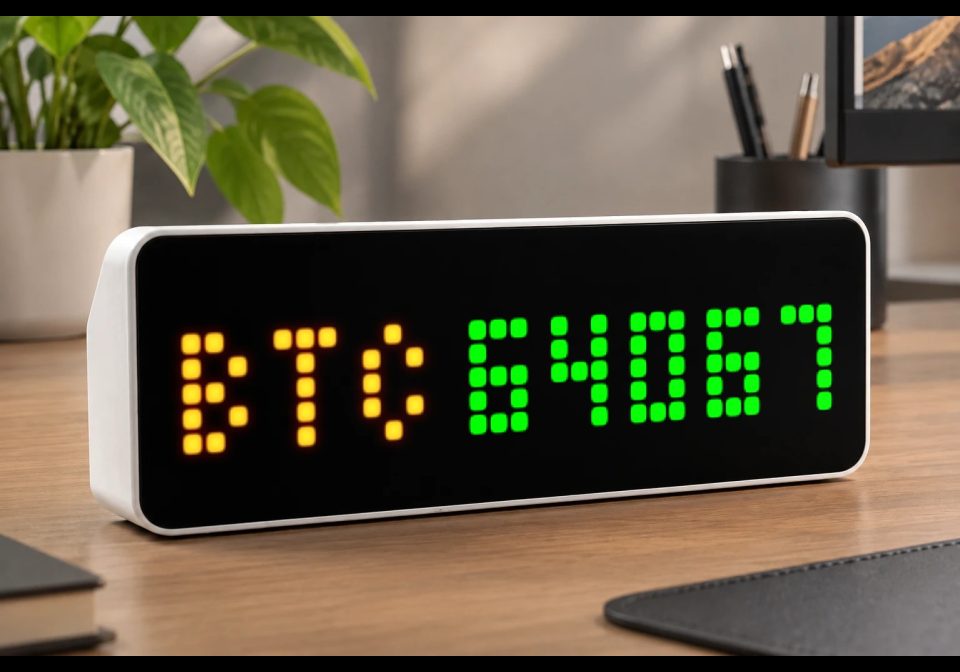
Cryptocurrency Market
Displays real-time cryptocurrency prices directly on your device using the CoinGecko API.
| System | AWTRIX NG Scripts |
|---|---|
| Firmware | AWTRIX NG |
| Topic | Miscellaneous |
| Built by | Avemer |
| File | bbq5QDWDHE8j.ax · 3.9 KB |
| Icons | — |
| Published | 12 Aug 2026 · updated 12 Aug 2026 |
| Downloads | 40 |
In the 1.1 update, I will try to make the color of the numeric value of the cost appear depending on the values for the previous day.
Inspired by the work of RobG.
- This script uses ideas and implementation approaches from RobG's original cryptocurrency price display, particularly the CoinGecko API integration, price fetching logic, and handling of cached/previous price data.
- The current script was independently adapted and extended for this implementation, including its display logic, price comparison coloring, the ability to display the price in different currencies, user settings, and update behavior.
The script is designed to use the CoinGecko API to periodically request and real-time cryptocurrency prices directly on your device.
FEATURES
- Supports cryptocurrencies available through the CoinGecko API. You can specify the CoinGecko Coin ID yourself.
- Displays the cryptocurrency ticker together with its current price.
- Supports multiple quote currencies such as USD, EUR, GBP, RUB and others.
- Automatic green/red price coloring based on the latest received price.
- Custom ticker and price colors.
- Adjustable ticker length.
- Adjustable price update interval.
- Adjustable spacing between ticker and price.
- Lightweight and designed for the limited resources of the ULANZI TC001.
- Technically, you can have several such scripts that rotate each other on the clock display and show different cryptocurrencies.
!!! IMPORTANT NOTE - Data Source & Delay !!!
- This script uses the free CoinGecko API to retrieve cryptocurrency prices directly on the watch.
- The displayed value comes from the CoinGecko API and therefore depends on the API response time, network connection, device performance and API availability.
- The script does not calculate or estimate the cryptocurrency price itself — it simply requests the latest value available from CoinGecko.
- The actual time between a market price change and the value becoming available through the API can vary. Therefore, the displayed value should not be considered guaranteed real-time exchange data.
- The script sends requests directly from the watch and does not require Home Assistant, a smart-home server, a PC or any additional setup.
- No API token is required for the configuration shown in this script.
- The free API is subject to CoinGecko's usage limits and availability. If requests are made too frequently, requests may fail or be temporarily limited.
- In other words, this script prioritizes simplicity and standalone operation over guaranteed real-time market data.
SETTINGS
In the code look for the section:
====== START OF USER SETTINGS ======
!!! IMPORTANT NOTE - Settings !!!
COIN_ID must be a valid CoinGecko Coin ID. The ticker symbol itself is not used to identify the cryptocurrency.
TICKER_LETTERS must not exceed the actual length of TICKER.
For example, if TICKER = "BTC", use values from 0 to 3. Values above 3 can cause the script to fail.
1. Coin ID
self.COIN_ID = "bitcoin"
Enter the CoinGecko Coin ID.
Examples:
bitcoin
ethereum
solana
dogecoin
The Coin ID is not necessarily the same as the ticker.
For example:
Coin ID: bitcoin
Ticker: BTC
2. Ticker
self.TICKER = "BTC"
Enter the ticker displayed on the watch.
Examples:
BTC
ETH
SOL
DOGE
The ticker is only used for display; the API request uses COIN_ID.
3. Currency
self.CURRENCY = "usd"
Select the currency in which the cryptocurrency price is displayed.
Examples:
usd
eur
gbp
rub
For example:
BTC 64123
with CURRENCY = "usd" displays the Bitcoin price in USD.
4. Adjust Ticker Length
self.TICKER_LETTERS = 3
Controls how many characters of the ticker are displayed:
self.TICKER_LETTERS = 0 — hide ticker
self.TICKER_LETTERS = 1 — B
self.TICKER_LETTERS = 2 — BT
self.TICKER_LETTERS = 3 — BTC
self.TICKER_LETTERS = 4 — BTC + requires a 4-character ticker
self.TICKER_LETTERS = 5+ — full ticker
For example:
BTC + 1 → B 64123
BTC + 3 → BTC 64123
5. Ticker Color
self.TICKER_COLOR = 0xFFFFFF
Sets the ticker color using 0xRRGGBB format.
Examples:
0xFFFFFF — White
0xFF0000 — Red
0x00FF00 — Green
0x0000FF — Blue
0xFFFF00 — Yellow
0x00FFFF — Cyan
0xFF00FF — Magenta
6. Price Color Mode
self.PRICE_COLOR_MODE = 2
Controls the price color:
self.PRICE_COLOR_MODE = 0 — always white
self.PRICE_COLOR_MODE = 1 — use custom PRICE_COLOR
self.PRICE_COLOR_MODE = 2 — automatically use green/red
In automatic mode:
Green — current price is higher than the previous received price.
Red — current price is lower than the previous received price.
White — price has not changed.
The comparison is made against the previous price successfully received by the script, not against the previous day's closing price.
7. Custom Price Color
self.PRICE_COLOR = 0xFFFFFF
Used when:
PRICE_COLOR_MODE = 1
Uses the same 0xRRGGBB color format as the ticker.
8. Price Update Interval
self.UPDATE_TICKS = 30
Controls how frequently the script requests a new price.
loop() runs approximately once per second.
Examples:
self.UPDATE_TICKS = 10 — approximately every 10 seconds
self.UPDATE_TICKS = 30 — approximately every 30 seconds (recommended)
The script starts the first request immediately when possible and starts the update interval after a successful response.
Lower values mean more frequent requests but also increase network, CPU and memory usage and may increase the chance of API request errors.
9. Text Gap
self.GAP = 2
Controls the distance in pixels between the ticker and the price.
For example:
BTC 64123
The value determines the space between BTC and 114250.
TROUBLESHOOTING
If the script does not work, displays ..., fails to load values, or shows request errors:
- Make sure COIN_ID is a valid CoinGecko Coin ID and save the changes (Ctrl+S) (see settings 1).
- Make sure TICKER contains the correct number of characters for the selected TICKER_LETTERS (Ctrl+S) (see settings 2).
- Make sure CURRENCY is supported by the CoinGecko endpoint.
- Check the watch's internet connection.
- If requests frequently fail, increase UPDATE_TICKS to 30 or higher.
- Keep in mind that API response time depends on the network, CoinGecko availability and the watch itself.
- If many scripts are running simultaneously, the ULANZI TC001 may run low on available resources. Reducing the request frequency can help.
8. Always consider rebooting the watch. Open the watch's web interface by entering its IP address in your browser, go to System → Maintenance → Reboot, and then press Sure?. A reboot can resolve temporary glitches, memory-related issues and other unexpected script behavior.
Vibecoded with ChatGPT, polished by Avemer. Inspired by the work of RobG.
P.S. I wrote this script for myself, and I bought the Ulanzi TC001 watch for this idea. Therefore, I tried to optimize the code as much as possible. I didn't test it much though. I hope that it will work well, but if I find errors, I will try to fix them and update this flow, create similar scripts with different functionality. The code contains explanations, that take some memory to store, if you run into troubles with that, you can always delete them and you can use it as a base for your development. If mistakes occur, do not judge strictly. And I'm a newbie. I hope this script will be useful to someone.
bbq5QDWDHE8j.ax
# @name Cryptocurrency Market
# @desc Cryptocurrency price display
# @author Avemer
# @version 1.0
class CryptocurrencyMarket

var COIN_ID
var TICKER
var CURRENCY
var TICKER_LETTERS
var TICKER_COLOR
var PRICE_COLOR_MODE
var PRICE_COLOR
var UPDATE_TICKS
var GAP

var url
var needle
var result
var oldPrice
var previousPrice
var ticks
var color
var displayTICKER
var requestActive

# ================ START OF USER SETTINGS ================
def init()
# bitcoin, ethereum, solana, dogecoin
self.COIN_ID = "bitcoin"

# BTC, ETH, SOL, DOGE
self.TICKER = "BTC"

# usd, eur, gbp, rub, cny
self.CURRENCY = "usd"

# NUMBER OF TICKER LETTERS DISPLAYED
self.TICKER_LETTERS = 3


# Format: 0xRRGGBB
self.TICKER_COLOR = 0xF7931A

# 0 = always white
# 1 = custom PRICE_COLOR
# 2 = automatic green/red comparison
# with the previously received price.
self.PRICE_COLOR_MODE = 2

# CUSTOM PRICE COLOR
# Used when PRICE_COLOR_MODE = 1.
self.PRICE_COLOR = 0xFFFFFF

# PRICE UPDATE INTERVAL
self.UPDATE_TICKS = 30

# DISTANCE BETWEEN TICKER AND PRICE
self.GAP = 2
# ================ END OF USER SETTINGS ================

# API URL
self.url = "https://api.coingecko.com/api/v3/simple/price?ids=" + self.COIN_ID + "&vs_currencies=" + self.CURRENCY

# FIND CURRENCY
self.needle = self.CURRENCY

# INITIAL VALUES
self.result = "..."
self.oldPrice = 0
self.previousPrice = 0
self.ticks = 0
self.color = 0xFFFFFF
self.displayTICKER = ""
self.requestActive = false

# CREATE DISPLAYED TICKER
if self.TICKER_LETTERS <= 0

self.displayTICKER = ""

elif self.TICKER_LETTERS == 1

self.displayTICKER = self.TICKER[0]

elif self.TICKER_LETTERS == 2

self.displayTICKER = self.TICKER[0] + self.TICKER[1]

elif self.TICKER_LETTERS == 3

self.displayTICKER = self.TICKER[0] + self.TICKER[1] + self.TICKER[2]

elif self.TICKER_LETTERS == 4

self.displayTICKER = self.TICKER[0] + self.TICKER[1] + self.TICKER[2] + self.TICKER[3]

else

self.displayTICKER = self.TICKER

end
end

# UPDATE COLOR
def update_color()

if self.PRICE_COLOR_MODE == 0

self.color = 0xFFFFFF
return

end

if self.PRICE_COLOR_MODE == 1

self.color = self.PRICE_COLOR
return

end

if self.PRICE_COLOR_MODE == 2

if self.previousPrice <= 0

self.color = 0xFFFFFF
return

end

if self.oldPrice > self.previousPrice

self.color = 0x00FF00

elif self.oldPrice < self.previousPrice

self.color = 0xFF0000

else

self.color = 0xFFFFFF

end

return

end
end

# PROCESS RESPONSE
def on_price(body, status)

self.requestActive = false

if body == nil

return

end

var p = re.search(
"[0-9][0-9.]*",
body
)

if p == nil

return

end

var newPrice = num(p[0])

if newPrice == nil

return

end

# SAVE PREVIOUS PRICE
if self.oldPrice > 0

self.previousPrice = self.oldPrice

end

# SAVE CURRENT PRICE
self.oldPrice = newPrice

# DISPLAY PRICE
self.result = str(newPrice)

# UPDATE COLOR
self.update_color()

# START DELAY AFTER SUCCESSFUL RESPONSE
self.ticks = self.UPDATE_TICKS

end

# MAIN LOOP
def loop()

# WAIT AFTER PREVIOUS REQUEST
if self.ticks > 0

self.ticks -= 1
return

end

# DO NOT SEND ANOTHER REQUEST
# WHILE CURRENT REQUEST IS ACTIVE
if self.requestActive

return

end

# SEND REQUEST
self.requestActive = true

http.get(
self.url,
/ b, st -> self.on_price(b, st),
{'find': self.needle, 'keep': 32}
)

end

# DRAW
def draw()

clear()

var tickerWidth = text_ink_width(self.displayTICKER)
var priceWidth = text_ink_width(self.result)

var totalWidth = tickerWidth + self.GAP + priceWidth

var x = int((width() - totalWidth) / 2)

if self.TICKER_LETTERS > 0

text(
x,
7,
self.displayTICKER,
self.TICKER_COLOR
)

end

text(
x + tickerWidth + self.GAP,
7,
self.result,
self.color
)

end

def on_button(btn)
end

end
return CryptocurrencyMarket()
Install it on your AWTRIX NG
Your browser writes the script straight to the device on your network. It joins the app rotation right away.
Some browsers refuse to talk to a device on your network from a public page. Download the flow and paste it into the Scripts tab of your device, or install it from a terminal:
More flows for AWTRIX NG Scripts or Miscellaneous
Something wrong with this flow? Report it.