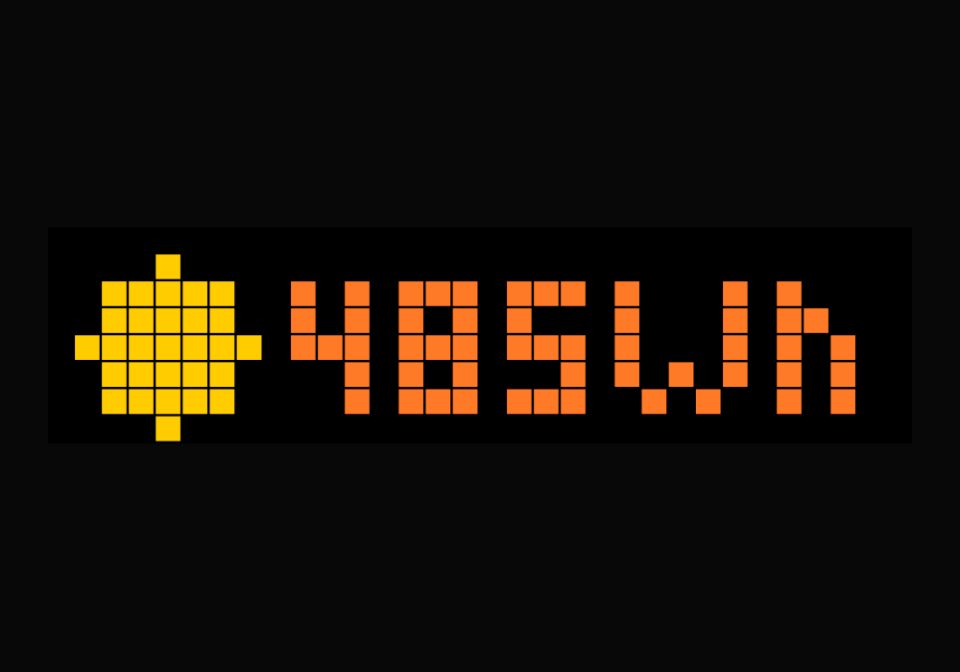
Total Yield Day Power (OpenDTU)
Shows the current Total Yield Day - OpenDTU
| System | AWTRIX NG Scripts |
|---|---|
| Firmware | AWTRIX NG |
| Topic | Smarthome |
| Built by | olimans |
| File | ZGAjqmr8hFKN.ax · 2.1 KB |
| Icons | — |
| Published | 6 Aug 2026 · updated 6 Aug 2026 |
| Downloads | 53 |
What it shows
A small sun on the left (drawn directly, no icon file needed)
Current Total Yield Day on the right, in Wh or kWh
Colour-coded by power level: grey (0 Wh) → orange → yellow → light green → deep green (high power)
Data source
Uses the OpenDTU API value YieldDay
Acknowledgment
This code is heavily inspired by Simpi's. Thanks to @Simpi.
ZGAjqmr8hFKN.ax
# @name PV Power (OpenDTU)
# @desc Current PV output via OpenDTU local API
# @author olimans (fork simpi)
# @version 1.0

class PV
  # IP Address or Hostname (ex: "192.168.1.50")
  var dtuHost
  var power, ticks, age

  def init()
    self.dtuHost = "192.168.0.141" # <-- OPENDTU IP Address
    self.power = store.get("power")
    self.ticks = 0
    self.age = 9999
  end

  def on_body(w, status)
    if w == nil return end
    # Extract JSON OpenDTU
    var m = re.search("\"YieldDay\":\\{\"v\":([-0-9.]+)", w)
    if m == nil return end
    var w_val = num(m[1])
    if w_val == nil return end

    # Value in Wh
    self.power = w_val
    self.age = 0
    store.set("power", self.power)
  end

  def loop()
    self.age += 1
    if self.ticks <= 0
      self.ticks = 120 # Update every 120 secondes
      http.get("http://" + self.dtuHost + "/api/livedata/status",
               / b, st -> self.on_body(b, st),
               {'find': "\"YieldDay\":", 'keep': 300})
    end
    self.ticks -= 1
  end

  def draw()
    clear()
    if self.power == nil
      text(6, 6, "...", 0x666666)
      return
    end

    var p = self.power
    var label, col

    if p < 1
      label = "0Wh"
      col = 0x666666
    elif p < 500
      label = str(int(p)) + "Wh"
      col = 0xFF7A27
    elif p < 3000
      var kw = p / 1000.0
      label = str(int(kw)) + "." + str(int((kw - int(kw)) * 10)) + "kWh"
      col = 0xFFCC00
    elif p < 5000
      var kw = p / 1000.0
      label = str(int(kw)) + "." + str(int((kw - int(kw)) * 10)) + "kWh"
      col = 0xFFFF28
    else
      var kw = p / 1000.0
      label = str(int(kw)) + "." + str(int((kw - int(kw)) * 10)) + "kWh"
      col = 0x6ED228
    end

    # Petit soleil à gauche (icône)
    circle_fill(4, 4, 3, 0xFFCC00)

    text(9 + int((22 - text_ink_width(label)) / 2), 7, label, col)

    # Si pas de donnée fraîche depuis plus de 10 minutes, affiche un pixel rouge d'erreur
    if self.age > 600
      pixel(width() - 1, height() - 1, 0xFF0000)
    end
  end

  def on_button(btn)
    if btn == "select" self.ticks = 0 end
  end
end

return PV()
Install it on your AWTRIX NG
Your browser writes the script straight to the device on your network. It joins the app rotation right away.
Some browsers refuse to talk to a device on your network from a public page. Download the flow and paste it into the Scripts tab of your device, or install it from a terminal:
More flows for AWTRIX NG Scripts or Smarthome
Something wrong with this flow? Report it.