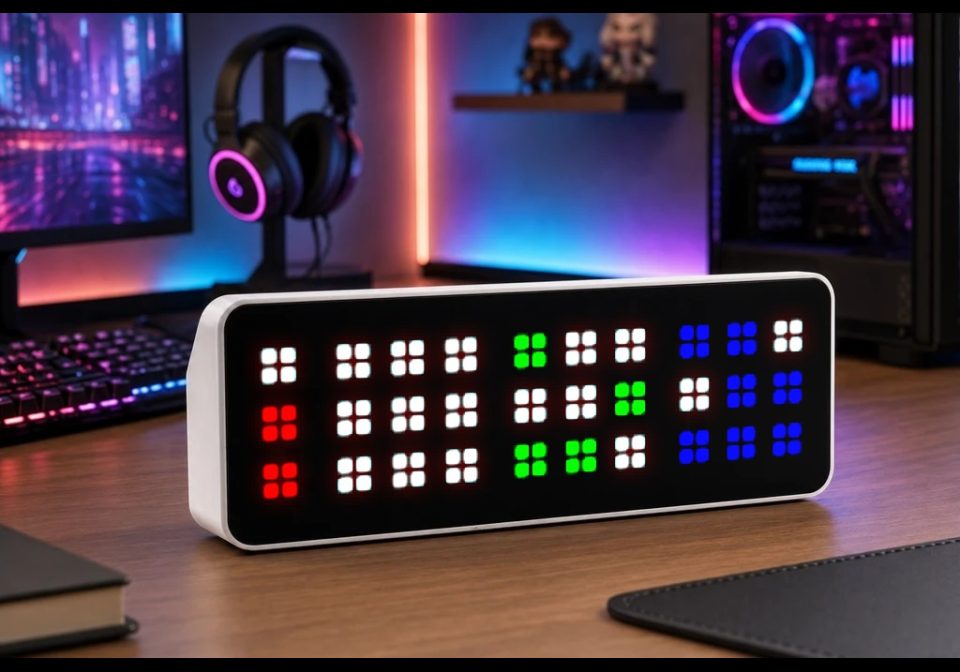
TIX Clock Redux
A recreation of a bygone clock with a unique display
| System | AWTRIX NG Scripts |
|---|---|
| Firmware | AWTRIX NG |
| Topic | Miscellaneous |
| Built by | whypick1 |
| File | Y5qoteTAY9sQ.ax · 9.6 KB |
| Icons | — |
| Published | 20 Aug 2026 · updated 22 Aug 2026 |
| Downloads | 26 |
Updated 2026-08-22 - changed logic regarding 12/24 hour time and to fix not displaying "12" for the hour at midnight on 12 hour time.
What It Does
A unique clock interface. The current time (HH:MM) is broken into four separate digits. Each digit has a 3x3 array of pixels (1x3 for the Hour Tens digit) and the number of pixels corresponding to that digit's value are lit up, with the pattern changing at the user-specified interval. In the preview photo there are 2, 0, 4 and 7 pixels on, which means the time is 20:47 / 8:47PM.
The original TIX clock is shown here: https://www.geekalerts.com/tix-led-clock/
Requirements
A 32x8 display device. Only tested on the TC001.
Setup
Out of the box no setup is required. By default, the clock will run with these settings, which can be configured in the Apps page:
- Update Interval - 60 seconds
- This can be set to any factor of 60 (1, 4, 15, etc.) and will update at that interval based on the actual time, not time of first execution (so a 4 second interval will update at :00, :04, :08, etc., give or take the delay of loop())
- 24 Hour Time - Enabled
- Hour Tens Digit Color - #FF0000 (Red)
- Hour Ones Digit Color - #FFFF00 (Yellow)
- Minute Tens Digit Color - #00FF00 (Green)
- Minute Ones Digit Color - #0000FF (Blue)
- Off Pixel Color - #FFFFFF (White)
All code, and any issues with it, was 100% written by me
Y5qoteTAY9sQ.ax
# @name Tix_Clock
# @config interval    select  "Update Interval in Seconds"   default=60 options=1,2,3,4,6,10,12,15,20,30,60 help="Display will update at the specified increment from :00 and whenever the app is launched"
# @config mil_time    bool "24 Hour Time"  default=true
# @config hour_tens_color  color   "Hour Tens Digit Color" default=#FF0000
# @config hour_ones_color  color   "Hour Ones Digit Color" default=#FFFF00
# @config minute_tens_color  color   "Minutes Tens Digit Color" default=#00FF00
# @config minute_ones_color  color   "Minute Ones Digit Color" default=#0000FF
# @config off_color  color   "Off Pixel Color" default=#FFFFFF
import math
#import string

class Tix_Clock

        var values_0
        var values_1
        var values_2
        var values_3
        var values_4
        var values_5
        var values_6
        var values_7
        var values_8
        var values_9
        var values_ht_0
        var values_ht_1
        var values_ht_2
        var values
        var hour_tens
        var hour_ones
        var minute_tens
        var minute_ones
        var prev_update
        var columns
        var digits
        var colors
        var mil_time
        var off_color
        var interval
        var logging
        var random_values

    def init()
        # Really ugly lookup table of values who binary representation have the appropriate number of bits set
        self.values_0 = [0]
        self.values_1 = [1,2,4,8,16,32,64,128,256]
        self.values_2 = [3,5,6,9,10,12,17,18,20,24,33,34,36,40,48,65,66,68,72,80,96,129,130,132,136,144,160,192,257,258,260,264,272,288,320,384]
        self.values_3 = [7,11,13,14,19,21,22,25,26,28,35,37,38,41,42,44,49,50,52,56,67,69,70,73,74,76,81,82,84,88,97,98,100,104,112,131,133,134,137,138,140,145,146,148,152,161,162,164,168,176,193,194,196,200,208,224,259,261,262,265,266,268,273,274,276,280,289,290,292,296,304,321,322,324,328,336,352,385,386,388,392,400,416,448]
        self.values_4 = [15,23,27,29,30,39,43,45,46,51,53,54,57,58,60,71,75,77,78,83,85,86,89,90,92,99,101,102,105,106,108,113,114,116,120,135,139,141,142,147,149,150,153,154,156,163,165,166,169,170,172,177,178,180,184,195,197,198,201,202,204,209,210,212,216,225,226,228,232,240,263,267,269,270,275,277,278,281,282,284,291,293,294,297,298,300,305,306,308,312,323,325,326,329,330,332,337,338,340,344,353,354,356,360,368,387,389,390,393,394,396,401,402,404,408,417,418,420,424,432,449,450,452,456,464,480]
        self.values_5 = [31,47,55,59,61,62,79,87,91,93,94,103,107,109,110,115,117,118,121,122,124,143,151,155,157,158,167,171,173,174,179,181,182,185,186,188,199,203,205,206,211,213,214,217,218,220,227,229,230,233,234,236,241,242,244,248,271,279,283,285,286,295,299,301,302,307,309,310,313,314,316,327,331,333,334,339,341,342,345,346,348,355,357,358,361,362,364,369,370,372,376,391,395,397,398,403,405,406,409,410,412,419,421,422,425,426,428,433,434,436,440,451,453,454,457,458,460,465,466,468,472,481,482,484,488,496]
        self.values_6 = [63,95,111,119,123,125,126,159,175,183,187,189,190,207,215,219,221,222,231,235,237,238,243,245,246,249,250,252,287,303,311,315,317,318,335,343,347,349,350,359,363,365,366,371,373,374,377,378,380,399,407,411,413,414,423,427,429,430,435,437,438,441,442,444,455,459,461,462,467,469,470,473,474,476,483,485,486,489,490,492,497,498,500,504]
        self.values_7 = [127,191,223,239,247,251,253,254,319,351,367,375,379,381,382,415,431,439,443,445,446,463,471,475,477,478,487,491,493,494,499,501,502,505,506,508]
        self.values_8 = [255,383,447,479,495,503,507,509,510]
        self.values_9 = [511]
        # Special lists for the Hour Tens digit, that only include bits 0, 3, 6; makes it easier when we get to draw()
        self.values_ht_0 = [0]
        self.values_ht_1 = [1, 8, 64]
        self.values_ht_2 = [9, 65, 72]

        # Store all of them in a map
        self.values = {0: self.values_0, 1: self.values_1, 2: self.values_2, 3: self.values_3, 4: self.values_4, 5: self.values_5, 6: self.values_6, 7: self.values_7, 8: self.values_8, 9: self.values_9, 10: self.values_ht_0, 11: self.values_ht_1, 12: self.values_ht_2}

        # These will store the digits that represent the time we wish to display
        self.hour_tens = -1
        self.hour_ones = -1
        self.minute_tens = -1
        self.minute_ones = -1
        self.digits = []

        # This will keep track of what second (derived from epoch) we last updated, so that we only update the displayed values at the approriate interval; -1 will tell us to do an update on reset
        self.prev_update = -1

        # These will be the left most columns on the display for the 4 digits (assumes 32x8 display, will need to revisit for other displays)
        self.columns = [0, 4, 14, 24]

        # Update interval, in seconds
        self.interval = -1

        # And this list will hold said values for when draw() is called but we don't need to display new random binary values
        self.random_values = [-1, -1, -1, -1]
    end
    def setup()
        math.srand(second()) # Seed the RNG

        # Get our user config values
        self.colors = [store.get("hour_tens_color"), store.get("hour_ones_color"), store.get("minute_tens_color"), store.get("minute_ones_color")]
        self.mil_time = bool(store.get("mil_time"))
        self.off_color = store.get("off_color")
        self.interval = int(store.get("interval"))

    end
    def loop()
        # If this is the first time the app has run or we've hit the update interval, get new values
        if (self.prev_update == -1) ||  ((int(epoch_ms() / 1000) % self.interval == 0) && int(epoch_ms() / 1000) != self.prev_update)
            # Break the time to display into the 4 separate digits and store them in a list
            if self.mil_time # Use slightly different math for the hour depending on if we're in 24 hour mode or not
                self.hour_tens = math.floor(hour() / 10)
                self.hour_ones = hour() % 10
            else
                if hour() == 0 # Need to display "12" when we're between midnight and 1AM and not in 24 hour mode
                    self.hour_tens = 1
                    self.hour_ones = 2
                else
                    if hour() < 13
                        self.hour_tens = math.floor(hour() / 10)
                        self.hour_ones = hour() % 10
                    else
                        self.hour_tens = math.floor((hour() - 12) / 10)
                        self.hour_ones = (hour() - 12) % 10
                    end
                end
            end
            self.minute_tens = math.floor(minute() / 10)
            self.minute_ones = minute() % 10
            self.digits = [self.hour_tens, self.hour_ones, self.minute_tens, self.minute_ones]

            # Store what time in epoch seconds we performed this update so that we update at the appropriate interval
            self.prev_update = int(epoch_ms() / 1000)

            # Iterate through the 4 digits and get random binary values to display for them
            for i: 0 .. 3
                var bin_list = []
                var bin_value = -1
                if i != 0
                    bin_list = self.values.find(int(self.digits[i])) # Get the approriate list from the values map that have i number of bits set
                else
                    bin_list = self.values.find(int(self.digits[i]) + 10) # Since it's the Hour Tens digit, need the special lists that are at keys 10-12 of the values map
                end
                bin_value = bin_list[math.rand() % int(size(bin_list))] # Pick a random value from the list we got
                self.random_values[i] = bin_value # Store the random values that the draw() sequence will display
            end
        end
    end
    def draw()
        var out_color
        var out_x = -1
        var out_y = -1
        # Go through the 4 digits and draw the appropriate pixels
        for i: 0 .. 3
            for j: 0 .. 8 # Go through each pixel location for the digit
                if ((i != 0) || (j % 3 == 0)) # For the Hour Tens digit, only go through i = 0, 3, 6, as it's a 1x3 area and not a 3x3 like the others
                    # If the bit representing this pixel in the random value is set, use the "on" color for that pixel, otherwise use the "off" color
                    if self.random_values[i] & (1 << j)
                        out_color = self.colors[i]
                    else
                        out_color = self.off_color
                    end
                    # Get the X and Y coordinates of the pixel we will be drawing
                    out_x = self.columns[i] + 3 * (j % 3)
                    out_y = 3 * math.floor(j / 3)

                    # Draw the pixel
                    rect(out_x, out_y, 2, 2, out_color)
                end
            end
        end
    end
end

return Tix_Clock()
Install it on your AWTRIX NG
Your browser writes the script straight to the device on your network. It joins the app rotation right away.
Some browsers refuse to talk to a device on your network from a public page. Download the flow and paste it into the Scripts tab of your device, or install it from a terminal:
More flows for AWTRIX NG Scripts or Miscellaneous
Something wrong with this flow? Report it.