Anothertime
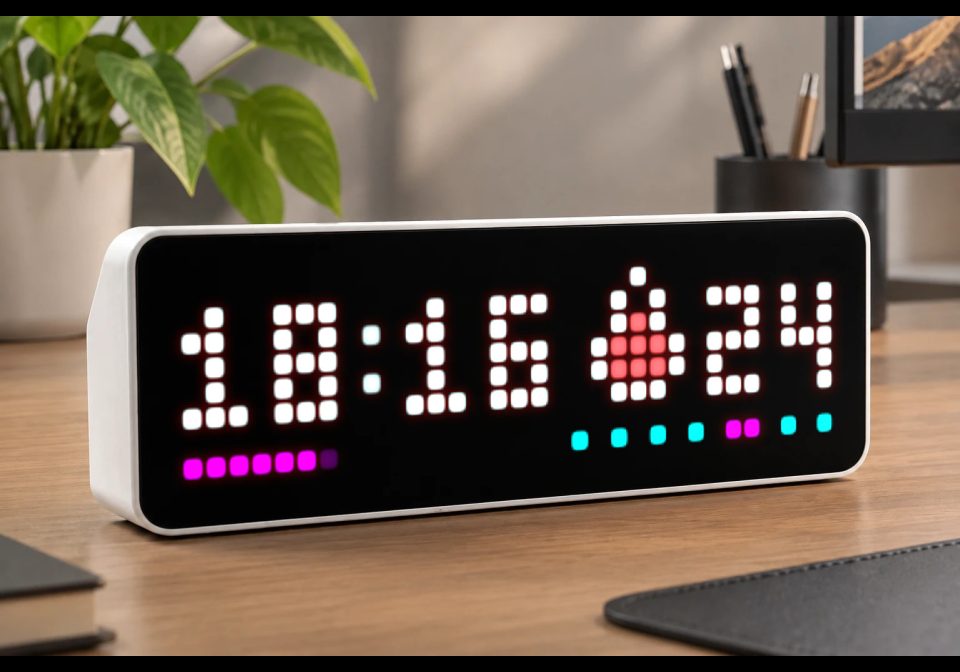
Always see time, date, week, temperature and humidity
| System | AWTRIX NG Scripts |
|---|---|
| Firmware | AWTRIX NG |
| Topic | Miscellaneous |
| Built by | Toinux |
| File | WkxRvlZTvA9O.ax · 6.9 KB |
| Icons | — |
| Published | 21 Aug 2026 · updated 26 Aug 2026 |
| Downloads | 36 |
Anothertime
Changes
- 1.0 : first release
- 1.1 : battery widget, customization of widget orders and duration, other fixes...
- 1.2 : add calendar style for date, use more system colors
- 1.3 : seconds rewind effect
Description
An always-on clock that packs time, seconds, weekday and a rotating widget onto a single 32×8 panel.
Anothertime is a compact "everything at once" clock face: a big HH:MM readout with animated digit
transitions, a seconds-progress bar, a weekday indicator, and a small rotating widget (date /
temperature / humidity / battery) in the corner — all on the same screen, all the time.
This app is still evolving — some things below (widget timing, a couple of colors) aren't
configurable yet and are hardcoded for now. It's fully usable as-is.
The script is compacted to stay compatible with the default 8192 bytes limit (it won't last...), the original source code is available at https://github.com/toinux/awtrixng
Requirements
- AWTRIX NG. No PSRAM or extra memory needed — the script draws everything with primitives, no icons.
- Time sync (NTP) strongly recommended. The clock, the seconds bar and the weekday indicator
all read the device's wall clock; before it syncs they simply won't show meaningful values. - Temperature / humidity sensor: optional. If your board has none, those two widgets just
show--instead of a reading — nothing breaks. - No network requests, no API keys, no icons required. Everything is drawn on-device.
What you see on screen
-
Time (top-left, large digits):
HH:MM. The colon between hours and minutes fades in and out
once a second. When the minute changes, the two affected digits animate from old to new — either
a fade cross-dissolve or a scroll (digits slide past each other), your choice. -
Seconds bar (bottom-left, columns 0–16): fills left to right over the course of each minute,
with a softly-fading pixel at the leading edge instead of a hard cutoff. -
Weekday indicator (bottom-right, columns 18–31): a small row of dots/segments showing where
in the week you are, in one of four visual styles, with today highlighted in its own color. -
Rotating widget (top-right corner): cycles automatically between:
- Date — day of the month, with a little calendar icon
- Temperature — from the device's sensor, one decimal, with a thermometer icon
- Humidity — from the device's sensor, rounded, with a droplet icon
- Battery — from the device or from a MQTT topic, with dynamic battery icon
Each switch cross-fades smoothly between the outgoing and incoming widget (icon and value together).
-
The time's color automatically follows your device's Time color setting (or Default text
color if that's unset) — including live changes, no restart needed.
Settings
Go to the Apps tab → the ⋯ menu on Anothertime's row → Settings. Saving restarts the app.
WkxRvlZTvA9O.ax
# @name Anothertime
# @desc Always see time and other widgets
# @author toinux@gmail.com
# @version 1.3
# @config sc color "Seconds color" default=#FF00FF
# @config ta select "Time animation" options=scroll,fade default=fade
# @config tad slider "Time animation duration" min=100 max=2000 default=500 unit=ms
# @config dsty select "Date style" default=icon options=icon,calendar
# @config wsty select "Week style" default=dotted2 options=large,progress,dotted,dotted2
# @config wc color "Week days color" default=#00FFFF
# @config wdc color "Current day color" default=#FF00FF
# @config ssun bool "Week starts Sunday" default=false
# @config wa select "Widgets animation" options=scroll,fade default=fade
# @config wad slider "Widgets animation duration" min=100 max=2000 default=500 unit=ms
# @config btopic text "Battery topic" default=""
# @config wlist text "Widgets" default="date,temperature,humidity,battery" help="ex: date,temperature@5,humidity,date@4,battery" maxlen=200
import math
class a
var b,c,d,e,f,g,h,i,j,k,l,m,n,o,p,q,r,s,t,u,v,w,x,y,z,A,B,C,D,E,F,G,H,I,J,K,L,M,N,O
def parse_widgets()
var P=[]
var Q=store.get("wlist")
if Q!=nil
for R:re.matchall("[^,]+",Q)
var S=re.match("(date|temperature|humidity|battery)(@([0-9]+))?$",R)
if S!=nil
P.push({"name":S[1],
"duration":S[3]==nil?self.h:clamp(num(S[3],self.h),1,60)})
end
end
end
if size(P)==0
P.push({"name":"date","duration":self.h})
end
return P
end
def init()
self.update()
self.b=["0","0","0","0"]
self.c=["0","0","0","0"]
self.f=nil
self.h=3
self.g=self.parse_widgets()
self.i=0
self.k=self.g[0]["name"]
self.l=nil
self.j=self.g[0]["duration"]
self.m=nil
self.v=store.get("wa")
self.w=store.get("wad")
self.s=store.get("sc")
self.t=store.get("ta")
self.u=store.get("tad")
self.N=500
self.O=nil
self.o=store.get("wsty")
self.p=store.get("wc")
self.q=store.get("wdc")
self.r=store.get("ssun")
self.F=store.get("dsty")
self.A="?"
self.C=-1
var P=store.get("btopic")
if P!=nil&&size(P)>0
mqtt.subscribe(P,/Q,R->self.setbat(R))
self.B=true
else
self.B=false
end
end
def update()
var P=sensor.temperature()
self.y=P==nil?"?":str(round(settings.get("useCelsius")?P:(P*1.8+32)))
var Q=sensor.humidity()
self.z=Q==nil?"?":str(round(Q))
if!self.B
self.setbat(sensor.battery())
end
self.D=day()
self.E=str(self.D)
self.x=self.getcolor("timeColor")
self.G=self.getcolor("dateColor")
self.H=self.getcolor("temperatureColor")
self.I=self.getcolor("humidityColor")
self.J=self.getcolor("batteryColor")
self.K=self.getcolor("calendarHeaderColor")
self.L=self.getcolor("calendarBodyColor")
self.M=self.getcolor("calendarTextColor")
end
def getcolor(P)
var Q=settings.get(P)
return Q==nil?settings.get("textColor"):Q
end
def setbat(P)
self.C=P==nil?-1:num(P)
self.A=self.C<0?"?":str(self.C)
end
def loop()
if self.j<=0
if size(self.g)>1
self.l=self.k
self.i=(self.i+1)%size(self.g)
self.k=self.g[self.i]["name"]
self.j=self.g[self.i]["duration"]
self.m=epoch_ms()
else
self.j=self.g[0]["duration"]
end
end
self.j-=1
self.update()
end
def calculate_cur_prev()
var P=hour()
var Q=minute()
self.b=[str(P/10),str(P%10),str(Q/10),str(Q%10)]
self.d=self.b[0]+self.b[1]
self.e=self.b[2]+self.b[3]
var R=Q-1
var S=P
if R<0 R=59 S=(P-1<0)?23:P-1 end
self.c=[str(S/10),str(S%10),str(R/10),str(R%10)]
self.f=Q
end
def fade_color(P,Q)
if P==nil return self.fade_color(0xFFFFFF,Q)end
if Q>=1.0 return P end
var R=(P>>16)&0xFF
var S=(P>>8)&0xFF
var T=P&0xFF
return rgb(int(R*Q),int(S*Q),int(T*Q))
end
def draw_widget(P,Q,R)
var S=19
var T=self.fade_color(0xFFFFFF,Q)
var U=self.x
var V=""
if P=="date"
if self.F=="calendar"
U=self.M
S=21
rect_fill(S,R,11,2,self.fade_color(self.K,Q))
rect_fill(S,R+2,11,5,self.fade_color(self.L,Q))
S-=self.D<10?2:4
else
var W=self.fade_color(0x8B898C,Q)
var X=self.fade_color(0x0036FF,Q)
rect_fill(S,R+1,5,2,X)
rect_fill(S,R+3,5,3,T)
line(S+1,R,S+1,R+1,W)
line(S+3,R,S+3,R+1,W)
pixel(S+1,R+4,W)
pixel(S+3,R+4,W)
U=self.G
end
V=self.E
elif P=="temperature"
var Y=self.fade_color(0xFF4C50,Q)
pixel(S+2,R,T)
line(S+1,R+1,S+1,R+2,T)
line(S+3,R+1,S+3,R+2,T)
pixel(S+2,R+2,Y)
rect_fill(S,R+3,5,2,T)
rect_fill(S+1,R+3,3,2,Y)
rect_fill(S+1,R+5,3,1,T)
V=self.y
U=self.H
elif P=="battery"
var Z=self.fade_color(0x00FF00,Q)
rect(S,R,5,6,T)
pixel(S,R,0x000000)
pixel(S+4,R,0x000000)
for a0:1..4
if self.C>(100-25*a0)
line(S+1,R+a0,S+3,R+a0,Z)
end
end
pixel(S+1,R+1,T)
pixel(S+3,R+1,T)
V=self.A
U=self.J
elif P=="humidity"
var b0=self.fade_color(0xD5F6FF,Q)
var c0=self.fade_color(0xBDF3FF,Q)
var d0=self.fade_color(0x62E2FF,Q)
var e0=self.fade_color(0x40DAFE,Q)
var f0=self.fade_color(0x00AEFF,Q)
var g0=self.fade_color(0x0089CD,Q)
pixel(S+2,R,b0)
pixel(S+2,R+1,c0)
rect_fill(S+1,R+2,3,3,d0)
rect_fill(S+1,R+2,2,2,c0)
pixel(S+1,R+2,b0)
line(S,R+3,S,R+4,T)
pixel(S+4,R+3,f0)
pixel(S+1,R+2,T)
pixel(S+3,R+4,e0)
pixel(S+4,R+4,g0)
line(S+1,R+5,S+2,R+5,f0)pixel(S+3,R+5,g0)
V=self.z
U=self.I
end
var h0=self.fade_color(U,Q)
if size(V)>2
scroll_text(S+6,R+6,6,V,h0,{"mode":"bounce","speed":40})
else
text(S+6,R+6,V,h0)
end
end
def draw()
if minute()!=self.f
self.calculate_cur_prev()
end
clear()
var P=epoch_ms()
var Q=P%60000
var R=0
var S=6
if second()%2>0
var T=(P%1000)/1000.0
var U=(math.cos(2*math.pi*T+math.pi)+1)*0.5
text(R+8,S,":",self.fade_color(self.x,U))
end
if Q<self.u
var U=real(Q)/self.u
for V:0..3
if self.b[V]!=self.c[V]
if self.t=="scroll"
var W=int(U*8)
text(R,S+W-8,self.b[V],self.x)
text(R,S+W,self.c[V],self.x)
else
var X=(U<0.5)?self.c[V]:self.b[V]
text(R,S,X,self.fade_color(self.x,(math.cos(2*math.pi*U)+1)*0.5))
end
else
text(R,S,self.b[V],self.x)
end
R+=4
if V==1 R+=2 end
end
else
text(0,6,self.d,self.x)
text(10,6,self.e,self.x)
end
var Y=17
if Q>=60000-self.N&&self.O==nil
self.O=P
end
if Q<100
self.O=nil
end
var Z=0
var U=0.0
if self.O!=nil
var a0=P-self.O
var b0=clamp(a0*1.0/self.N,0.0,1.0)
var c0=Y*(1.0-b0)
Z=int(c0)
U=c0-Z
else
var d0=(Q*Y)/59000.0
Z=int(d0)
U=d0-Z
end
for V:0..Z-1
pixel(V,7,self.s)
end
if Z<Y
pixel(Z,7,self.fade_color(self.s,U))
end
if self.m!=nil
var a0=P-self.m
if a0>=self.w
self.m=nil
self.draw_widget(self.k,1.0,0)
else
var U=a0*1.0/self.w
if self.v=="scroll"
var W=int(U*8)
self.draw_widget(self.k,1,W-8)
self.draw_widget(self.l,1,W)
else
self.draw_widget((U<0.5)?self.l:self.k,(math.cos(2*math.pi*U)+1)*0.5,0)
end
end
else
self.draw_widget(self.k,1.0,0)
end
var e0=self.r?weekday():(weekday()+6)%7
R=18
if self.o=="large"
line(R,7,31,7,self.p)
line(R+e0*2,7,R+e0*2+1,7,self.q)
elif self.o=="progress"
line(R,7,31,7,self.p)
line(R,7,R+e0*2+1,7,self.q)
elif self.o=="dotted"
line(R,7,31,7,0x000000)
var V=0
while V<7
pixel(R+V*2,7,V==e0?self.q:self.p)
V+=1
end
elif self.o=="dotted2"
line(R,7,31,7,0x000000)
var V=0
var f0=R
while V<7
if V==e0
line(f0,7,f0+1,7,self.q)
f0+=3
else
pixel(f0,7,self.p)
f0+=2
end
V+=1
end
end
end
end
return a()
Install it on your AWTRIX NG
Your browser writes the script straight to the device on your network. It joins the app rotation right away.
Some browsers refuse to talk to a device on your network from a public page. Download the flow and paste it into the Scripts tab of your device, or install it from a terminal:
More flows for AWTRIX NG Scripts or Miscellaneous
Something wrong with this flow? Report it.