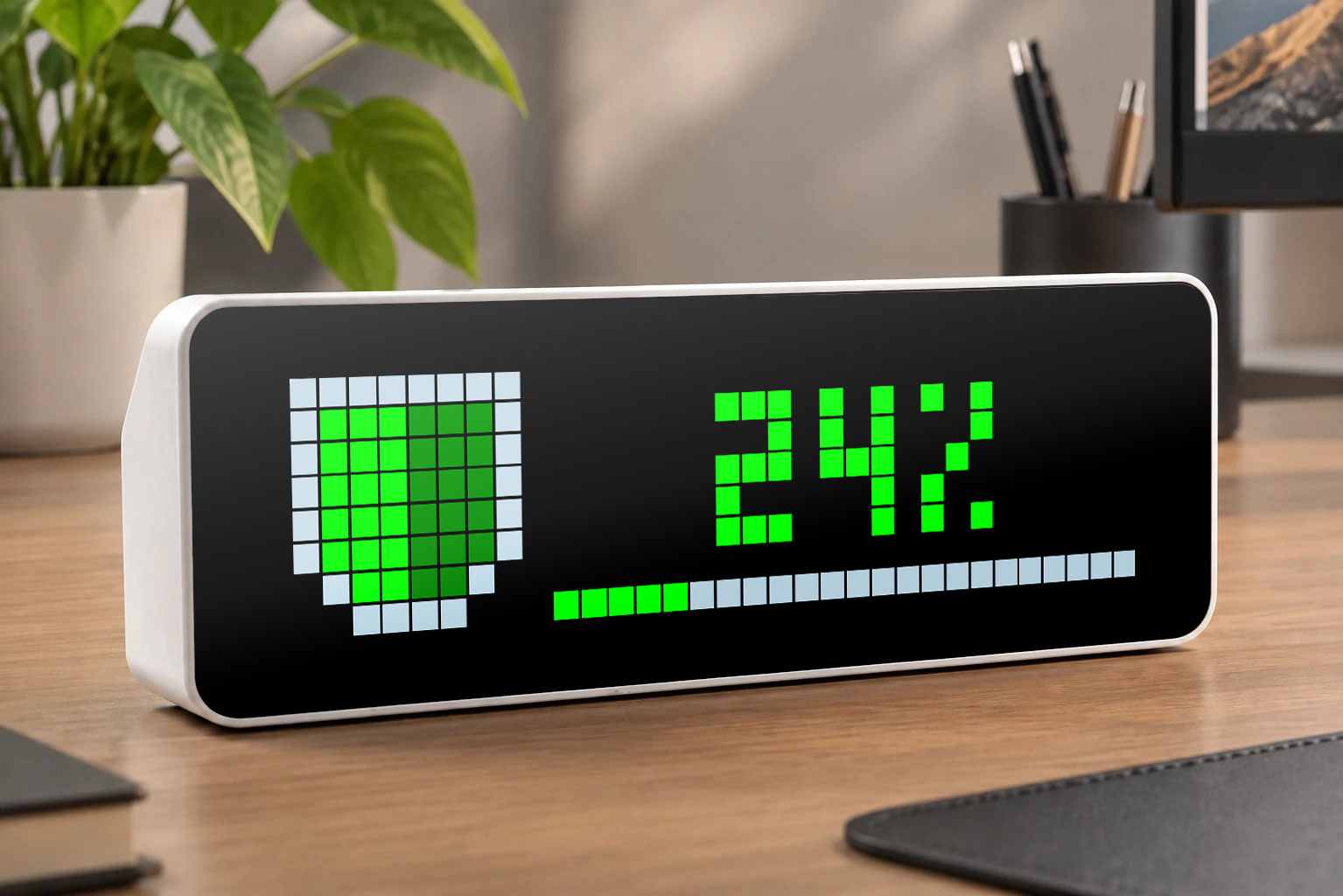
Pihole Status
Shows the status of your Pihole
| System | AWTRIX NG Scripts |
|---|---|
| Firmware | AWTRIX NG |
| Topic | Miscellaneous |
| Built by | Pascal |
| File | UM5mz3uNKzst.ax · 7.9 KB |
| Icons | — |
| Published | 1 Sep 2026 |
A status display for your Pihole
- Icon shows if the pihole is active, deactivated or not reachable.
- Text shows the status of the pihole: On/Off, percentage blocked, timer
- Progressbar shows: Percentage blocked or timer
- App: Show always, or only when pihole is deactivated or not reachable
Setup:
Just install the script,
Enter your Pihole hostname or IP and the Pihole API password.
UM5mz3uNKzst.ax
# @name    Pihole
# @desc    Pi-hole status, block rate and countdown
# @author  Pascal
# @version 1.7
# @config  host   text   "Pi-hole address"   default="pi.hole" maxlen=48 help="IP or hostname, no trailing slash"
# @config  pass   text   "App password"      default="" maxlen=64 help="Leave empty if no password is set"
# @config  every  number "Poll interval"     default=30 min=5 max=600 unit=s
# @config  mode   select "Show app"          default=always options=always,disabled,problem help="disabled = only while blocking is off, problem = also on connection errors"
# @config  show   select "Text"              default=auto options=auto,status,percent,countdown
# @config  bar    select "Bar"               default=auto options=off,percent,countdown,auto
# @config  ind    select "Indicator"         default=off options=off,1,2,3
# @config  itgt   text   "Indicator target"  default="awtrixNG" maxlen=48 help="MQTT prefix, or http://IP of the AWTRIX"
# @config  cOn    color  "Active"            default=#00FF00
# @config  cOff   color  "Disabled"          default=#FF0000
# @config  cErr   color  "Unreachable"       default=#FFAA00
# @config  cLine  color  "Shield outline"    default=#B7D0DF help="also the track of the progress bar"

class Pihole
  var url, per, md, sm, bm        # from the settings, resolved once in init()
  var ind, itg, ihttp             # indicator: number, target, HTTP instead of MQTT
  var c1, c2, c3, c4              # colors active / disabled / error / outline
  var sid                         # Pi-hole session, nil = none
  var st                          # nil unknown, 0 error, 1 active, 2 disabled
  var pct, left, tmax             # block rate %, seconds left, timer start value
  var lbl, ticks, busy, last, iw

  def init()
    var h = store.get("host")
    if h == nil h = "pi.hole" end
    if re.search("^https?://", h) == nil h = "http://" + h end
    self.url = h
    self.per = store.get("every")
    self.md = store.get("mode")
    self.sm = store.get("show")
    self.bm = store.get("bar")
    self.ind = store.get("ind")
    var t = store.get("itgt")
    if t == nil t = "" end
    self.itg = t
    self.ihttp = re.search("^https?://", t) != nil
    self.c1 = store.get("cOn")
    self.c2 = store.get("cOff")
    self.c3 = store.get("cErr")
    self.c4 = store.get("cLine")
    self.sid = nil
    self.st = nil
    self.pct = nil
    self.left = nil
    self.tmax = nil
    self.lbl = nil
    self.ticks = 0
    self.busy = 0
    self.last = nil
    self.iw = 0
  end

  def got(k, b, s)
    self.busy -= 1
    if k == 0                                    # reply from /api/auth
      self.busy = 0
      var a = b == nil ? nil : re.search("\"sid\":\"([^\"]+)\"", b)
      if a == nil
        self.st = 0
      else
        self.sid = a[1]
        self.ticks = 0                           # fetch data right away
      end
      return
    end
    if b == nil                                  # nothing arrived, or field missing
      if s == 401 self.sid = nil end             # session expired -> log in again
      if k == 1 self.st = 0 end
      return
    end
    if k == 2                                    # block rate in percent
      var q = re.search(":\\s*([0-9.]+)", b)
      if q != nil self.pct = round(num(q[1])) end
      return
    end
    var m = re.search("\"blocking\":\"(\\w+)\"", b)
    if m == nil
      self.st = 0
      return
    end
    if m[1] == "enabled"
      self.st = 1
      self.left = nil
      self.tmax = nil
    else
      self.st = 2
      m = re.search("\"timer\":([0-9.]+)", b)    # null = disabled indefinitely
      if m == nil
        self.left = nil
        self.tmax = nil
      else
        self.left = int(num(m[1]))
        if self.tmax == nil || self.left > self.tmax self.tmax = self.left end
      end
    end
  end

  def loop()
    if self.ticks <= 0
      self.ticks = self.per
      if self.busy <= 0
        var p = store.get("pass")
        if self.sid == nil && p != nil && size(p) > 0
          self.busy = 1
          http.post(self.url + "/api/auth", "{\"password\":\"" + p + "\"}",
                    / b, s -> self.got(0, b, s),
                    {'headers': {'Content-Type': "application/json"}, 'find': "\"sid\"", 'keep': 72})
        else
          self.busy = 2
          var o = {'find': "\"blocking\"", 'keep': 64}
          if self.sid != nil o['headers'] = {'X-FTL-SID': self.sid} end
          http.get(self.url + "/api/dns/blocking", / b, s -> self.got(1, b, s), o)
          o = {'find': "\"percent_blocked\"", 'keep': 40}
          if self.sid != nil o['headers'] = {'X-FTL-SID': self.sid} end
          http.get(self.url + "/api/stats/summary", / b, s -> self.got(2, b, s), o)
        end
      end
    end
    self.ticks -= 1

    if self.st == 2 && self.left != nil && self.left > 0    # keep the countdown running locally
      self.left -= 1
    end

    var v = self.sm
    if v == "auto"
      v = self.st == 2 && self.left != nil ? "countdown" : "percent"
    end
    if self.st == nil
      self.lbl = nil
    elif self.st == 0
      self.lbl = "ERR"
    elif v == "countdown" && self.left != nil
      var mm = self.left / 60
      var ss = self.left % 60
      self.lbl = (mm < 10 ? "0" : "") + str(mm) + ":" + (ss < 10 ? "0" : "") + str(ss)
    elif v == "percent" && self.pct != nil
      self.lbl = str(self.pct) + "%"
    else
      self.lbl = self.st == 2 ? "OFF" : "ON"
    end

    self.iw -= 1
    if self.st != self.last || self.iw <= 0     # indicator: on change, otherwise every 10 min
      if self.st != nil && self.ind != "off"
        var c = self.st == 1 ? self.c1 : (self.st == 2 ? self.c2 : self.c3)
        var bd = "{\"color\":" + str(c) + ",\"blinkMs\":" + (self.st == 1 ? "0" : "800") + "}"
        if self.ihttp
          http.put(self.itg + "/api/v1/indicators/" + self.ind, bd, / b, s -> b,
                   {'headers': {'Content-Type': "application/json"}})
        else
          mqtt.publish(self.itg + "/cmd/indicators/" + self.ind, bd)
        end
      end
      self.iw = 600
      self.last = self.st
    end
  end

  def should_show()
    if self.md == "always" return true end
    if self.st == nil return false end          # no reply yet, nothing to say
    if self.md == "problem" return self.st != 1 end
    return self.st == 2
  end

  def draw()
    clear()
    var c = self.st == 1 ? self.c1 : (self.st == 2 ? self.c2 : self.c3)
    var d = (c & 0xFEFEFE) >> 1                 # half brightness for the right half
    var b = self.bm
    if b == "auto"
      b = self.st == 2 && self.tmax != nil ? "countdown" : "percent"
    end
    var p = -1
    if b == "countdown" && self.left != nil && self.tmax != nil && self.tmax > 0
      p = clamp(self.left * 100 / self.tmax, 0, 100)
    elif b == "percent" && self.pct != nil
      p = clamp(self.pct, 0, 100)
    end
    if p >= 0                                   # bar spans the text area only
      var bw = width() - 9
      rect_fill(9, 7, bw, 1, self.c4)           # track in the outline color
      rect_fill(9, 7, bw * p / 100, 1, c)
    end
    if self.lbl == nil
      text(10, 6, "...", 0x666666)
    else
      text(9 + (width() - 9 - text_ink_width(self.lbl)) / 2, 6, self.lbl, c)
    end
    rect_fill(1, 1, 3, 5, c)                    # fill, left half
    rect_fill(4, 1, 3, 5, d)                    # fill, right half
    rect_fill(2, 6, 2, 1, c)
    rect_fill(4, 6, 2, 1, d)
    var o = self.c4
    line(0, 0, 7, 0, o)                         # top edge
    line(0, 1, 0, 5, o)                         # left flank
    line(7, 1, 7, 5, o)                         # right flank
    pixel(1, 6, o)                              # chamfers
    pixel(6, 6, o)
    line(2, 7, 5, 7, o)                         # bottom edge
  end

  def on_button(btn)
    if btn == "select" self.ticks = 0 end
  end
end

return Pihole()
Install it on your AWTRIX NG
Your browser writes the script straight to the device on your network. It joins the app rotation right away.
Some browsers refuse to talk to a device on your network from a public page. Download the flow and paste it into the Scripts tab of your device, or install it from a terminal:
More flows for AWTRIX NG Scripts or Miscellaneous
Something wrong with this flow? Report it.