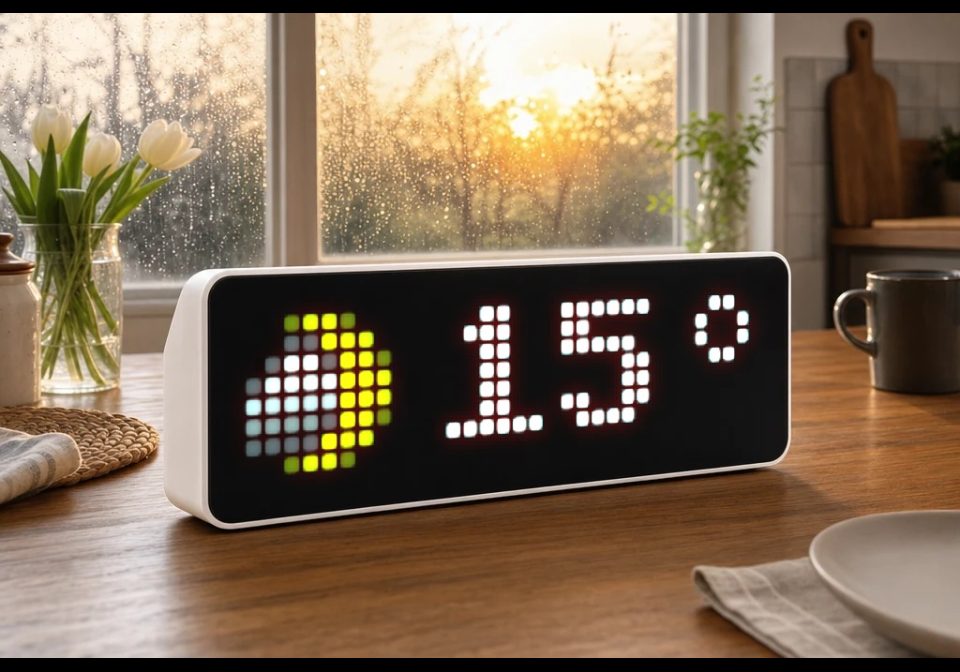
Weather Script
Weather Script
| System | AWTRIX NG Scripts |
|---|---|
| Firmware | AWTRIX NG |
| Topic | Miscellaneous |
| Built by | bagrue |
| File | QZ0sO0JQb7ut.ax · 5.9 KB |
| Icons | 22 |
| Published | 20 Aug 2026 · updated 4 Sep 2026 |
| Downloads | 144 |
A compact and memory-optimized weather app for AWTRIX NG. The script displays the current outdoor temperature, current weather conditions
Weather data is provided by Open-Meteo. No user account or API key is required.
Credits
Weather data: Open-Meteo
Weather app: Hank_the_Tank / Codex
QZ0sO0JQb7ut.ax
# @name Alta Weather
# @desc Current weather and temperature for Alta Norway
# @author Hank_the_Tank / bagrue
# @version 2.4
# @config latitude number "Latitude" default=69.97 min=-90 max=90 step=0.01
# @config longitude number "Longitude" default=23.27 min=-180 max=180 step=0.01
# @config refresh number "Refresh" default=5 min=1 max=60 unit=min
# @config unit select "Temperature" default=C options=C,F
class Weather
var tcol
var wic
var ticks
var age
var url
var period
var temp_value
var temp_negative
var font
def init()
self.tcol = 0x666666
self.wic = "36637"
self.ticks = 0
self.age = 9999
self.temp_value = 0
self.temp_negative = false
self.period = store.get("refresh") * 60
self.url = "https://api.open-meteo.com/v1/forecast" +
"?latitude=" + str(store.get("latitude")) +
"&longitude=" + str(store.get("longitude")) +
"¤t=temperature_2m,weather_code" +
"&timezone=auto"
# Kompakt 6 x 7-pikslers font.
# Hvert tall består av sju rader.
self.font = [
# 0
[30, 51, 51, 51, 51, 51, 30],
# 1
[12, 28, 12, 12, 12, 12, 63],
# 2
[30, 51, 3, 14, 24, 51, 63],
# 3
[30, 51, 3, 14, 3, 51, 30],
# 4
[6, 14, 22, 38, 63, 6, 7],
# 5
[63, 48, 62, 3, 3, 51, 30],
# 6
[14, 24, 48, 62, 51, 51, 30],
# 7
[63, 51, 3, 6, 12, 12, 12],
# 8
[30, 51, 51, 30, 51, 51, 30],
# 9
[30, 51, 51, 31, 3, 6, 28]
]
end
# --------------------------------------------------
# TEGN ETT TALL
# --------------------------------------------------
def digit(x, n)
var row = 0
while row < 7
var bits = self.font[n][row]
var col = 0
while col < 6
if (bits & (1 << (5 - col))) != 0
pixel(x + col, row, self.tcol)
end
col += 1
end
row += 1
end
end
# --------------------------------------------------
# MINUSTEGN
# --------------------------------------------------
def minus(x)
var col = 0
while col < 5
pixel(x + col, 3, self.tcol)
col += 1
end
end
# --------------------------------------------------
# GRADTEGN
# --------------------------------------------------
def degree(x)
pixel(x + 2, 0, self.tcol)
pixel(x + 3, 0, self.tcol)
pixel(x + 1, 1, self.tcol)
pixel(x + 4, 1, self.tcol)
pixel(x + 1, 2, self.tcol)
pixel(x + 4, 2, self.tcol)
pixel(x + 2, 3, self.tcol)
pixel(x + 3, 3, self.tcol)
end
# --------------------------------------------------
# TEGN TEMPERATUREN
# --------------------------------------------------
def draw_temperature()
var t = self.temp_value
var x = 11
# Minustegn
if self.temp_negative
self.minus(x)
x += 7
end
# Ett tall
if t < 10
self.digit(x, t)
x += 7
# To tall
else
var tens = int(t / 10)
var ones = t - tens * 10
self.digit(x, tens)
x += 7
self.digit(x, ones)
x += 7
end
# Gradtegn
self.degree(x + 1)
end
# --------------------------------------------------
# MOTTA VÆRDATA
# --------------------------------------------------
def on_body(body, status)
if body == nil
return
end
if status != 200
return
end
var m = re.search(
"temperature_2m\":([-0-9.]+)",
body
)
var c = re.search(
"weather_code\":([0-9]+)",
body
)
if m == nil || c == nil
return
end
# Berry bruker real(), ikke num().
var t = real(m[1])
# Celsius eller Fahrenheit
var u = store.get("unit")
if u == "F"
t = t * 1.8 + 32
end
# Temperaturfarge
if t > 20
self.tcol = 0xFF0000
elif t < 0
self.tcol = 0x0080FF
else
self.tcol = 0xFFFFFF
end
# Rund av uten ternary-operator
var ti
if t >= 0
ti = int(t + 0.5)
else
ti = int(t - 0.5)
end
# Lagre minus separat
if ti < 0
self.temp_negative = true
self.temp_value = 0 - ti
else
self.temp_negative = false
self.temp_value = ti
end
# Værkode
var k = int(c[1])
var ic = "36637"
if k == 0
# Klarvær
ic = "53386"
elif k <= 2
# Delvis skyet
ic = "2286"
elif k == 3
# Overskyet
ic = "53384"
elif k <= 48
# Tåke
ic = "17055"
elif k <= 67
# Regn
ic = "2720"
elif k <= 77
# Snø
ic = "2289"
elif k <= 82
# Regnbyger
ic = "49300"
elif k <= 86
# Snøbyger
ic = "2289"
elif k >= 95
# Tordenvær
ic = "29839"
end
self.wic = ic
self.age = 0
end
# --------------------------------------------------
# OPPDATERING
# --------------------------------------------------
def loop()
self.age += 1
if self.ticks <= 0
self.ticks = self.period
http.get(
self.url,
/body, status -> self.on_body(body, status),
{
"find": "\"current\":",
"keep": 256
}
)
end
self.ticks -= 1
end
# --------------------------------------------------
# SKJERM
# --------------------------------------------------
def draw()
clear()
# Værikon
if !icon(self.wic, 0, 0)
circle_fill(4, 4, 3, 0xFFCC00)
end
# Temperatur
if self.age < 9999
self.draw_temperature()
else
text(6, 6, "...", 0x666666)
end
# Rød prikk hvis værdataene er gamle
if self.age > 1200
pixel(width() - 1, height() - 1, 0xFF0000)
end
end
# --------------------------------------------------
# KNAPP
# --------------------------------------------------
def on_button(btn)
if btn == "select"
self.ticks = 0
end
end
end
return Weather()Install it on your AWTRIX NG
Your browser writes the script straight to the device on your network. It joins the app rotation right away.
Some browsers refuse to talk to a device on your network from a public page. Download the flow and paste it into the Scripts tab of your device, or install it from a terminal:
These icons belong on the device, in /ICONS. Each one is at
most 32×8
pixels — shown here magnified, at their real proportions.

8×8 px

8×8 px

8×8 px

8×8 px

8×8 px

8×8 px

8×8 px

8×8 px

8×8 px

8×8 px

8×8 px

8×8 px

8×8 px

8×8 px

8×8 px

8×8 px

8×8 px

8×8 px

8×8 px

8×8 px

8×8 px

8×8 px
More flows for AWTRIX NG Scripts or Miscellaneous
Something wrong with this flow? Report it.