Shelly 3EM Power (Gen1)
Live Power Display for Shelly3EM (Gen1)
| System | AWTRIX NG Scripts |
|---|---|
| Firmware | AWTRIX NG |
| Topic | Miscellaneous |
| Built by | Fukkel |
| File | Ld72H5EqwKj2.ax · 8.1 KB |
| Icons | — |
| Published | 8 Aug 2026 · updated 8 Aug 2026 |
| Downloads | 33 |
Shelly 3EM Power (Gen1)
Live power display with:
- Color-coded levels
- Power bar
- Overload alert
- Daily/Previous-Day Energy Tracking
- Configurable threshold below which the App stays hidden.
!!! IMPORTANT !!!
The script is only compatible with a Shelly3M Gen1 / tested.
From Shelly 3EM Gen2/Pro, the API query has changed.
Since I do not have a Gen2 or Pro hardware available.
So i can not modify or adjust the script at the moment.
Shelly 3EM Power (Gen1)
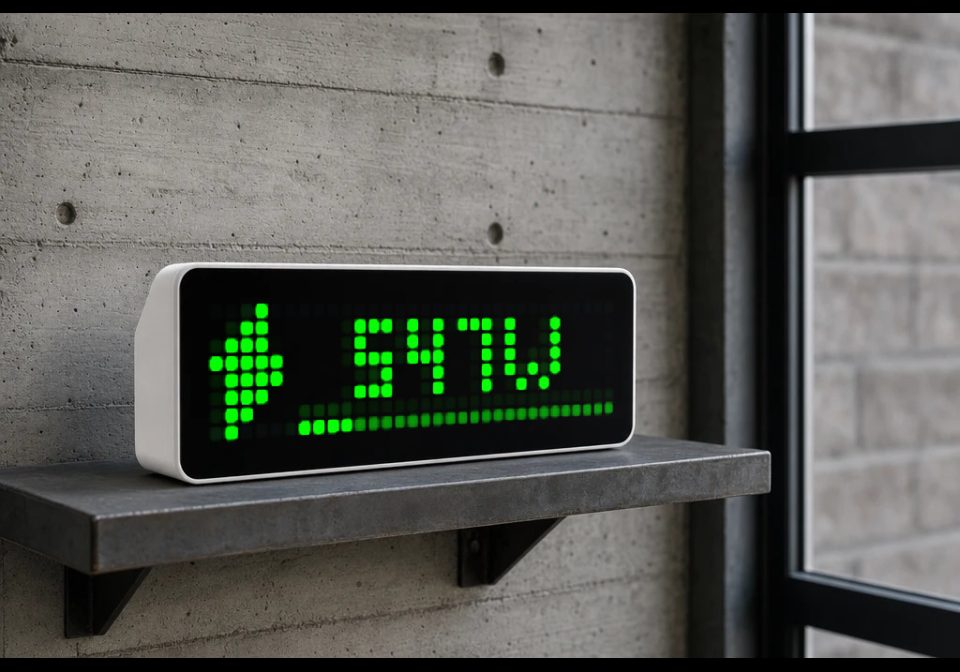
Displays live active power from a Shelly 3EM (Gen1) via its local API, no cloud required. The value is shown in Watts (or kW for larger values) with a color that shifts from blue through green, yellow, and orange to red as power rises through two configurable thresholds. A brightness-scaled bar along the bottom edge visualizes power relative to a configurable maximum, and an icon (custom or a built-in lightning bolt) is shown alongside the reading.
An optional overload threshold triggers a blinking red warning when power exceeds it, with a short debounce/inrush delay to avoid false alarms from brief startup spikes. If the connection to the Shelly fails repeatedly, the display shows an "IP?" warning; if data becomes stale, a small red indicator appears in the corner.
Pressing the select button cycles through three views: current power, today's energy consumption, and yesterday's energy consumption (both in Wh/kWh), calculated from the three phase energy meters with automatic handling of daily rollover and meter resets.
A configurable "minimum power" threshold lets the app stay out of the display rotation entirely while power is below it, so a clock or other apps aren't interrupted by a near-zero reading — the app only reappears once power rises above that level.
Ld72H5EqwKj2.ax
# @name Shelly 3EM Power (Gen1)
# @desc Shelly 3EM Wirkleistung
# @author Fukkel with KI help´s
# @version 2.6_beta
# @config shellyHost text "IP-Adresse Shelly 3EM" default=192.168.1.50
# @config interval number "Abfrage-Intervall (s)" default=5 min=2 max=60 step=1
# @config minP number "Anzeige ab Leistung (W)" default=0 min=0 max=5000 step=10
# @config tMed number "Schwelle mittel (W)" default=500 min=0 max=10000 step=10
# @config tHigh number "Schwelle hoch (W)" default=2000 min=0 max=10000 step=10
# @config iconId text "Eigenes Icon (ID, optional)" default=
# @config maxPower number "Balkenskala Maximum (W)" default=4000 min=100 max=20000 step=100
# @config overload number "Überlastwarnung (W, 0=aus)" default=6000 min=0 max=30000 step=100
# @config fixedColor color "Feste Farbe (0=automatisch)" default=#000000
# @config inrushDelay number "Verzögerung Einschaltstrom (s)" default=5 min=0 max=30 step=1
# @config dayOffset number "Korrekturwert Tagesenergie (Wh)" default=0 min=0 max=100000 step=1

class ShellyPower
var power, ticks, age, blink
var wAbv, lvlT, cLvl
var ovWAbv, ovT, cOv
var failC
var dWh, dayNum, viewMode
var totals, dBase, eT, pSaveT, yWh, pMsk
def init()
self.power = store.get("power")
self.ticks = 0
self.age = 9999
self.blink = 0
self.wAbv = false
self.lvlT = 0
self.cLvl = nil
self.ovWAbv = false
self.ovT = 0
self.cOv = false
self.failC = 0
self.dWh = self.cfg("dayEnergy", 0)
self.dayNum = self.cfg("dayNum", -1)
self.viewMode = 0
self.totals = [nil, nil, nil]
self.dBase = store.get("dBase")
self.eT = 0
self.pSaveT = 0
self.yWh = self.cfg("yesterdayEnergy", 0)
self.pMsk = self.cfg("pMsk", 0)
end
def cfg(key, default)
var v = store.get(key)
if v == nil return default end
return v
end
def cfg_min(key, default, minv)
var v = self.cfg(key, default)
if v < minv return minv end
return v
end
def compute_level(p, tMed, tHigh)
if p < 0 return -1 end
if p < tMed return 0 end
if p < tHigh return 1 end
if p < tHigh * 2 return 2 end
return 3
end
def debounce(val, confirmed, wAbv, elapsed, delay, iv)
if confirmed == nil || val <= confirmed
return [val, false, 0]
end
elapsed = wAbv ? elapsed + iv : 0
if elapsed >= delay
return [val, false, 0]
end
return [confirmed, true, elapsed]
end
def on_phase_total(idx, w, status)
if w == nil return end
var m = re.search("\"total\":([-0-9.]+)", w)
if m == nil return end
var v = num(m[1])
if v == nil return end
self.totals[idx] = v
self.recompute_energy()
end
def recompute_energy()
var cur = 0
var ready = true
var i = 0
while i < 3
if (self.pMsk >> i) & 1 == 1
if self.totals[i] == nil ready = false else cur += self.totals[i] end
end
i += 1
end
if !ready return end
i = 0
while i < 3
if self.totals[i] != nil && (self.pMsk >> i) & 1 == 0
if self.dBase != nil self.dBase += self.totals[i] end
self.pMsk = self.pMsk | (1 << i)
store.set("pMsk", self.pMsk)
cur += self.totals[i]
end
i += 1
end
if self.pMsk == 0 return end
var d = day()
var newDay = (d != self.dayNum)
var meterReset = (self.dBase != nil && (cur < self.dBase || cur - self.dBase > 100000))
if newDay || self.dBase == nil || meterReset
if newDay
self.yWh = self.dWh + self.cfg("dayOffset", 0)
store.set("yesterdayEnergy", self.yWh)
store.set("dayOffset", 0)
end
self.dayNum = d
self.dBase = cur
store.set("dayNum", d)
store.set("dBase", cur)
end
var e = cur - self.dBase
if e < 0 e = 0 end
self.dWh = e
store.set("dayEnergy", e)
end

def on_body(w, status)
if w == nil
self.failC += 1
return
end
var m = re.search("\"total_power\":([-0-9.]+)", w)
if m == nil
self.failC += 1
return
end
var w_val = num(m[1])
if w_val == nil
self.failC += 1
return
end
self.failC = 0
self.power = w_val
self.age = 0
self.pSaveT -= 1
if self.pSaveT <= 0
store.set("power", w_val)
self.pSaveT = 6
end
var iv = self.cfg("interval", 5)
var delay = self.cfg("inrushDelay", 5)
var ap = w_val < 0 ? -w_val : w_val
var lvl = self.compute_level(w_val, self.cfg("tMed", 500), self.cfg("tHigh", 2000))
var r1 = self.debounce(lvl, self.cLvl, self.wAbv, self.lvlT, delay, iv)
self.cLvl = r1[0]
self.wAbv = r1[1]
self.lvlT = r1[2]
var ov = store.get("overload")
if ov != nil && ov > 0
var newOv = ap >= ov ? 1 : 0
var curOv = self.cOv ? 1 : 0
var r2 = self.debounce(newOv, curOv, self.ovWAbv, self.ovT, delay, iv)
self.cOv = (r2[0] == 1)
self.ovWAbv = r2[1]
self.ovT = r2[2]
else
self.cOv = false
self.ovWAbv = false
self.ovT = 0
end
end
def loop()
self.age += 1
if self.ticks <= 0
self.ticks = self.cfg_min("interval", 5, 1)
var host = store.get("shellyHost")
if host != nil && host != ""
http.get("http://" + host + "/status",
/ b, st -> self.on_body(b, st),
{'find': "\"total_power\":", 'keep': 300})
end
end
self.ticks -= 1
if self.eT <= 0
self.eT = 60
var host = store.get("shellyHost")
if host != nil && host != ""
http.get("http://" + host + "/emeter/0", / b, st -> self.on_phase_total(0, b, st), {'find': "\"total\":", 'keep': 100})
http.get("http://" + host + "/emeter/1", / b, st -> self.on_phase_total(1, b, st), {'find': "\"total\":", 'keep': 100})
http.get("http://" + host + "/emeter/2", / b, st -> self.on_phase_total(2, b, st), {'find': "\"total\":", 'keep': 100})
end
end
self.eT -= 1
end
def draw_bolt(col)
pixel(3, 0, col)
pixel(2, 1, col) pixel(3, 1, col)
pixel(1, 2, col) pixel(2, 2, col) pixel(3, 2, col)
pixel(0, 3, col) pixel(1, 3, col) pixel(2, 3, col) pixel(3, 3, col) pixel(4, 3, col)
pixel(1, 4, col) pixel(2, 4, col) pixel(3, 4, col) pixel(4, 4, col)
pixel(1, 5, col) pixel(2, 5, col) pixel(3, 5, col)
pixel(1, 6, col) pixel(2, 6, col)
pixel(1, 7, col)
end
def dim_channel(v)
if v <= 0 return 0 end
var d = int(v / 2.8)
if d < 25 d = 25 end
if d > 255 d = 255 end
return d
end
def draw_power_bar(col)
var maxP = self.cfg("maxPower", 4000)
if maxP <= 0 maxP = 4000 end
var ap = self.power < 0 ? -self.power : self.power
var barStart = 6
var barW = width() - barStart
var filled = int(ap * barW / maxP + 0.5)
if filled > barW filled = barW end
if filled < 0 filled = 0 end
var dim = (self.dim_channel((col >> 16) & 0xFF) << 16) |
(self.dim_channel((col >> 8) & 0xFF) << 8) |
self.dim_channel(col & 0xFF)
var i = 0
while i < barW
pixel(barStart + i, 7, i < filled ? col : dim)
i += 1
end
end
def fmt_value(v, unit)
if v < 1000 return str(int(v)) + unit end
var k = v / 1000.0
if k >= 10 return str(int(k)) + "k" + unit end
var frac = int((k - int(k)) * 10 + 0.0001)
return str(int(k)) + "." + str(frac) + "k" + unit
end
def draw_icon(col)
var ic = store.get("iconId")
var shown = ic != nil && ic != "" && icon(ic, 0, 0)
if !shown self.draw_bolt(col) end
end
def draw_label(label, col)
var x = 6 + int((25 - text_ink_width(label)) / 2)
if x < 6 x = 6 end
text(x, 6, label, col)
end
def should_show()
if self.power == nil return true end
return (self.power < 0 ? -self.power : self.power) >= self.cfg("minP", 0)
end
def draw()
clear()
if self.power == nil
if self.failC >= 3
text(4, 6, "IP?", 0xFF0000)
else
text(6, 6, "...", 0x666666)
end
return
end
if self.cOv
self.blink += 1
if self.blink % 10 >= 5 return end
end
if self.age > self.cfg_min("interval", 5, 1) * 3 pixel(width() - 1, 0, 0xFF0000) end
var fixed = store.get("fixedColor")
var col
if self.viewMode == 1
var label = self.fmt_value(self.dWh + self.cfg("dayOffset", 0), "Wh")
col = (fixed != nil && fixed != 0) ? fixed : 0x00FFFF
self.draw_icon(col)
self.draw_label(label, col)
return
end
if self.viewMode == 2
var label = self.fmt_value(self.yWh, "Wh")
col = (fixed != nil && fixed != 0) ? fixed : 0xFF8800
self.draw_icon(col)
self.draw_label(label, col)
return
end
var p = self.power
var ap = p < 0 ? -p : p
var label = self.fmt_value(ap, "W")
var levelColors = [0x00A2FF, 0x00FF00, 0xFFCC00, 0xFFA500, 0xFF0000]
var lvl = self.cLvl
if lvl == nil lvl = 0 end
col = levelColors[lvl + 1]
if fixed != nil && fixed != 0 col = fixed end
if self.cOv col = 0xFF0000 end
self.draw_icon(col)
self.draw_label(label, col)
self.draw_power_bar(col)
end
def on_button(btn)
if btn == "select"
self.viewMode = (self.viewMode + 1) % 3
self.ticks = 0
end
end
end
return ShellyPower()
Install it on your AWTRIX NG
Your browser writes the script straight to the device on your network. It joins the app rotation right away.
Some browsers refuse to talk to a device on your network from a public page. Download the flow and paste it into the Scripts tab of your device, or install it from a terminal:
More flows for AWTRIX NG Scripts or Miscellaneous
Something wrong with this flow? Report it.