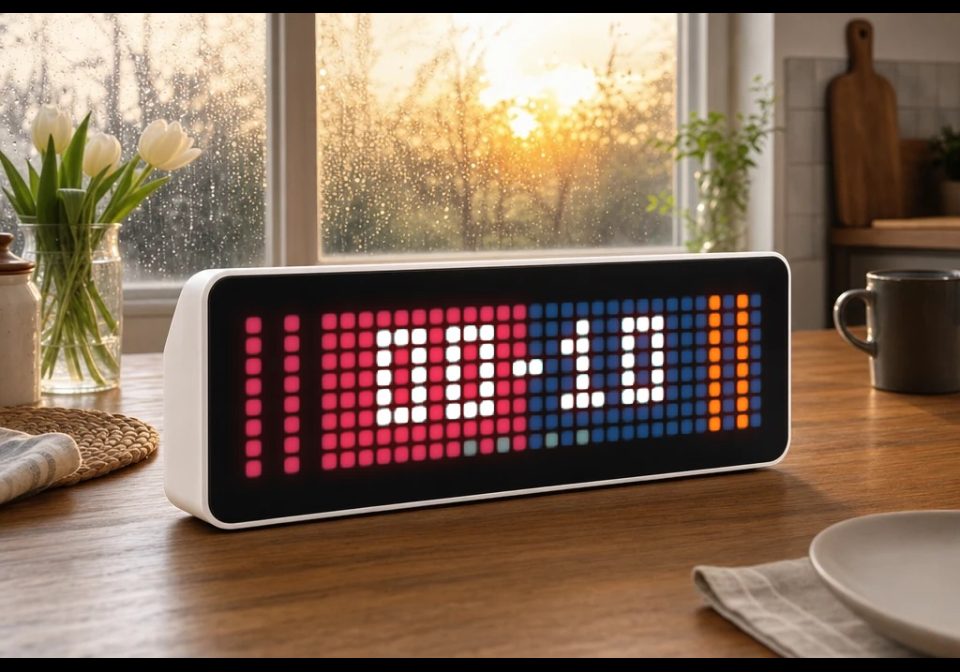
NFL Scoreboard
Display live NFL scores from Home Assistant
| System | Home Assistant Blueprint |
|---|---|
| Firmware | AWTRIX NG |
| Topic | Miscellaneous |
| Built by | Hank_the_Tank |
| File | Je7FLWhjHK0p.yaml · 6.6 KB |
| Icons | — |
| Published | 8 Aug 2026 · updated 15 Aug 2026 |
| Downloads | 24 |
🏈 AWTRIX NG NFL Team Scoreboard
Display live NFL scores from Home Assistant directly on one or more AWTRIX NG devices.
The blueprint uses a sensor from the HACS Team Tracker integration and automatically creates a pushed app while the selected NFL game is live.
Features
- Displays the current NFL score on AWTRIX NG
- Supports one or multiple AWTRIX NG devices
- Automatically detects home and away teams
- Uses the colors supplied by Team Tracker
- Shows both scores with two digits
- Displays the current quarter using four indicator pixels
- Uses amber quarter indicators during overtime
- Updates when either team scores
- Updates when the quarter changes
- Immediately switches to the scoreboard after an update
- Automatically removes the pushed app when the game is no longer live
- Configurable display duration
- Configurable pushed-app name
- Provides automatic fallback colors when Team Tracker returns unusable colors
Requirements
- Home Assistant 2024.11 or newer
- MQTT integration
- AWTRIX NG with Home Assistant discovery enabled
- Team Tracker installed through HACS
- A configured Team Tracker sensor for an NFL team
Display Layout
The 32×8 display is divided into two sections:
- The home team is displayed on the left
- The away team is displayed on the right
- Each side uses the corresponding primary and secondary team colors
- The current score is shown in white
- Four pixels along the bottom indicate the current quarter
During overtime, all four quarter indicators change to amber.
Configuration
AWTRIX NG devices
Select one or more AWTRIX NG devices on which the scoreboard should appear.
AWTRIX app name
Enter a unique name for the pushed app.
AWTRIX NG app names may only contain:
A-Z, a-z, 0-9, _ and -
Example:
NFLScore
Do not use spaces, umlauts, accented characters or other special characters.
Display duration
Defines how many seconds the scoreboard remains visible during each app rotation.
Team Tracker sensor
Select the Team Tracker sensor representing your NFL team.
Game Status
The scoreboard is active while the Team Tracker sensor has the following state:
IN
When the sensor changes to another state, such as PRE, POST, BYE or NOT_FOUND, the pushed app is automatically removed from AWTRIX NG.
Automatic Updates
The display is updated whenever one of these attributes changes:
team_score:
opponent_score:
quarter:
After every update, AWTRIX NG immediately switches to the scoreboard.
Team Colors
The blueprint normally uses these Team Tracker attributes:
team_colors:
opponent_colors:
If either color set is missing or contains only black values, the blueprint automatically uses dark gray and white as fallback colors.
Quarter Indicator
The four pixels along the bottom represent the four regular quarters:
● ○ ○ ○  First quarter
● ● ○ ○  Second quarter
● ● ● ○  Third quarter
● ● ● ●  Fourth quarter
Inactive quarters are gray, active quarters are white, and overtime is displayed in amber.
Je7FLWhjHK0p.yaml
blueprint:
  name: 🏈 AWTRIX NG – NFL Team Scoreboard
  author: Hank_the_Tank / AWTRIX NG migration
  description: >-
    # NFL Team Scoreboard for AWTRIX NG ver. 1.0

    Displays the live score of an NFL game from a HACS Team Tracker sensor.
    The home and away sides use their team colors, while four pixels along the
    bottom show the current quarter. During overtime, all quarter pixels turn
    amber. The pushed app is removed automatically when the game is no longer
    live.

    ## Requirements

    - Home Assistant 2024.11 or newer
    - MQTT integration
    - AWTRIX NG with Home Assistant discovery enabled
    - HACS Team Tracker integration

  domain: automation

  input:
    awtrix_devices:
      name: AWTRIX NG devices
      description: Select one or more AWTRIX NG devices.
      selector:
        device:
          multiple: true
          filter:
            - integration: mqtt
              manufacturer: Blueforcer
              model: AWTRIX NG

    app_name:
      name: AWTRIX app name
      description: >-
        Unique pushed-app name. Use only letters, numbers, underscores and
        hyphens, with a maximum length of 32 characters.
      default: nfl_team_score
      selector:
        text:

    message_duration:
      name: Display duration
      description: How long the scoreboard remains visible per rotation.
      default: 15
      selector:
        number:
          min: 0
          max: 300
          step: 1
          mode: box
          unit_of_measurement: s

    team_sensor:
      name: Team Tracker sensor
      description: Select the Team Tracker sensor for your NFL team.
      selector:
        entity:


triggers:
  - trigger: state
    entity_id: !input team_sensor
    to: IN
    id: game_state

  - trigger: state
    entity_id: !input team_sensor
    from: IN
    id: game_state

  - trigger: time_pattern
    minutes: /1
    id: game_update

variables:
  device_ids: !input awtrix_devices
  app_name: !input app_name
  team_sensor: !input team_sensor
  message_duration: !input message_duration

  mqtt_prefixes: >-
    {% set ns = namespace(prefixes=[]) %}
    {% for device_id in device_ids %}
      {% set entities = device_entities(device_id)
        | select('search', 'mqtt_prefix') | list %}
      {% if entities | length > 0 %}
        {% set prefix = states(entities[0]) | trim %}
        {% if prefix not in ['', 'unknown', 'unavailable'] %}
          {% set ns.prefixes = ns.prefixes + [prefix] %}
        {% endif %}
      {% endif %}
    {% endfor %}
    {{ ns.prefixes | unique | list }}

  home_game: "{{ state_attr(team_sensor, 'team_homeaway') == 'home' }}"

  team_colors: >-
    {% set colors = state_attr(team_sensor, 'team_colors') or [] %}
    {% if colors | length >= 2
          and (colors[0] | lower) in ['#000000', '000000']
          and (colors[1] | lower) in ['#000000', '000000'] %}
      {{ ['#404040', '#FFFFFF'] }}
    {% elif colors | length > 0 %}
      {{ colors }}
    {% else %}
      {{ ['#404040', '#FFFFFF'] }}
    {% endif %}

  opponent_colors: >-
    {% set colors = state_attr(team_sensor, 'opponent_colors') or [] %}
    {% if colors | length >= 2
          and colors[0] | lower in ['#000000', '000000']
          and colors[1] | lower in ['#000000', '000000'] %}
      {{ ['#404040', '#FFFFFF'] }}
    {% elif colors | length > 0 %}
      {{ colors }}
    {% else %}
      {{ ['#404040', '#FFFFFF'] }}
    {% endif %}

  home_colors: "{{ team_colors if home_game else opponent_colors }}"
  away_colors: "{{ opponent_colors if home_game else team_colors }}"

  home_color_1: >-
    {{ home_colors[0] if home_colors | length > 0 else '#404040' }}
  home_color_2: >-
    {{ home_colors[1] if home_colors | length > 1 else '#FFFFFF' }}
  away_color_1: >-
    {{ away_colors[0] if away_colors | length > 0 else '#404040' }}
  away_color_2: >-
    {{ away_colors[1] if away_colors | length > 1 else '#FFFFFF' }}

  home_score_number: >-
    {{ (state_attr(team_sensor, 'team_score') if home_game
        else state_attr(team_sensor, 'opponent_score')) | int(0) }}
  away_score_number: >-
    {{ (state_attr(team_sensor, 'opponent_score') if home_game
        else state_attr(team_sensor, 'team_score')) | int(0) }}
  home_score: "{{ '%02d' | format(home_score_number | int(0)) }}"
  away_score: "{{ '%02d' | format(away_score_number | int(0)) }}"

  quarter: "{{ state_attr(team_sensor, 'quarter') | int(0) }}"
  quarter_draw: >-
    {% set inactive = '#707070' %}
    {% set active = '#FFB000' if quarter | int > 4 else '#FFFFFF' %}
    {{ [
      ['pixel', 12, 7, active if quarter | int >= 1 else inactive],
      ['pixel', 14, 7, active if quarter | int >= 2 else inactive],
      ['pixel', 17, 7, active if quarter | int >= 3 else inactive],
      ['pixel', 19, 7, active if quarter | int >= 4 else inactive]
    ] }}

conditions: []

actions:
  - repeat:
      for_each: "{{ mqtt_prefixes }}"
      sequence:
        - choose:
            - conditions:
                - condition: template
                  value_template: "{{ is_state(team_sensor, 'IN') }}"
              sequence:
                - action: mqtt.publish
                  data:
                    qos: 0
                    retain: false
                    topic: >-
                      {{ repeat.item ~ '/cmd/apps/pushed/' ~ app_name }}
                    payload: >-
                      {{
                        {
                          'draw': [
                            ['rectFill', 0, 0, 16, 8, home_color_1],
                            ['rectFill', 16, 0, 16, 8, away_color_1],
                            ['line', 1, 0, 1, 7, home_color_2],
                            ['line', 3, 0, 3, 7, home_color_2],
                            ['line', 28, 0, 28, 7, away_color_2],
                            ['line', 30, 0, 30, 7, away_color_2],
                            ['text', 7, 1, home_score | string, '#FFFFFF'],
                            ['text', 18, 1, away_score | string, '#FFFFFF'],
                            ['line', 15, 3, 16, 3, '#FFFFFF']
                          ] + quarter_draw,
                          'durationMs': (message_duration | int) * 1000
                        } | to_json
                      }}

          default:
            - action: mqtt.publish
              data:
                qos: 0
                retain: false
                topic: >-
                  {{ repeat.item ~ '/cmd/apps/pushed/' ~ app_name }}
                payload: ""

  - delay: "00:01:00"

mode: single
More flows for Home Assistant Blueprint or Miscellaneous
Something wrong with this flow? Report it.