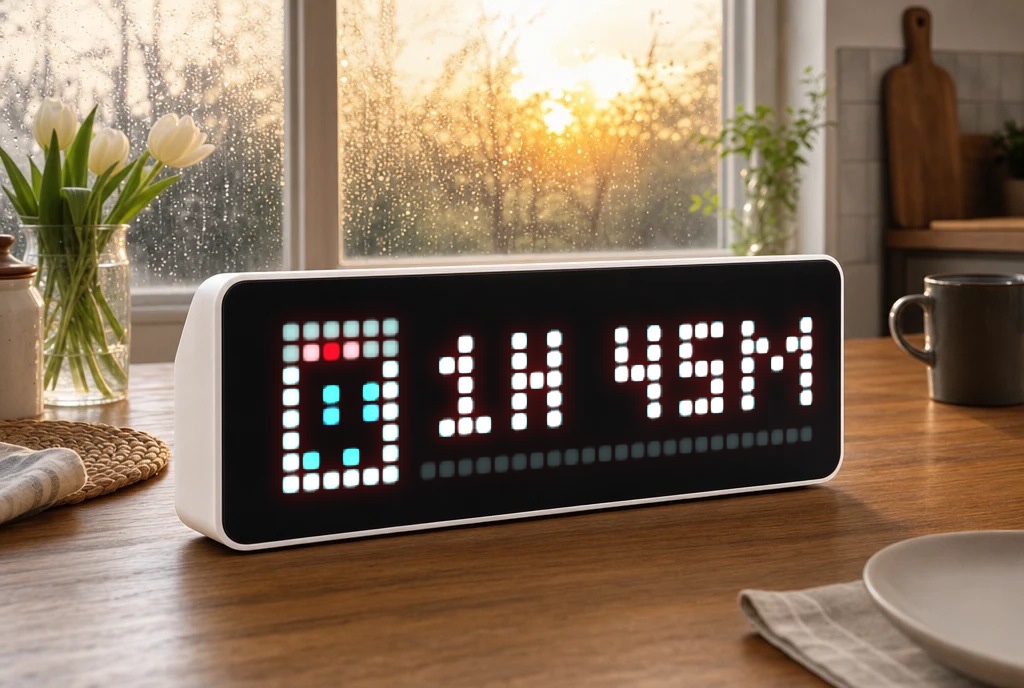
HomeAssistant Washdata
Shows remaining time & progress of a washing machine, dishwasher, or dryer with icon and progress bar on AWTRIX NG.
| System | Home Assistant Blueprint |
|---|---|
| Firmware | AWTRIX NG |
| Topic | Smarthome |
| Built by | idomi94 |
| File | GO8wCYv68E4R.yaml · 9.2 KB |
| Icons | — |
| Published | 30 Aug 2026 |
| Downloads | 1 |
What it does
Shows the progress of a running machine (washing machine, dishwasher, dryer, ...) as its own app on your AWTRIX NG display: icon, progress bar (0–100%), and remaining time as text (e.g. 1h 23m or 45min). Once the machine is done, it briefly shows "Done!" and then the app is automatically removed.
Features
- Multiple machines at once – set up this blueprint once per machine as its own automation, each getting its own app slot in the rotation.
- Device instead of manual topic prefix – pick your AWTRIX device from a dropdown, the MQTT prefix is read automatically from the device.
- Freely selectable trigger sensors – only updates on an actual sensor change (remaining-time and/or progress sensor), no time-pattern polling, keeping automation traces clean and easy to follow.
- Progress either comes directly from a percentage sensor or is calculated automatically from remaining time + total cycle duration.
- Automatic topic sanitizing – the internal app name is automatically converted into a safe MQTT topic name (lowercase, no umlauts/special characters).
- Freely configurable colors (text, progress bar, bar background), display duration, lifetime timeout, and a "Done" notification.
Requirements
- An AWTRIX NG device (via the MQTT integration in Home Assistant)
- A sensor providing the remaining time in minutes
- A binary sensor indicating whether the machine is running
- Optional: a progress sensor (percentage)
- An icon ID from the AWTRIX icon browser for each machine. e.g:
Dishwasher: 17590
Washing Maschine: 26671
GO8wCYv68E4R.yaml
blueprint:
  name: "AWTRIX NG – Maschinen-Zyklusanzeige"
  description: >
    Zeigt eine laufende Maschine (Waschmaschine, Spülmaschine, Trockner ...)
    auf einem AWTRIX-NG-Display an: Icon, Fortschrittsbalken und Restzeit
    (z. B. "1h 23m" oder "45min"). Läuft die Maschine nicht mehr, wird kurz
    "Fertig!" angezeigt und die App danach vom Display entfernt.

    Trigger: Du wählst selbst, welche Sensoren eine Aktualisierung auslösen
    sollen (z. B. Restzeit-Sensor und/oder Fortschritt-Sensor). Es gibt
    keinen Zeit-Pattern-Trigger - dadurch findest du im Trace immer genau
    die Sensor-Änderung, die eine Aktualisierung ausgelöst hat.

    Gerät statt Prefix: Du wählst dein AWTRIX-Gerät aus einer Liste, der
    MQTT-Prefix wird automatisch aus dessen "MQTT prefix"-Sensor gelesen.

    Der App-Name wird automatisch in einen sicheren MQTT-Topic-Namen
    umgewandelt (Kleinbuchstaben, Umlaute → ae/oe/ue/ss, Leer- und
    Sonderzeichen → "_"). Du kannst also z. B. "Spüli" eintragen, im Topic
    landet dann automatisch "spueli".

    Mehrere Maschinen: Dieses Blueprint einmal PRO MASCHINE als eigene
    Automatisierung anlegen (z. B. "AWTRIX – Waschmaschine",
    "AWTRIX – Spülmaschine", "AWTRIX – Trockner"). Jede Instanz bekommt
    einen eigenen App-Namen und erscheint dadurch als eigener Slot in der
    Awtrix-App-Rotation.

    Icon-ID: im Awtrix-Web-UI unter "Icons" nach "washing machine",
    "dishwasher" bzw. "tumble dryer" suchen und die ID dort ablesen.
  domain: automation
  input:
    awtrix:
      name: AWTRIX-Gerät
      description: Wähle dein AWTRIX-Gerät (MQTT-Integration) aus.
      selector:
        device:
          filter:
            - integration: mqtt
              manufacturer: Blueforcer
    restzeit_sensor:
      name: Restzeit-Sensor
      description: Sensor mit der Restzeit der Maschine in Minuten (Zahl).
      selector:
        entity:
          domain: sensor
    laeuft_sensor:
      name: 'Läuft-Sensor'
      description: >
        Binärsensor, der "on" ist, solange die Maschine läuft (z. B. aus
        einer Smart-Plug-Leistungsmessung oder Geräte-Integration).
      selector:
        entity:
          domain: binary_sensor
    fortschritt_sensor:
      name: Fortschritt-Sensor (optional)
      description: >
        Sensor mit dem Fortschritt in Prozent (0–100). Wenn gesetzt, wird
        dieser statt der Berechnung aus Gesamtdauer verwendet.
      default: ""
      selector:
        entity:
          domain: sensor
    trigger_sensors:
      name: Sensoren für Aktualisierung
      description: >
        Wähle alle Sensoren aus, bei deren Änderung die Anzeige aktualisiert
        werden soll. Meist: Restzeit-Sensor, und falls vorhanden zusätzlich
        den Fortschritt-Sensor (der sich oft öfter ändert als die Restzeit).
      selector:
        entity:
          domain: sensor
          multiple: true
    app_name:
      name: Interner App-Slot-Name (NICHT auf dem Display sichtbar)
      description: >
        Nur ein interner Bezeichner, damit AWTRIX diese Maschine als
        eigenen Anzeige-Slot von anderen Apps (Uhrzeit, Wetter, andere
        Maschinen ...) unterscheiden kann - erscheint selbst NIE auf dem
        Display. Muss nur innerhalb dieses Geräts eindeutig sein, z. B.
        "Spülmaschine" oder "Spüli". Wird automatisch in einen sicheren
        MQTT-Topic-Namen umgewandelt, muss also nicht "sauber"
        geschrieben werden.
      selector:
        text:
    icon_id:
      name: Icon-ID
      description: Icon-ID aus dem Awtrix-Icon-Browser für diese Maschine.
      selector:
        text:
    gesamtdauer_minuten:
      name: Gesamtdauer eines Zyklus (Minuten)
      description: Nur nötig, wenn kein Fortschritt-Sensor angegeben ist.
      default: 120
      selector:
        number:
          min: 1
          max: 600
          mode: box
    text_color:
      name: Textfarbe
      default: "#FFFFFF"
      selector:
        text:
    progress_color:
      name: Farbe Fortschrittsbalken
      default: "#00A6FF"
      selector:
        text:
    progress_track_color:
      name: Farbe Balken-Hintergrund
      default: "#222222"
      selector:
        text:
    duration_ms:
      name: Anzeigedauer pro Rotation (ms)
      default: 6000
      selector:
        number:
          min: 1000
          max: 30000
          step: 500
    lifetime_ms:
      name: Lifetime / Sicherheits-Timeout (ms)
      description: App verschwindet automatisch, falls keine Updates mehr kommen.
      default: 90000
      selector:
        number:
          min: 5000
          max: 600000
          step: 1000
    fertig_text:
      name: Text bei Fertigstellung
      default: "Fertig!"
      selector:
        text:
    fertig_duration_ms:
      name: Anzeigedauer der "Fertig"-Meldung (ms)
      default: 8000
      selector:
        number:
          min: 1000
          max: 20000
          step: 500

triggers:
  - trigger: state
    entity_id: !input trigger_sensors
    id: update
  - trigger: state
    entity_id: !input laeuft_sensor
    id: laeuft
  - trigger: homeassistant
    event: start
    id: start

conditions: []

variables:
  v_device_id: !input awtrix
  restzeit_sensor: !input restzeit_sensor
  laeuft_sensor: !input laeuft_sensor
  fortschritt_sensor: !input fortschritt_sensor
  app_name: !input app_name
  icon_id: !input icon_id
  gesamtdauer_minuten: !input gesamtdauer_minuten
  text_color: !input text_color
  progress_color: !input progress_color
  progress_track_color: !input progress_track_color
  duration_ms: !input duration_ms
  lifetime_ms: !input lifetime_ms
  fertig_text: !input fertig_text
  fertig_duration_ms: !input fertig_duration_ms
  # Prefix aus dem "MQTT prefix"-Sensor des gewählten Geräts lesen.
  v_prefix: >-
    {% set e = device_entities(v_device_id) | select('search', 'mqtt_prefix') | list %}
    {{ states(e[0]) if e else 'unknown' }}
  # App-Name in einen sicheren MQTT-Topic-Slug umwandeln.
  v_app_slug: >-
    {%- set s = app_name | lower -%}
    {%- set s = s | replace('ä','ae') | replace('ö','oe') | replace('ü','ue') | replace('ß','ss') -%}
    {%- set s = s | regex_replace('[^a-z0-9_-]+', '_') -%}
    {%- set s = s | regex_replace('^_+|_+$', '') -%}
    {{ s if s else 'maschine' }}

actions:
  - choose:
      # Maschine ist gerade fertig geworden (laeuft_sensor -> off)
      - conditions:
          - condition: trigger
            id: laeuft
          - condition: state
            entity_id: !input laeuft_sensor
            state: "off"
          - condition: template
            value_template: "{{ v_prefix not in ['unknown', 'unavailable', 'none', ''] }}"
        sequence:
          - action: mqtt.publish
            data:
              topic: "{{ v_prefix }}/cmd/notify"
              payload: >-
                {{ {
                  "text": fertig_text,
                  "icon": icon_id,
                  "textColor": "#00FF00",
                  "durationMs": fertig_duration_ms | int
                } | tojson }}
          - delay:
              seconds: 2
          - action: mqtt.publish
            data:
              topic: "{{ v_prefix }}/cmd/apps/pushed/{{ v_app_slug }}"
              payload: ""
      # Maschine läuft: Trigger-Sensor-Update, Start oder HA-Neustart während sie läuft
      - conditions:
          - condition: state
            entity_id: !input laeuft_sensor
            state: "on"
          - condition: template
            value_template: "{{ v_prefix not in ['unknown', 'unavailable', 'none', ''] }}"
        sequence:
          - action: mqtt.publish
            data:
              topic: "{{ v_prefix }}/cmd/apps/pushed/{{ v_app_slug }}"
              payload: >-
                {%- set remaining = states(restzeit_sensor) | float(0) -%}
                {%- if fortschritt_sensor and states(fortschritt_sensor) not in ['unknown','unavailable',''] -%}
                  {%- set pct = states(fortschritt_sensor) | float(0) -%}
                {%- else -%}
                  {%- set total = gesamtdauer_minuten | float(1) -%}
                  {%- set pct = ((total - remaining) / total * 100) -%}
                {%- endif -%}
                {%- set pct = [0, [100, pct | round(0) | int] | min] | max -%}
                {%- set h = (remaining // 60) | int -%}
                {%- set m = (remaining % 60) | int -%}
                {%- if h > 0 -%}
                  {%- set zeit_text = h ~ 'h ' ~ m ~ 'm' -%}
                {%- else -%}
                  {%- set zeit_text = m ~ 'min' -%}
                {%- endif -%}
                {{ {
                  "text": zeit_text,
                  "icon": icon_id,
                  "iconMode": "fixed",
                  "textColor": text_color,
                  "progress": pct,
                  "progressColor": progress_color,
                  "progressTrackColor": progress_track_color,
                  "durationMs": duration_ms | int,
                  "lifetimeMs": lifetime_ms | int,
                  "lifetimeExpiry": "remove",
                  "scroll": {"mode": "static"}
                } | tojson }}
    default: []

mode: single
max_exceeded: silent
More flows for Home Assistant Blueprint or Smarthome
Something wrong with this flow? Report it.