Bitcoin
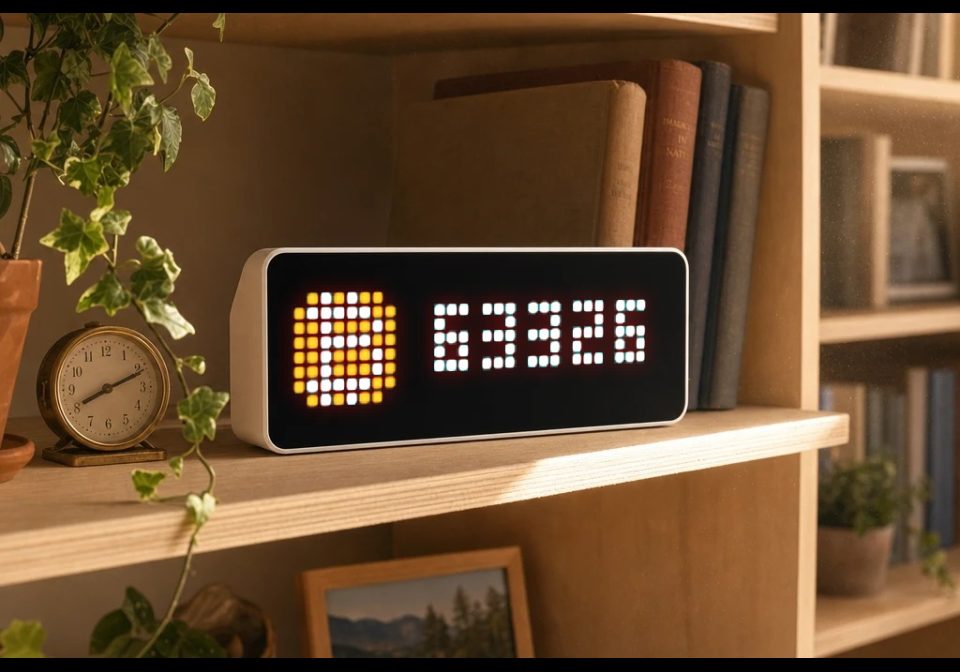
Shows the current Bitcoin price on your AWTRIX NG panel
| System | AWTRIX NG Scripts |
|---|---|
| Firmware | AWTRIX NG |
| Topic | Miscellaneous |
| Built by | RobG |
| File | GFZJK4udZVaY.ax · 2.8 KB |
| Icons | 1 |
| Published | 11 Aug 2026 · updated 11 Aug 2026 |
| Downloads | 69 |
Bitcoin
Shows the current Bitcoin price on your AWTRIX NG panel, fetched directly from the free CoinGecko API. Runs entirely on the device.
Features
- Live Bitcoin price in USD or EUR, refreshed on your own schedule (default: every 5 minutes)
- Instant after reboot - the last known price is remembered and shown immediately while the first fresh fetch runs
- Never shows stale data: if the price could not be refreshed for a while (3× the refresh interval), the app simply skips its turn in the rotation instead of displaying an outdated number
- Icon with a built-in fallback - set any icon from your device's icon folder (default
12460); if it's missing, the app draws an orange B instead, so there is never an empty gap - Compact format option:
114.1Kinstead of114123 - Memory friendly - reads only a ~32-byte window of the API response instead of parsing a full JSON document
Settings
| Setting | Default | Description |
|---|---|---|
| Currency | usd | Price in usd or eur |
| Refresh | 5 min | How often the price is fetched (1–60 min) |
| Text color | white | Color of the price text |
| Icon | 12460 | Icon name/ID from the device icon folder |
| Short format | off | Show 114.1K instead of the full number |
All settings are edited in the web UI: Apps tab → ⋯ on the Bitcoin row → Settings.
How it works
Once per refresh interval the app fetches api.coingecko.com/api/v3/simple/price over HTTPS and extracts just the price. The finished number is stored on the device, so it survives reboots and is painted without any work per frame. If the price is wider than the panel it scrolls past the icon automatically.
Installation
- Open the AWTRIX NG web interface.
- Go to the Scripts tab and create a new script (e.g.
Bitcoin). - Paste the script and press Save.
- The price appears in the app rotation as soon as the first fetch completes (a few seconds).
GFZJK4udZVaY.ax
# @name    Bitcoin
# @desc    Bitcoin price via CoinGecko (no API key needed)
# @author  RobG
# @version 1.0
# @config  currency select "Currency"               default=usd options=usd,eur
# @config  every    number "Refresh"                default=5 min=1 max=60 unit=min
# @config  color    color  "Text color"             default=#FFFFFF
# @config  ic       text   "Icon"                   default="12460" help="Icon name/ID from the device icon folder. Missing = orange B"
# @config  compact  bool   "Short format (114.1K)"  default=false

class Bitcoin
  var url, needle, period       # built from the settings in init()
  var color, ic, compact
  var price                     # last known price, nil until the first success
  var label                     # the finished string draw() paints
  var ticks, in_flight          # countdown of loop() calls; request outstanding
  var age                       # seconds since the last successful fetch

  def fmt(v)
    if self.compact && v >= 10000
      return str(round(v / 1000.0, 1)) + "K"
    end
    return str(round(v))
  end

  def init()
    var cur = str(store.get("currency"))
    self.url = "https://api.coingecko.com/api/v3/simple/price?ids=bitcoin&vs_currencies=" + cur
    self.needle = "\"" + cur + "\":"
    self.period = num(store.get("every"), 5) * 60
    self.color = store.get("color")
    self.ic = store.get("ic")
    self.compact = store.get("compact") == true
    self.price = store.get("price")             # survives a reboot: shows instantly
    self.label = self.price == nil ? nil : self.fmt(self.price)
    self.ticks = 0
    self.in_flight = false
    self.age = 0
  end

  def on_body(body, status)
    self.in_flight = false
    if body == nil return end                   # one check, every failure
    var m = re.search("([0-9][0-9.]*)", body)   # body starts at "usd": thanks to find
    if m == nil return end
    var v = num(m[1])
    if v == nil return end
    self.price = v
    self.label = self.fmt(v)
    self.age = 0
    store.set("price", v)                       # only once it is good
  end

  def loop()
    if self.ticks <= 0
      self.ticks = self.period
      if !self.in_flight
        self.in_flight = true
        http.get(self.url, / b, st -> self.on_body(b, st),
                 {'find': self.needle, 'keep': 32})
      end
    end
    self.ticks -= 1
    self.age += 1
  end

  def should_show()
    # nothing fetched yet, or the data has gone stale: skip our turn
    return self.label != nil && self.age < self.period * 3
  end

  def draw()
    clear()
    if !icon(self.ic, 0, 0)
      text(2, 6, "B", 0xF7931A)                 # fallback when the icon is missing
    end
    if self.label != nil
      scroll_text(9, 6, width() - 9, self.label, self.color)
    end
  end
end

return Bitcoin()
Install it on your AWTRIX NG
Your browser writes the script straight to the device on your network. It joins the app rotation right away.
Some browsers refuse to talk to a device on your network from a public page. Download the flow and paste it into the Scripts tab of your device, or install it from a terminal:
These icons belong on the device, in /ICONS. Each one is at
most 32×8
pixels — shown here magnified, at their real proportions.

8×8 px
More flows for AWTRIX NG Scripts or Miscellaneous
Something wrong with this flow? Report it.