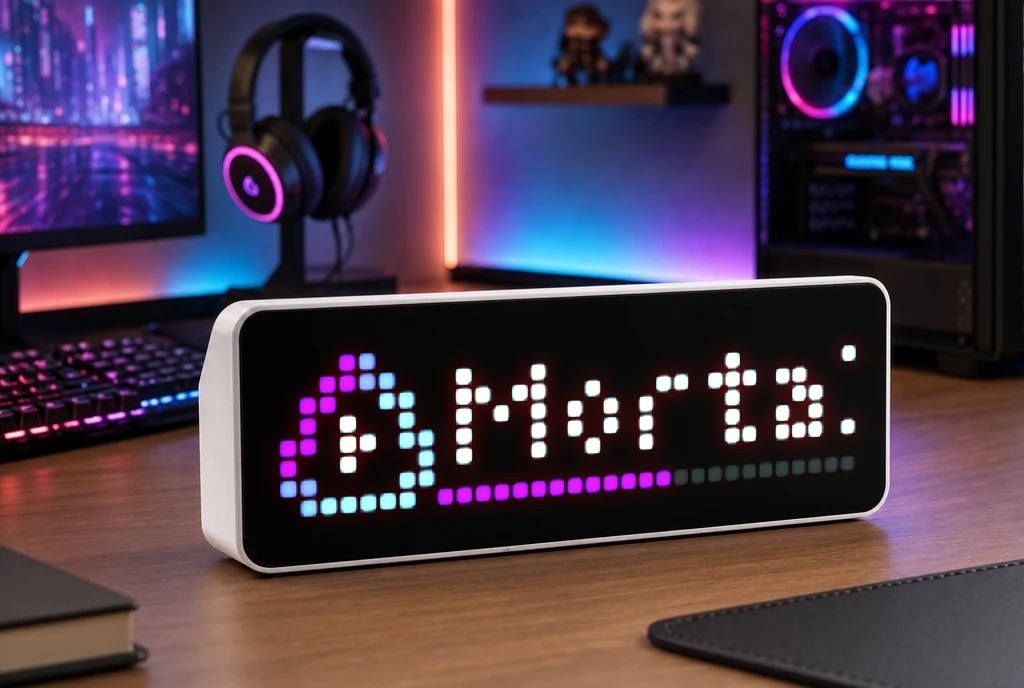
Jellyfin Status
Shows title of playing movie/series with progress bar
| System | Node-RED |
|---|---|
| Firmware | AWTRIX NG |
| Topic | Miscellaneous |
| Built by | strusic |
| File | FyvOggtfrhVC.json · 4.4 KB |
| Icons | 2 |
| Published | 29 Aug 2026 |
Jellyfin to Awtrix NG (Node-RED Flow)
This simple Node-RED flow connects to your Jellyfin API and displays what is currently playing (with a smooth progress bar) on your Awtrix NG matrix.
How to use:
- Import the JSON flow into your Node-RED.
- Double-click the HTTP Request node and update the URL with your details:
- Replace
JELLYFIN_IPwith your Jellyfin server IP. - Replace
YOUR_API_KEYwith your API key generated in Jellyfin (Dashboard->Advanced->API Keys).
- Double-click the MQTT Out node and select your own MQTT Broker.
- Note: Make sure the topic matches your Awtrix prefix (default is
awtrix-ng/cmd/apps/pushed/Jellyfin).
- Click Deploy and you're good to go!
FyvOggtfrhVC.json
[
    {
        "id": "1b0cb4375137d04e",
        "type": "tab",
        "label": "Jellyfin + Awtrix-NG",
        "disabled": false,
        "info": "",
        "env": []
    },
    {
        "id": "3bf1bbfe232b2040",
        "type": "inject",
        "z": "1b0cb4375137d04e",
        "name": "Timestamp 5s",
        "props": [
            {
                "p": "payload"
            },
            {
                "p": "topic",
                "vt": "str"
            }
        ],
        "repeat": "5",
        "crontab": "",
        "once": false,
        "onceDelay": 0.1,
        "topic": "",
        "payload": "",
        "payloadType": "date",
        "x": 120,
        "y": 100,
        "wires": [
            [
                "d3dafda4e5b356ae"
            ]
        ]
    },
    {
        "id": "d3dafda4e5b356ae",
        "type": "http request",
        "z": "1b0cb4375137d04e",
        "name": "Jellyfin Connection",
        "method": "GET",
        "ret": "obj",
        "paytoqs": "ignore",
        "url": "http://JELLYFIN_IP:8096/Sessions?activeWithinSeconds=120&api_key=YOUR_API_KEY",
        "tls": "",
        "persist": false,
        "proxy": "",
        "insecureHTTPParser": false,
        "authType": "",
        "senderr": false,
        "headers": [],
        "x": 330,
        "y": 100,
        "wires": [
            [
                "f9962144452b64b8"
            ]
        ]
    },
    {
        "id": "f9962144452b64b8",
        "type": "function",
        "z": "1b0cb4375137d04e",
        "name": "Payload Function",
        "func": "if (!msg.payload || !Array.isArray(msg.payload) || msg.payload.length === 0) {\n    return { payload: \"\" };\n}\n\nlet session = msg.payload.find(s => s.NowPlayingItem);\n\nif (!session) {\n    return { payload: \"\" };\n}\n\nlet item = session.NowPlayingItem;\nlet isPaused = session.PlayState && session.PlayState.IsPaused;\n\nlet title = item.Name || \"Brak tytułu\";\nif (item.SeriesName && item.ParentIndexNumber && item.IndexNumber) {\n    let s = String(item.ParentIndexNumber).padStart(2, '0');\n    let e = String(item.IndexNumber).padStart(2, '0');\n    title = `${item.SeriesName} S${s}-E${e}`;\n} else if (item.ProductionYear) {\n    title = `${title} (${item.ProductionYear})`;\n}\n\nlet pct = 0;\nif (item.RunTimeTicks > 0 && session.PlayState && session.PlayState.PositionTicks > 0) {\n    pct = Math.round((session.PlayState.PositionTicks / item.RunTimeTicks) * 100);\n    if (pct > 100) pct = 100;\n    if (pct < 0) pct = 0;\n}\n\nmsg.payload = {\n    text: title,\n    icon: isPaused ? \"75372\" : \"75392\",\n    textColor: \"#FFFFFF\",\n    scroll: { speed: 200 },\n    progress: pct,\n    progressColor: \"#BB0FFF\",\n    progressTrackColor: \"#333333\",\n    repeat: 2,\n    lifetimeExpiry: \"remove\",\n    iconMode: \"fixed\",\n    textCase: \"asTyped\"\n};\n\nreturn msg;",
        "outputs": 1,
        "timeout": 0,
        "noerr": 0,
        "initialize": "",
        "finalize": "",
        "libs": [],
        "x": 550,
        "y": 100,
        "wires": [
            [
                "c40f8674a4355dfe"
            ]
        ]
    },
    {
        "id": "c40f8674a4355dfe",
        "type": "mqtt out",
        "z": "1b0cb4375137d04e",
        "name": "MQTT TOPIC",
        "topic": "awtrix-ng/cmd/apps/pushed/Jellyfin",
        "qos": "",
        "retain": "",
        "respTopic": "",
        "contentType": "",
        "userProps": "",
        "correl": "",
        "expiry": "",
        "broker": "a22dcf45cb4d8e5e",
        "x": 760,
        "y": 100,
        "wires": []
    },
    {
        "id": "a22dcf45cb4d8e5e",
        "type": "mqtt-broker",
        "name": "Mosquitto",
        "broker": "192.168.0.103",
        "port": 1883,
        "clientid": "",
        "autoConnect": true,
        "usetls": false,
        "protocolVersion": 4,
        "keepalive": 60,
        "cleansession": true,
        "autoUnsubscribe": true,
        "birthTopic": "",
        "birthQos": "0",
        "birthRetain": "false",
        "birthPayload": "",
        "birthMsg": {},
        "closeTopic": "",
        "closeQos": "0",
        "closeRetain": "false",
        "closePayload": "",
        "closeMsg": {},
        "willTopic": "",
        "willQos": "0",
        "willRetain": "false",
        "willPayload": "",
        "willMsg": {},
        "userProps": "",
        "sessionExpiry": ""
    }
]
These icons belong on the device, in /ICONS. Each one is at
most 32×8
pixels — shown here magnified, at their real proportions.

8×8 px

8×8 px
More flows for Node-RED or Miscellaneous
Something wrong with this flow? Report it.