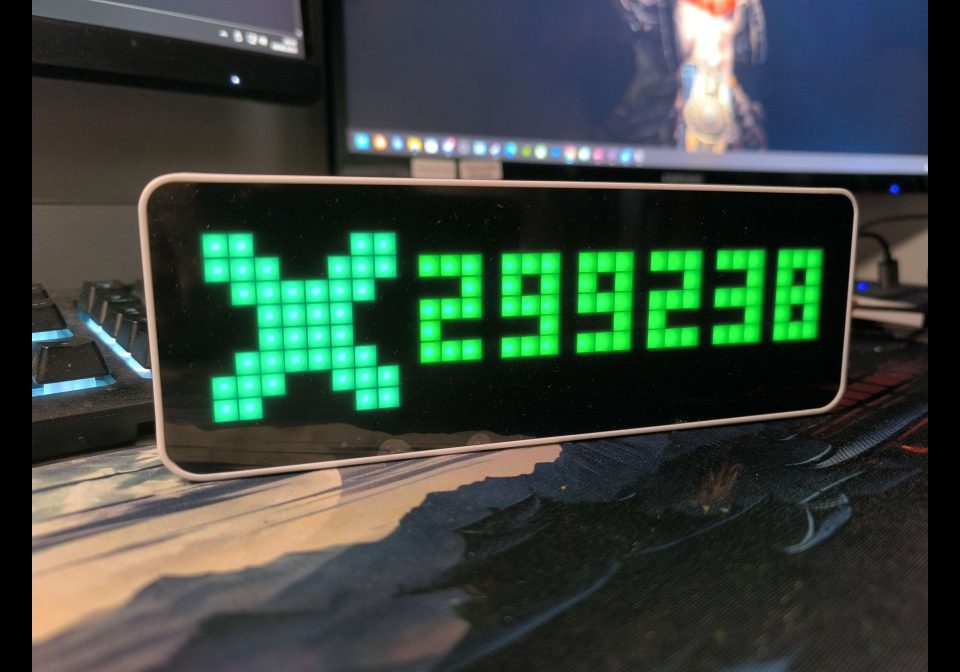
Xbox Gamerscore
Zeigt deinen aktuellen Xbox-Gamerscore auf deinem AWTRIX NG.
| System | AWTRIX NG Scripts |
|---|---|
| Firmware | AWTRIX NG |
| Topic | Gaming |
| Built by | Big Quantum |
| File | 7Sv6nCyY6nTy.ax · 1.3 KB |
| Icons | 1 |
| Published | 9 Aug 2026 · updated 9 Aug 2026 |
| Downloads | 53 |
Xbox Gamerscore
Zeigt den aktuellen Gamerscore deines Xbox-Kontos direkt auf deinem AWTRIX NG.
Voraussetzungen
- AWTRIX NG
- OpenXBL API-Key
- Xbox-Konto
- Internetverbindung
Einrichtung
Die App verwendet die OpenXBL API, um den Gamerscore des mit dem API-Key verbundenen Xbox-Kontos abzurufen.
Wichtig: Jeder Benutzer benötigt seinen eigenen OpenXBL API-Key. Niemals einen fremden oder bereits vorkonfigurierten API-Key verwenden.
Das Xbox-Icon wird auf dem Display zusammen mit dem aktuellen Gamerscore angezeigt.
Die App aktualisiert den Gamerscore regelmäßig. Bei einem kurzfristigen Verbindungsfehler bleibt der zuletzt erfolgreich abgerufene Wert erhalten.
7Sv6nCyY6nTy.ax
# @name    XboxGamerscore

# @desc    Xbox Gamerscore

# @author  Big Quantum

# @version 2.7

class XboxGamerscore
var key
var score
var busy
var ticks

def init()
self.key = "OpenXBL API key here"
self.score = "..."
self.busy = false
self.ticks = 0
end

def body(b, s)
self.busy = false

log("Xbox HTTP status=" + str(s))

if b == nil
  log("Xbox temporary connection error - keeping last score")
  return
end

var m = re.search("\"value\"\\s*:\\s*\"(\\d+)\"", b)

if m == nil
  log("Gamerscore value not found - keeping last score")
  return
end

self.score = m[1]
log("Gamerscore=" + self.score)
end

def loop()
if self.ticks > 0
self.ticks -= 1
return
end

if self.busy
return
end

# Alle 10 Minuten aktualisieren
self.ticks = 600
self.busy = true

http.get(
  "https://api.xbl.io/v2/account",
  / b, s -> self.body(b, s),
  {
    'headers': {
      'X-Authorization': self.key,
      'Accept': 'application/json'
    },
    'find': "Gamerscore",
    'keep': 100
  }
)
end

def draw()
clear()

# Xbox Icon 4253
if !icon("4253", 0, 0)
  circle_fill(4, 4, 3, 0x00FF00)
end

# Gamerscore
var tw = text_ink_width(self.score)

text(
  9 + (width() - 9 - tw) / 2,
  6,
  self.score,
  0x00FF00
)

end

end

return XboxGamerscore()
Install it on your AWTRIX NG
Your browser writes the script straight to the device on your network. It joins the app rotation right away.
Some browsers refuse to talk to a device on your network from a public page. Download the flow and paste it into the Scripts tab of your device, or install it from a terminal:
These icons belong on the device, in /ICONS. Each one is at
most 32×8
pixels — shown here magnified, at their real proportions.

8×8 px
More flows for AWTRIX NG Scripts or Gaming
Something wrong with this flow? Report it.