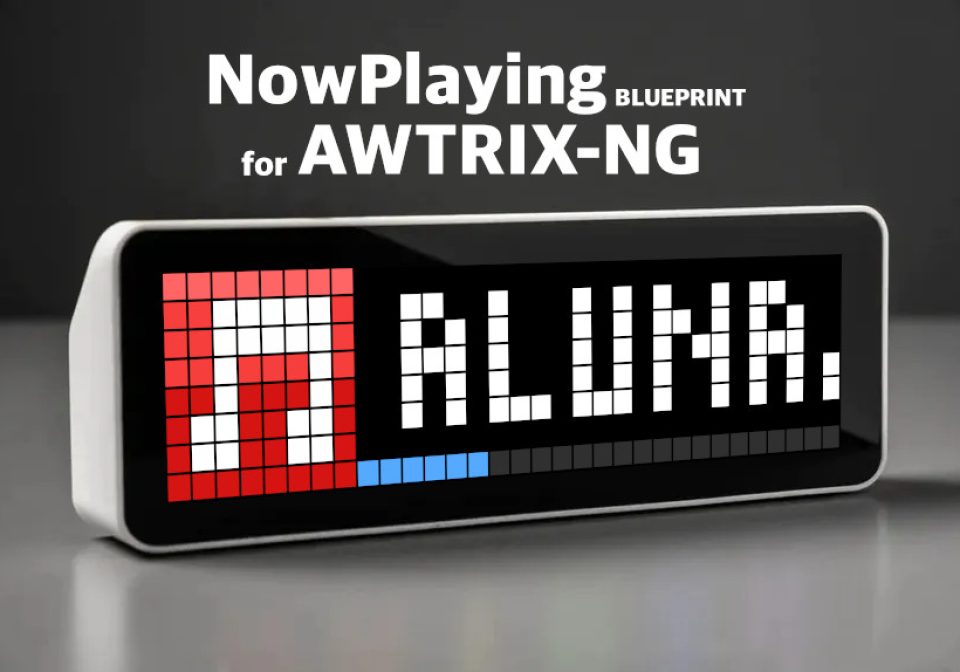
NowPlaying
Displays artist, title and playback progress from a HA media player
| System | Home Assistant Blueprint |
|---|---|
| Firmware | AWTRIX NG |
| Topic | Smarthome |
| Built by | Hank_the_Tank |
| File | 79w0nQbo6Czy.yaml · 4.9 KB |
| Icons | 1 |
| Published | 3 Aug 2026 · updated 19 Aug 2026 |
| Downloads | 174 |
AWTRIX NG – Now Playing Blueprint
Display the currently playing artist, track title and playback progress from a Home Assistant media player on an AWTRIX NG device.
The blueprint creates an AWTRIX NG pushed app named NowPlaying. It updates the playback progress every five seconds and automatically removes the app when playback stops.
Features
- Displays the current artist and track title
- Shows a configurable AWTRIX NG icon
- Adds a playback progress bar along the bottom of the display
- Updates the progress bar every five seconds
- Supports a configurable text repeat count
- Provides a color picker for the progress bar
- Uses a dark gray progress track for good contrast
- Removes the pushed app automatically when the media player is no longer playing
- Works with any Home Assistant
media_playerentity that provides the required playback attributes
Display layout
The pushed app contains:
- the selected icon on the left
- the artist and track title as scrolling text
- a progress bar on the bottom row
The text is formatted as:
Artist - Track title
The text uses AWTRIX NG wrap scrolling. The progress bar represents the estimated current playback position as a percentage of the track duration.
Requirements
- Home Assistant
- A configured MQTT integration in Home Assistant
- An AWTRIX NG device connected to the same MQTT broker
- The MQTT prefix configured on the AWTRIX NG
- A Home Assistant media player that exposes:
media_artistmedia_titlemedia_durationmedia_positionmedia_position_updated_at
- The selected icon must already be stored on the AWTRIX NG
If the media player does not provide duration or position information, the progress bar remains at 0%. Artist and title availability depends on the media player integration.
Installation
-
Copy
awtrix_ng_now_playing_blueprint.yamlto your Home Assistant blueprint directory:/config/blueprints/automation/awtrix_ng/awtrix_ng_now_playing_blueprint.yaml -
Reload automations or restart Home Assistant.
-
Open Settings → Automations & Scenes → Blueprints.
-
Find AWTRIX NG – Now Playing.
-
Select Create automation.
-
Configure the inputs described below and save the automation.
Configuration
| Setting | Description | Default |
|---|---|---|
| AWTRIX NG | MQTT prefix configured on the AWTRIX NG MQTT page. Do not include a trailing slash. | awtrixNG |
| Media Player | Home Assistant media player whose current track should be displayed. | Required |
| AWTRIX NG Icon ID | ID of an icon already stored on the AWTRIX NG. | 44739 |
| Repeat | Number of completed text scrolls. Use 0 to rely on the normal AWTRIX NG app duration. |
3 |
| Progress Color | Color of the filled portion of the playback progress bar. | #55AAFF |
The unfilled progress track uses the fixed color #303030.
MQTT details
While the selected media player is playing, the blueprint publishes the pushed app to:
<mqtt-prefix>/cmd/apps/pushed/NowPlaying
With the default prefix, the topic is:
awtrixNG/cmd/apps/pushed/NowPlaying
When playback stops, pauses or becomes unavailable, the blueprint publishes an empty payload to the same topic. AWTRIX NG then removes the NowPlaying pushed app from its rotation.
MQTT messages use QoS 0 and are not retained.
Playback progress calculation
The blueprint combines the last reported media_position with the time elapsed since media_position_updated_at. This allows the progress bar to continue advancing between state updates from the media player.
The calculated value is limited to the valid range of 0–100% before it is sent to AWTRIX NG.
Multiple players or displays
Create a separate automation from the blueprint for each media player or AWTRIX NG device.
Each AWTRIX NG device must have a unique MQTT prefix if several devices use the same broker. Because AWTRIX NG does not expose its configured MQTT prefix as a selectable Home Assistant entity, the prefix is entered manually in the blueprint settings.
Troubleshooting
Nothing appears on the AWTRIX NG
- Verify the MQTT prefix. It is case-sensitive and must not end with
/. - Confirm that MQTT is connected on the AWTRIX NG MQTT page.
- Confirm that the selected media player is in the
playingstate. - Check that Home Assistant can publish to the configured MQTT broker.
The icon is missing
- Verify that the entered icon ID exists on the AWTRIX NG.
- Enter only the icon ID, without a filename extension.
The progress bar stays at zero
Open the media player in Developer Tools → States and check for media_duration, media_position and media_position_updated_at. Some integrations or live streams do not provide these attributes.
Artist or title is empty
The blueprint can only display metadata supplied by the selected media player integration. Radio streams, advertisements and some local sources may omit artist or title information.
The text stays visible longer than expected
The Repeat setting controls how often overflowing text completes its scroll. Long artist and title combinations therefore remain visible longer when a higher repeat count is selected.
Author
Hank_The_Tank / Codex
79w0nQbo6Czy.yaml
blueprint:
  name: AWTRIX NG – Now Playing
  description: >-
    Displays artist, title and playback progress from a media player as an
    AWTRIX NG pushed app. The app is removed when playback stops. The scrolling
    text can optionally use one of the built-in AWTRIX NG color palettes.
  domain: automation
  author: Hank_the_Tank / Codex
  input:
    awtrix_mqtt_prefix:
      name: AWTRIX NG
      description: >-
        Enter the MQTT prefix configured on the AWTRIX NG MQTT page,
        for example awtrixNG. Do not add a trailing slash.
      default: awtrixNG
      selector:
        text:

    media_player:
      name: Media Player
      description: Select the media player whose current track should be displayed.
      selector:
        entity:
          domain: media_player

    icon_id:
      name: AWTRIX NG Icon ID
      description: Enter the ID of an icon already stored on the AWTRIX NG.
      default: "44739"
      selector:
        text:

    repeat_count:
      name: Repeat
      description: >-
        Number of completed text scrolls. Use 0 to rely on the normal app duration.
      default: 3
      selector:
        number:
          mode: box
          min: 0
          max: 100
          step: 1

    text_palette:
      name: Text Color Palette
      description: >-
        Select an AWTRIX NG built-in palette for the scrolling artist and title.
        Choose White (no palette) to display normal white text.
      default: White (no palette)
      selector:
        select:
          mode: dropdown
          options:
            - White (no palette)
            - Cloud
            - Lava
            - Ocean
            - Forest
            - Stripe
            - Party
            - Heat
            - Rainbow

    progress_color:
      name: Progress Color
      description: Select the color of the filled playback progress bar.
      default: [85, 170, 255]
      selector:
        color_rgb:

mode: restart

triggers:
  - trigger: state
    entity_id: !input media_player

  - trigger: time_pattern
    seconds: /5

variables:
  awtrix_mqtt_prefix: !input awtrix_mqtt_prefix
  media_player_entity: !input media_player
  icon_id: !input icon_id
  repeat_count: !input repeat_count
  text_palette: !input text_palette
  progress_color: !input progress_color

actions:
  - choose:
      - conditions:
          - condition: template
            value_template: "{{ is_state(media_player_entity, 'playing') }}"
        sequence:
          - variables:
              progress_percent: |-
                {% set duration =
                  state_attr(media_player_entity, 'media_duration') | float(0) %}
                {% set position =
                  state_attr(media_player_entity, 'media_position') | float(0) %}
                {% set updated =
                  state_attr(media_player_entity, 'media_position_updated_at') %}
                {% if duration > 0 %}
                  {% set elapsed =
                    as_timestamp(now())
                    - as_timestamp(updated, as_timestamp(now())) %}
                  {% set current = position + ([elapsed, 0] | max) %}
                  {% set percentage =
                    (current / duration * 100) | round(0) | int %}
                  {{ [[percentage, 0] | max, 100] | min }}
                {% else %}
                  0
                {% endif %}

          - action: mqtt.publish
            data:
              evaluate_payload: false
              qos: 0
              retain: false
              topic: "{{ awtrix_mqtt_prefix ~ '/cmd/apps/pushed/NowPlaying' }}"
              payload: >-
                {% set base_payload = {
                  'text':
                    (state_attr(media_player_entity, 'media_artist') or '')
                    ~ ' - '
                    ~ (state_attr(media_player_entity, 'media_title') or ''),
                  'icon': icon_id,
                  'repeat': repeat_count | int,
                  'textOffsetX': 23,
                  'scroll': {
                    'mode': 'wrap'
                  },
                  'progress': progress_percent | int,
                  'progressColor': progress_color,
                  'progressTrackColor': '#303030'
                } %}
                {% if text_palette == 'White (no palette)' %}
                  {{ dict(base_payload, textColor='#FFFFFF') | to_json }}
                {% else %}
                  {{ dict(
                    base_payload,
                    textColor='palette',
                    palette=text_palette
                  ) | to_json }}
                {% endif %}

    default:
      - action: mqtt.publish
        data:
          evaluate_payload: false
          qos: 0
          retain: false
          topic: "{{ awtrix_mqtt_prefix ~ '/cmd/apps/pushed/NowPlaying' }}"
          payload: ""
These icons belong on the device, in /ICONS. Each one is at
most 32×8
pixels — shown here magnified, at their real proportions.

8×8 px
More flows for Home Assistant Blueprint or Smarthome
Something wrong with this flow? Report it.