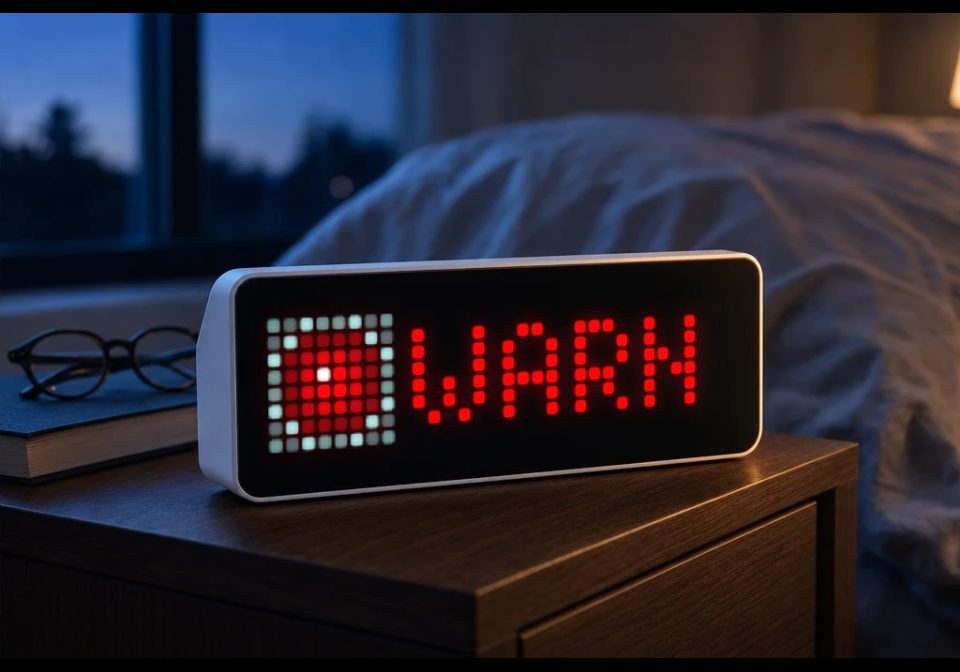
NINA Warnung
NINA Warnung for AWTRIX NG that shows official German civil-protection warnings
| System | AWTRIX NG Scripts |
|---|---|
| Firmware | AWTRIX NG |
| Topic | News |
| Built by | Hank_the_Tank |
| File | 0oCf5bwdUxa0.ax · 4.6 KB |
| Icons | — |
| Published | 24 Aug 2026 · updated 24 Aug 2026 |
| Downloads | 1 |
NINA Warnung — AWTRIX NG App
A Berry app for AWTRIX NG that shows official German civil-protection warnings (the same feed
that powers the NINA warning app from Germany's Federal Office of Civil Protection and
Disaster Assistance, BBK) directly on your LED matrix.
What it does
- Polls the public BBK warning feed for your district (
Landkreis/Kreisfreie Stadt) on a
configurable interval. - Shows a colour-coded severity badge (yellow → orange → red → magenta, matching the CAP
severity scale Minor/Moderate/Severe/Extreme) with the warning headline scrolling next to it. - Flashes the badge when a warning is rated Extreme.
- Fires a buzzer alarm and a device notification the moment a new warning appears — with the
notification held on screen and the alarm repeating for Extreme warnings until dismissed. - Stays out of the rotation entirely when there's nothing to report (optional), so it only takes
up panel time when it actually has something to say. - Everything is a real setting in the AWTRIX web UI — no code editing required.
Settings
| Setting | What it does |
|---|---|
| Kreisschlüssel (AGS) | The 5-digit official district code (Amtlicher Gemeindeschlüssel / Regionalschlüssel) for your district. This is how the app knows which region to watch. |
| Aktualisierung | How often to refresh, in minutes (1–60). |
| Ab Warnstufe | Minimum severity that triggers the app being shown / notifying (Minor, Moderate, Severe, Extreme). |
| Bei neuer Warnung benachrichtigen | Whether a new warning triggers an interrupting notification. |
| Signalton über Buzzer | Whether the notification includes an audible alarm tone. |
| Auch ohne Warnung anzeigen | If on, the app always shows a green checkmark when nothing is active (useful for confirming the app is alive); if off, the app is skipped by the rotation entirely when there's no relevant warning. |
Finding your district code
The feed only resolves down to district (Kreis) level, identified by a 5-digit
Amtlicher Gemeindeschlüssel (AGS) / district-level Regionalschlüssel. You can look yours up
in the Destatis Regionalschlüssel list
or just search "AGS Kreisschlüssel ".
Testing it
- With "Auch ohne Warnung anzeigen" on, you should see a green "OK" as soon as the app has
fetched successfully. - Press the right button on the device to fire a test alarm tone at any time — no need to
wait for a real (or drill) warning. - Germany's annual Warntag (a nationwide test alert, usually the second Thursday of
September) is a good opportunity to confirm the app reacts to a real warning end-to-end.
Data source
Data comes from the public BBK dashboard endpoint
(warnung.bund.de/api31/dashboard/<AGS>0000000.json), the same source the official NINA app and
warnung.bund.de website use. It aggregates warnings from MoWaS (civil protection), DWD (weather),
and flood-warning services.
Disclaimer
This is an unofficial, hobbyist integration and is not a certified life-safety warning
channel. It depends on your panel's power, Wi-Fi, and the third-party feed all being available
at the moment a warning is issued, none of which is guaranteed. Keep sirens, radio, and the
official NINA app as your primary sources — treat this as a convenient extra glance, not a
replacement.
0oCf5bwdUxa0.ax
# @name    NINA Warnung
# @desc    Aktuelle Bevoelkerungsschutz-Warnungen (BBK) fuer einen Landkreis
# @author  Hank_the_Tank / Codex
# @version 1.1
# @config  ars     text   "Kreisschluessel (AGS)" default="" maxlen=5 help="5-stellig, z.B. 05913 fuer Bochum - Liste: xrepository.de Regionalschluessel"
# @config  every   number "Aktualisierung"         default=10 min=1 max=60 unit=min
# @config  min_sev select "Ab Warnstufe"            default=Minor options=Minor,Moderate,Severe,Extreme
# @config  notify  bool   "Bei neuer Warnung benachrichtigen" default=true
# @config  sound   bool   "Signalton ueber Buzzer"            default=true
# @config  always  bool   "Auch ohne Warnung anzeigen"        default=true help="Gruener Haken, wenn nichts vorliegt - hilfreich zum Testen"

class NinaWarnung
  var ars, url, period, sevmin, notifyon, soundon, always, err
  var count, sev, head, color, lastid, firstrun, melody
  var ticks, busy

  def init()
    self.ars = store.get("ars")
    self.err = self.ars == ""
    self.url = "https://warnung.bund.de/api31/dashboard/" + self.ars + "0000000.json"
    self.period = store.get("every") * 60
    self.sevmin = self.rank(store.get("min_sev"))
    self.notifyon = store.get("notify")
    self.soundon = store.get("sound")
    self.always = store.get("always")
    self.melody = "alarm:d=8,o=6,b=180:c,a5,c,a5,c,a5,c,a5"

    self.count = store.get("count", 0)
    self.sev = store.get("sev", "")
    self.head = store.get("head", "")
    self.color = self.color_for(self.sev)
    var li = store.get("lastid")
    self.firstrun = li == nil
    self.lastid = li == nil ? "" : li

    self.ticks = self.err ? self.period : 15
    self.busy = false
  end

  # Rangfolge der CAP-Warnstufen, fuer den Schwellwertvergleich
  def rank(s)
    if s == "Extreme"  return 4 end
    if s == "Severe"   return 3 end
    if s == "Moderate" return 2 end
    if s == "Minor"    return 1 end
    return 0
  end

  def color_for(s)
    if s == "Extreme"  return 0xCC00CC end
    if s == "Severe"   return 0xFF0000 end
    if s == "Moderate" return 0xFF8800 end
    if s == "Minor"    return 0xFFCC00 end
    return 0x00CC44
  end

  def on_body(body, status)
    self.busy = false
    if body == nil return end

    var hits = re.matchall("\"headline\":\"", body)
    var n = size(hits)
    self.count = n

    if n == 0
      self.sev = ""
      self.head = ""
      self.color = self.color_for("")
      store.set("count", 0)
      store.set("sev", "")
      store.set("head", "")
      return
    end

    var sm = re.search("\"severity\":\"(\\w+)\"", body)
    var hm = re.search("\"headline\":\"([^\"]*)\"", body)
    if sm == nil || hm == nil return end
    self.sev = sm[1]
    self.head = hm[1]
    self.color = self.color_for(self.sev)

    var im = re.search("\"id\":\"([^\"]*)\"", body)
    var id = im == nil ? "" : im[1]

    if !self.firstrun && self.notifyon && id != self.lastid && self.rank(self.sev) >= self.sevmin
      var spec = {"text": self.head, "textColor": self.color}
      if self.soundon
        spec["soundRtttl"] = self.melody
        if self.sev == "Extreme"
          spec["soundLoop"] = true
          spec["hold"] = true
        end
      end
      notify(spec)
    end
    self.firstrun = false
    self.lastid = id

    store.set("count", self.count)
    store.set("sev", self.sev)
    store.set("head", self.head)
    store.set("lastid", self.lastid)
  end

  def loop()
    if self.err return end
    if self.ticks <= 0 && !self.busy
      self.ticks = self.period
      self.busy = true
      http.get(self.url, / b, st -> self.on_body(b, st))
    end
    self.ticks -= 1
  end

  def should_show()
    if self.err return true end
    if self.count > 0 && self.rank(self.sev) >= self.sevmin return true end
    return self.always
  end

  def draw()
    clear()
    if self.err
      text(1, 6, "ARS?", 0xFF8800)
      return
    end

    if self.count == 0 || self.rank(self.sev) < self.sevmin
      circle_fill(4, 4, 3, 0x00CC44)
      text(9, 6, "OK", 0x00CC44)
      return
    end

    var bcol = self.color
    if self.sev == "Extreme" && (now_ms() % 600) < 300
      bcol = 0xFFFFFF
    end
    rect_fill(0, 0, 8, 8, bcol)
    text(3, 6, "!", 0x000000)
    scroll_text(9, 6, width() - 9, self.head, 0xFFFFFF)
  end

  def on_button(btn)
    if btn == "select" self.ticks = 0 end
    if btn == "right" && self.soundon
      notify({"text": "Testton", "textColor": 0xFFCC00, "soundRtttl": self.melody})
    end
  end
end

return NinaWarnung()
Install it on your AWTRIX NG
Your browser writes the script straight to the device on your network. It joins the app rotation right away.
Some browsers refuse to talk to a device on your network from a public page. Download the flow and paste it into the Scripts tab of your device, or install it from a terminal:
More flows for AWTRIX NG Scripts or News
Something wrong with this flow? Report it.