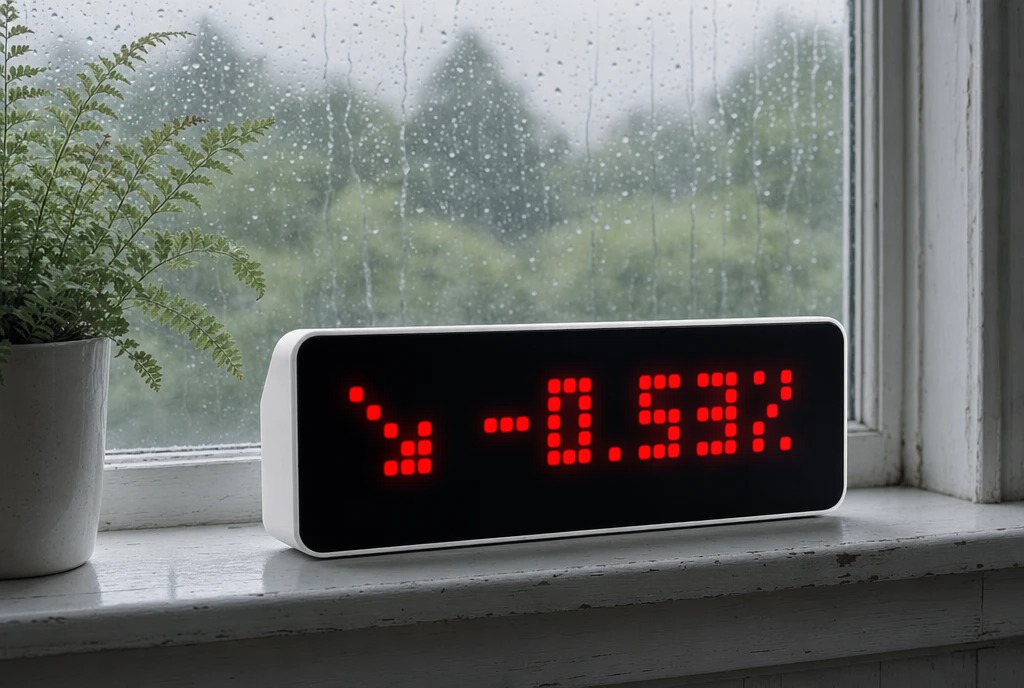
DAX Market
Shows the German DAX index, daily change and percentage directly on AWTRIX NG.
| System | AWTRIX NG Scripts |
|---|---|
| Firmware | AWTRIX NG |
| Topic | Miscellaneous |
| Built by | Spectral |
| File | 0TwprmFx5cD9.ax · 6.2 KB |
| Icons | — |
| Published | 20 Aug 2026 · updated 20 Aug 2026 |
| Downloads | 25 |
DAX Market for AWTRIX NG
A native AWTRIX NG script that displays the current German DAX index directly on the device. No Home Assistant, Node-RED, MQTT or other external service is required.
Features
- Current DAX index value
- Daily change in points
- Daily percentage change
- Green ↗ indicator when the DAX is up
- Red ↘ indicator when the DAX is down
- White → indicator when unchanged
- Short
DAXintro when the app enters the rotation - Configurable market hours
- Configurable refresh interval
- Configurable view duration
- Last successful values are kept if the data source is temporarily unavailable
- Red status pixel after an extended period without a successful update
- No network requests outside configured market hours
Data source
Market data is fetched directly from Yahoo Finance using the ^GDAXI symbol.
No API key is required.
The script only extracts the required regularMarketPrice and previousClose values instead of parsing the complete JSON response, keeping memory usage low.
Default schedule
Monday – Friday
09:00 – 18:00
Data refresh: every 5 minutes.
Installation
- Open the AWTRIX NG web interface.
- Go to Scripts.
- Create a new script named
DAX. - Paste the script and save it.
- Configure the app under Apps → DAX → Settings if required.
The script runs completely standalone on AWTRIX NG.
0TwprmFx5cD9.ax
# @name DAX
# @desc Native DAX via Yahoo Finance
# @author Spectral
# @version 0.3.8
# @config refresh number "Update-Intervall" default=300 min=60 max=1800 unit=s
# @config market_start text "Börsenstart" default="09:00" maxlen=5
# @config market_end text "Börsenende" default="18:00" maxlen=5
# @config view_seconds number "Ansichtsdauer" default=3 min=1 max=10 unit=s
# @config pos_color color "Positiv" default=#00FF00
# @config neg_color color "Negativ" default=#FF0000
# @config neutral_color color "Unverändert" default=#FFFFFF

class DAX
  var url, opts
  var refresh, startm, endm, viewsec
  var pos, neg, neutral
  var price, prev
  var lp, lv, ld
  var xp, xv, xd
  var col, trend
  var open, ready, stale, flight
  var fetch, vt, view, lastok
  var phx, intro, intro_at

  def init()
    self.url="https://query1.finance.yahoo.com/v8/finance/chart/^GDAXI?range=1d&interval=2m&includePrePost=false"
    self.opts={'find':"\"regularMarketPrice\":",'keep':512}

    self.refresh=store.get("refresh")
    self.viewsec=store.get("view_seconds")
    self.pos=store.get("pos_color")
    self.neg=store.get("neg_color")
    self.neutral=store.get("neutral_color")

    self.startm=540
    self.endm=1080

    var m=re.search("([0-9][0-9]):([0-9][0-9])",store.get("market_start"))
    if m!=nil
      var h=num(m[1])
      var n=num(m[2])
      if h!=nil && n!=nil && h>=0 && h<24 && n>=0 && n<60
        self.startm=h*60+n
      end
    end

    m=re.search("([0-9][0-9]):([0-9][0-9])",store.get("market_end"))
    if m!=nil
      var h=num(m[1])
      var n=num(m[2])
      if h!=nil && n!=nil && h>=0 && h<24 && n>=0 && n<60
        self.endm=h*60+n
      end
    end

    self.price=store.get("price")
    self.prev=store.get("prev")

    self.lp=nil
    self.lv=nil
    self.ld=nil

    self.xp=7
    self.xv=7
    self.xd=7

    self.open=false
    self.ready=false
    self.stale=false
    self.flight=false

    self.fetch=0
    self.vt=0
    self.view=1

    self.intro=false
    self.intro_at=0

    self.lastok=now_ms()

    self.phx=(width()-text_ink_width("DAX"))/2

    if self.price!=nil && self.prev!=nil && self.prev!=0
      var d=self.price-self.prev
      var p=d/self.prev*100.0
      var di=int(d+(d>=0 ? 0.5 : -0.5))

      if d>0
        self.trend=1
        self.col=self.pos
      elif d<0
        self.trend=-1
        self.col=self.neg
      else
        self.trend=0
        self.col=self.neutral
      end

      if self.trend>0
        self.lp="+"+str(round(p,2))+"%"
        self.ld="+"+str(di)
      elif self.trend<0
        self.lp=str(round(p,2))+"%"
        self.ld=str(di)
      else
        self.lp="0.00%"
        self.ld="0"
      end

      self.lv=str(int(self.price+0.5))

      self.xp=7+(width()-7-text_ink_width(self.lp))/2
      self.xv=7+(width()-7-text_ink_width(self.lv))/2
      self.xd=7+(width()-7-text_ink_width(self.ld))/2

      self.ready=true
    end
  end

  def on_body(b,st)
    self.flight=false

    if b==nil
      return
    end

    var a=re.search("\"regularMarketPrice\":([-0-9.]+)",b)
    var z=re.search("\"previousClose\":([-0-9.]+)",b)

    if a==nil || z==nil
      return
    end

    var p=num(a[1])
    var old=num(z[1])

    if p==nil || old==nil || old==0
      return
    end

    var d=p-old
    var pc=d/old*100.0
    var di=int(d+(d>=0 ? 0.5 : -0.5))

    if d>0
      self.trend=1
      self.col=self.pos
    elif d<0
      self.trend=-1
      self.col=self.neg
    else
      self.trend=0
      self.col=self.neutral
    end

    if self.trend>0
      self.lp="+"+str(round(pc,2))+"%"
      self.ld="+"+str(di)
    elif self.trend<0
      self.lp=str(round(pc,2))+"%"
      self.ld=str(di)
    else
      self.lp="0.00%"
      self.ld="0"
    end

    self.lv=str(int(p+0.5))

    self.xp=7+(width()-7-text_ink_width(self.lp))/2
    self.xv=7+(width()-7-text_ink_width(self.lv))/2
    self.xd=7+(width()-7-text_ink_width(self.ld))/2

    self.price=p
    self.prev=old

    self.ready=true
    self.stale=false
    self.lastok=now_ms()

    store.set("price",p)
    store.set("prev",old)
  end

  def loop()
    var w=weekday()
    var h=hour()

    if h<0
      self.open=false
      return
    end

    var t=h*60+minute()

    self.open=w>=1 && w<=5 &&
              t>=self.startm &&
              t<self.endm

    if !self.open
      self.fetch=0
      return
    end

    if self.ready
      self.stale=now_ms()-self.lastok>=1200000
    end

    # Intro erst nach tatsächlich 3000 ms beenden
    if self.intro
      if now_ms()-self.intro_at>=3000
        self.intro=false
        self.view=1
        self.vt=0
      end
    else
      self.vt+=1

      if self.vt>=self.viewsec
        self.vt=0
        self.view=(self.view+1)%3
      end
    end

    if self.fetch<=0
      if !self.flight
        self.flight=true
        self.fetch=self.refresh

        http.get(
          self.url,
          / b,st -> self.on_body(b,st),
          self.opts
        )
      end
    else
      self.fetch-=1
    end
  end

  def on_show()
    # Bei jedem Einblenden zuerst kurz "DAX"
    self.intro=true
    self.intro_at=now_ms()
    self.view=1
    self.vt=0
  end

  def should_show()
    return self.open
  end

  def duration()
    return self.viewsec*3000+3000
  end

  def draw()
    clear()

    # Titelphase
    if self.intro
      text(self.phx,6,"DAX",0xFFFFFF)
      return
    end

    if !self.ready
      text(self.phx,6,"DAX",0x888888)
      return
    end

    var a=1

    if self.trend>0
      line(a,6,a+4,2,self.col)
      line(a+2,2,a+4,2,self.col)
      line(a+4,2,a+4,4,self.col)

    elif self.trend<0
      line(a,1,a+4,5,self.col)
      line(a+2,5,a+4,5,self.col)
      line(a+4,3,a+4,5,self.col)

    else
      line(a,3,a+4,3,self.col)
      line(a+2,1,a+4,3,self.col)
      line(a+2,5,a+4,3,self.col)
    end

    if self.view==0
      text(self.xp,6,self.lp,self.col)
    elif self.view==1
      text(self.xv,6,self.lv,self.col)
    else
      text(self.xd,6,self.ld,self.col)
    end

    if self.stale
      pixel(width()-1,height()-1,self.neg)
    end
  end
end

return DAX()
Install it on your AWTRIX NG
Your browser writes the script straight to the device on your network. It joins the app rotation right away.
Some browsers refuse to talk to a device on your network from a public page. Download the flow and paste it into the Scripts tab of your device, or install it from a terminal:
More flows for AWTRIX NG Scripts or Miscellaneous
Something wrong with this flow? Report it.